We’d like to remind Forumites to please avoid political debate on the Forum.
This is to keep it a safe and useful space for MoneySaving discussions. Threads that are – or become – political in nature may be removed in line with the Forum’s rules. Thank you for your understanding.
📨 Have you signed up to the Forum's new Email Digest yet? Get a selection of trending threads sent straight to your inbox daily, weekly or monthly!
The Forum now has a brand new text editor, adding a bunch of handy features to use when creating posts. Read more in our how-to guide
MY PC IS SLOW IN GETTING UP AND RUNNING

aayush
Posts: 1,295 Forumite



in Techie Stuff
Hi
My desktop pc is slow in getting up and running what should i do to see what is causing this it takes 8 mins to load up and thus I use web browsers
My desktop pc is slow in getting up and running what should i do to see what is causing this it takes 8 mins to load up and thus I use web browsers
0
Comments
-
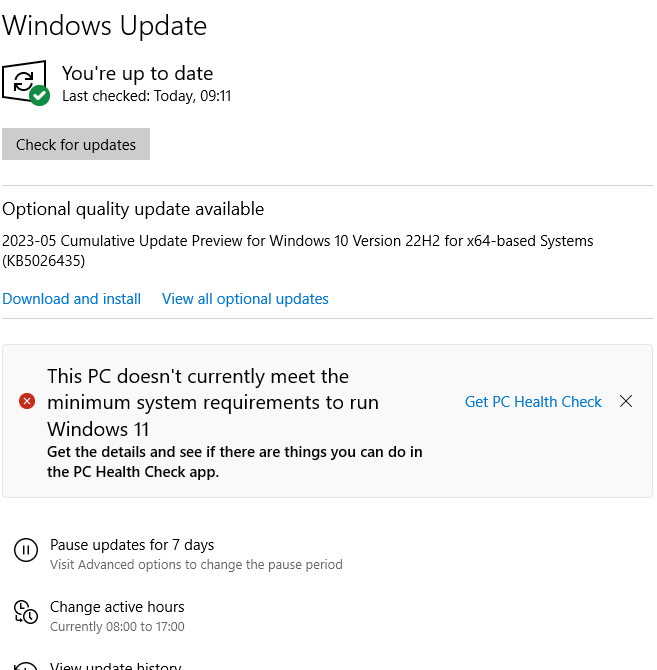
why i get the below
0 -
Install all updates and optional updates then go through this list from Microsoft.
Tips to improve PC performance in Windows - Microsoft Support
1 -
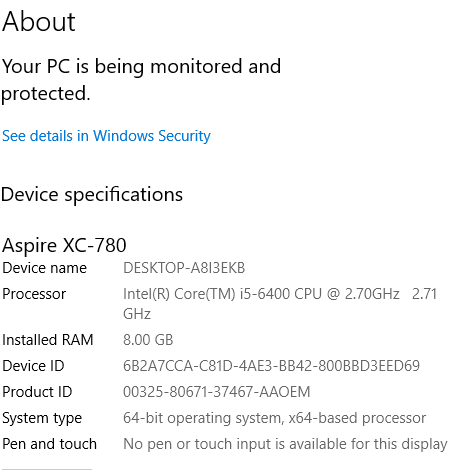
Hi,you haven't told us your specs, if an old HDD a change to SSD will make a big difference.0
-
is below enough infor
0 -
aayush said:is below enough infor
https://uk.crucial.com/ssd/mx500/ct1000mx500ssd1/ct11513992
https://uk.crucial.com/ssd/mx500/ct500mx500ssd1/ct11212261
https://uk.crucial.com/ssd/mx500/ct250mx500ssd1/ct11180100
Whichever you can afford.
8th Gen processor is 'necessary' to upgrade to Windows 11. Yours is 6th. Though easily bypassed if required.
0 -
so it means to much stuff on my hard drive
as moved all to external l hard drive so why still slow startup0 -
aayush said:so it means to much stuff on my hard drive
as moved all to external l hard drive so why still slow startupNobody said anything about too much stuff on your hard drive.If you get an SSD such as the linked ones the computer will start up faster, run faster and generally behave faster. Your problem is you have a mechanical hard drive. Which are slow.1 -
Agree hard drives are relatively slow but not that slow surely.I would however update to an SSD as it is well worth it - I have similar spec PC to you in terms of processor - and it used to take about 45 seconds to load to login stage and maybe a couple of minutes to login and become 'stable' after checking for updates etc.With an SSD holding just operating system ( win 10 ) and programs it is about 13 seconds load and then 30 seconds to login. So considerably faster with SSD.In conclusion, yes, do get an SSD, for your boot ("C" ) drive.Old hard drive I use for data.Suggest though you check as posted above to find out what is going on with your PC. Could be underlying problem that should be fixed such as a virus or other malware that should be treated before installing your SSD preferably, updates trying to run and struggling if short of disk space ( check that ) or a hard drive problem ( use chkdsk built on checker see https://answers.microsoft.com/en-us/windows/forum/all/disk-check-windows-10-chkdsk/c1f2fb49-7b71-409d-b713-6c10a28c9e51). If the latter comes up with issues the software can bypass them in normal use but lots of errors indicate the drive is failing.1
-
The next time you power it on, try right clicking on the Windows 'Start' icon (usually bottom left hand side of the task bar) and choose Task Manager.
OK, this might take some time to load itself but when it does, it might just allow you to see what is taking up all the CPU time and effort.
A year or so ago, I replaced my hard drive with an SSD and reinstalled Win 10. Now my laptop powers up in about 10 seconds.1 -
No-one ever believes me, but usually whenever I have encountered crippling slowness it has been because the hard drive was on the verge of failure.Calling up task manager (Ctrl + shift +esc) and clicking the "performance" tab shows disk usage at 100%.A new hard drive, preferably an SSD (and not connecting the failing drive as "extra storage") restores the lost performance.I want to go back to The Olden Days, when every single thing that I can think of was better.....
(except air quality and Medical Science )1
)1
 why i get the below



Confirm your email address to Create Threads and Reply

Categories
- All Categories
- 354.5K Banking & Borrowing
- 254.4K Reduce Debt & Boost Income
- 455.4K Spending & Discounts
- 247.4K Work, Benefits & Business
- 604.2K Mortgages, Homes & Bills
- 178.5K Life & Family
- 261.7K Travel & Transport
- 1.5M Hobbies & Leisure
- 16K Discuss & Feedback
- 37.7K Read-Only Boards