We’d like to remind Forumites to please avoid political debate on the Forum.
This is to keep it a safe and useful space for MoneySaving discussions. Threads that are – or become – political in nature may be removed in line with the Forum’s rules. Thank you for your understanding.
📨 Have you signed up to the Forum's new Email Digest yet? Get a selection of trending threads sent straight to your inbox daily, weekly or monthly!
The Forum now has a brand new text editor, adding a bunch of handy features to use when creating posts. Read more in our how-to guide
Dell Computer not booting

Mr_Mister
Posts: 447 Forumite



in Techie Stuff
Hi
I have an old (10 years) Dell All In One PC which has served me very well without any issues over the years.
Yesterday, the screen went weird with green lines randomly and I hard booted it but since then it is now not booting up.
After pressing the power button, you hear the fan sound briefly and then nothing. It then does this in a loop with nothing appearing on the screen. The only way to stop it is to unplug the power cable.
Sometimes it goes as far as the Dell logo screen and starts "Automatic Repair" but it then freezes on that screen.
I also tried running the Dell Diagnostics (F12) but that also freezes (see attached picture.
Any suggestions please?
Thanks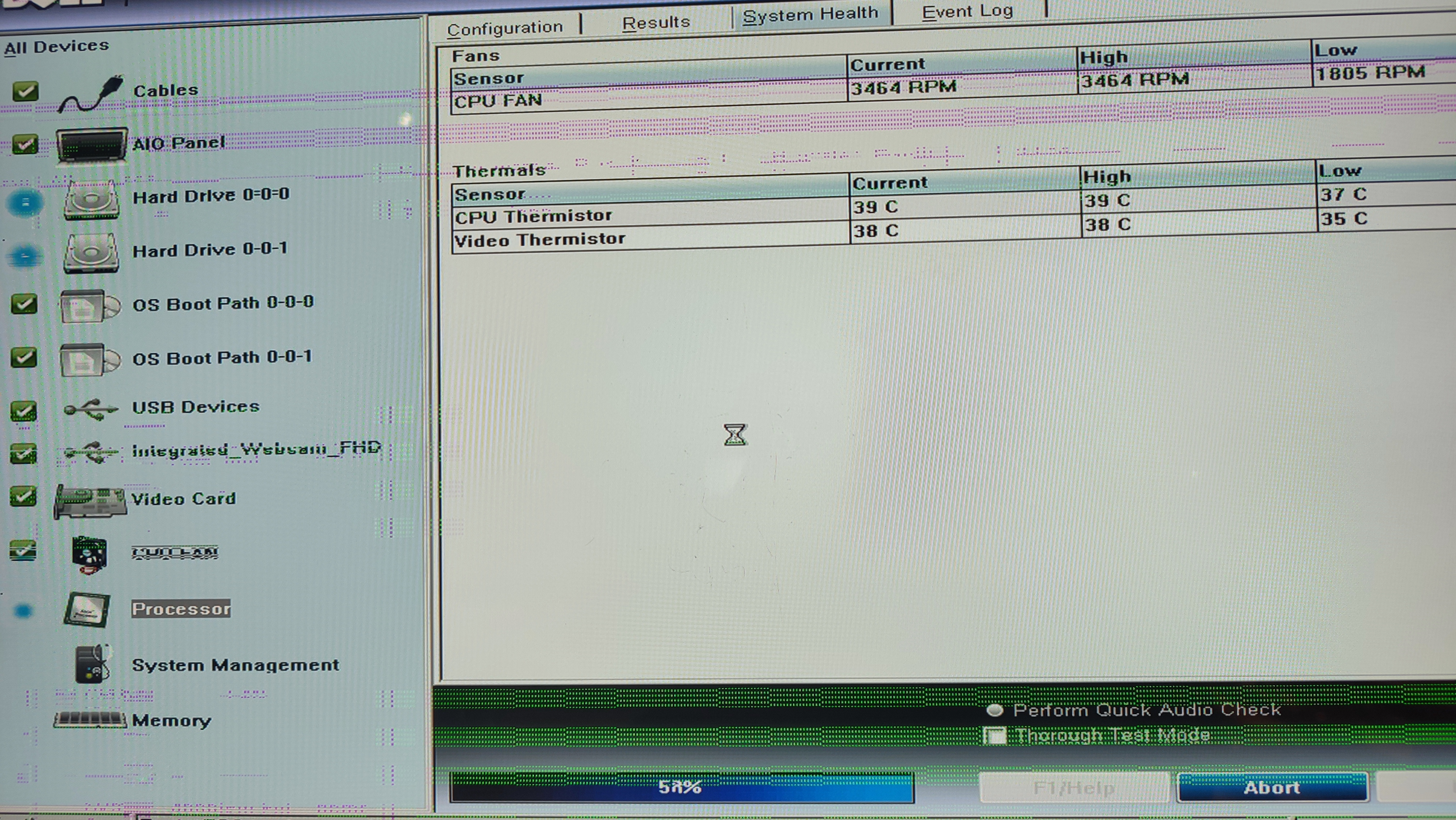
I have an old (10 years) Dell All In One PC which has served me very well without any issues over the years.
Yesterday, the screen went weird with green lines randomly and I hard booted it but since then it is now not booting up.
After pressing the power button, you hear the fan sound briefly and then nothing. It then does this in a loop with nothing appearing on the screen. The only way to stop it is to unplug the power cable.
Sometimes it goes as far as the Dell logo screen and starts "Automatic Repair" but it then freezes on that screen.
I also tried running the Dell Diagnostics (F12) but that also freezes (see attached picture.
Any suggestions please?
Thanks
0
Comments
-
The Dell Diagnostic thing is IIRC on the hard drive so that's probably what the issue is.
1 -
I would imagine the dell diagnostic software is built into the computer's bios and would not require a hard drive to operate (I've just done some googling which appears to confirm this). If this is the case I think you can rule out Windows & drivers etc being an issue as well as a new hard drive / windows install being the fix.
Graphical corruption will usually be down to the graphics card, but since this is an AIO I doubt there is a separate (discrete) graphics card that could be replaced. Instead the graphics hardware will likely be built into the CPU and even if this part could be replaced (lots of AIOs will use components soldered down) it's would need the OP to have the confidence to buy 2nd hand parts on ebay etc and do a tricky operation in the hope it might fix the issue. It could also be a problem with the motherboard or memory sticks.
I'm afraid the OP's best hope might be to take it to a PC repair specialist or consider buying a new system.
OP - what's the machine's part number?2 -
Thanksbooneruk said:I would imagine the dell diagnostic software is built into the computer's bios and would not reiquire a hard drive to operate (I've just done some googling which appears to confirm this). If this is the case I think you can rule out Windows & drivers etc being an issue as well as a new hard drive / windows install being the fix.
Graphical corruption will usually be down to the graphics card, but since this is an AIO I doubt there is a separate (discrete) graphics card that could be replaced. Instead the graphics hardware will likely be built into the CPU and even if this part could be replaced (lots of AIOs will use components soldered down) it's would need the OP to have the confidence to buy 2nd hand parts on ebay etc and do a tricky operation in the hope it might fix the issue. It could also be a problem with the motherboard or memory sticks.
I'm afraid the OP's best hope might be to take it to a PC repair specialist or consider buying a new system.
OP - what's the machine's part number?
It's a Dell Inspiron One 2350
I can try a Windows reinstall but can't seem to get into the Recovery options to start it0 -
try this if you have nothing to save.
Solved: Recovery Partition on New Inspiron One 2330 - Dell Community
1 -
I found the manual online: https://www.manuals.co.uk/dell/inspiron-2350/manual
It looks extremely fiddly and they appear to be quite custom parts that would really problematic to obtain second hand or new (if that's even possible 10years later).
As for the hard drive recovery/Windows reinstall etc - I really do think that can be ruled out. The diagnostics software is built into the PC and would run without a hard drive attached. Therefore if the PC is crashing within the diagnostics software then the hard drive is nothing to do with it - and the computer would continue to randomly crash while booting up, during windows install whether on the current hard drive, a replacement etc.
Heat might be a suspected problem after 10years of use (dust buildup), but the screenshot the OP included indicated temperatures are well in check.2 -
Thanks for checking as it sounds like a write off.booneruk said:I found the manual online: https://www.manuals.co.uk/dell/inspiron-2350/manual
It looks extremely fiddly and they appear to be quite custom parts that would really problematic to obtain second hand or new (if that's even possible 10years later).
As for the hard drive recovery/Windows reinstall etc - I really do think that can be ruled out. The diagnostics software is built into the PC and would run without a hard drive attached. Therefore if the PC is crashing within the diagnostics software then the hard drive is nothing to do with it - and the computer would continue to randomly crash while booting up, during windows install whether on the current hard drive, a replacement etc.
Heat might be a suspected problem after 10years of use (dust buildup), but the screenshot the OP included indicated temperatures are well in check.
What's the best way to save data from the hard drive?0 -
Thanks for checking as it sounds like a write off.Mr_Mister said:
Thanks for checking as it sounds like a write off.booneruk said:I found the manual online: https://www.manuals.co.uk/dell/inspiron-2350/manual
It looks extremely fiddly and they appear to be quite custom parts that would really problematic to obtain second hand or new (if that's even possible 10years later).
As for the hard drive recovery/Windows reinstall etc - I really do think that can be ruled out. The diagnostics software is built into the PC and would run without a hard drive attached. Therefore if the PC is crashing within the diagnostics software then the hard drive is nothing to do with it - and the computer would continue to randomly crash while booting up, during windows install whether on the current hard drive, a replacement etc.
Heat might be a suspected problem after 10years of use (dust buildup), but the screenshot the OP included indicated temperatures are well in check.
What's the best way to save data from the hard drive?
Probably.
What's the best way to save data from the hard drive?
Remove the hard disc, Stick it in a USB adaptor, and plug that into a brand new PC.
No reliance should be placed on the above! Absolutely none, do you hear?0 -
Yes, it's probably a write-off - never can be 100% sure but to find out for sure would take a lot of effort and quite possibly cost. I'm sure the OP will be amazed by the difference in power a new PC will bring though

Page 23 in the manual I linked to earlier shows how to remove the hard drive - and some of the previous pages will cover how to get the computer open in the first place.
The hard drive is more than likely 2.5inch. Something like this would do the job (not a recommendation, I've not used one personally but the reviews read ok): https://www.amazon.co.uk/Benfei-Drive-Adapter-Optical-Support/dp/B07JGT17B8/
1 -
Thank you for your time looking into the details.booneruk said:Yes, it's probably a write-off - never can be 100% sure but to find out for sure would take a lot of effort and quite possibly cost. I'm sure the OP will be amazed by the difference in power a new PC will bring though
Page 23 in the manual I linked to earlier shows how to remove the hard drive - and some of the previous pages will cover how to get the computer open in the first place.
The hard drive is more than likely 2.5inch. Something like this would do the job (not a recommendation, I've not used one personally but the reviews read ok): https://www.amazon.co.uk/Benfei-Drive-Adapter-Optical-Support/dp/B07JGT17B8/
😊0







Confirm your email address to Create Threads and Reply

Categories
- All Categories
- 353.5K Banking & Borrowing
- 254.1K Reduce Debt & Boost Income
- 455K Spending & Discounts
- 246.5K Work, Benefits & Business
- 602.9K Mortgages, Homes & Bills
- 178K Life & Family
- 260.5K Travel & Transport
- 1.5M Hobbies & Leisure
- 16K Discuss & Feedback
- 37.7K Read-Only Boards