We’d like to remind Forumites to please avoid political debate on the Forum.
This is to keep it a safe and useful space for MoneySaving discussions. Threads that are – or become – political in nature may be removed in line with the Forum’s rules. Thank you for your understanding.
📨 Have you signed up to the Forum's new Email Digest yet? Get a selection of trending threads sent straight to your inbox daily, weekly or monthly!
The Forum now has a brand new text editor, adding a bunch of handy features to use when creating posts. Read more in our how-to guide
Excel - "reverse" Loan to Value calculation

bhjm
Posts: 341 Forumite


in Techie Stuff
Hello Everyone,
I know it may sound silly but I am stuck and hit a mental blockage.
I want to find out what is the LTV (Loan to Value)
if I give the percentage and the deposit.
LTV brackets (fixed)
<95
<90
<85
<80
<75
<70
Deposit: variable, so I could change it, and it tells me how much then the property can be worth.i.e. let`s say a house 200.000 and a deposit of 20.000 is a LTV of 90%, if I would increase the deposit to 30.000 the LTV would be 85. How can I calculate if I know the deposit and the LTV, but want to know the Property Value within the brackets. I hope I am clear, if not please ask !
I know it may sound silly but I am stuck and hit a mental blockage.
I want to find out what is the LTV (Loan to Value)
if I give the percentage and the deposit.
LTV brackets (fixed)
<95
<90
<85
<80
<75
<70
Deposit: variable, so I could change it, and it tells me how much then the property can be worth.i.e. let`s say a house 200.000 and a deposit of 20.000 is a LTV of 90%, if I would increase the deposit to 30.000 the LTV would be 85. How can I calculate if I know the deposit and the LTV, but want to know the Property Value within the brackets. I hope I am clear, if not please ask !
0
Comments
-
So you want to put 94% LTV in one field (A1) and £60,000 (A2) and then the formula calculate the property is £1m?
=A2/(1-A1)
If you wanted the upper and lower bound so for 94% it'd be 95% and 90%
=A2/(1-floor(A1,0.05))
=A2/(1-ceiling(A1,0.05))1 -
hi DGG - thanks for the quick reply.
i just need 1 value, not the floor and ceiling.
bet yes basically thats what I want.
0 -
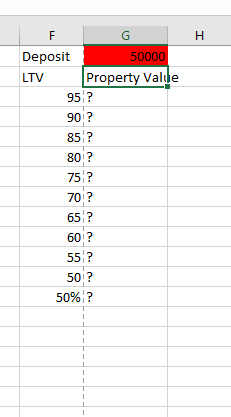 maybe this helps to understand.
0 -
some more thinking about - I would need to calculate the loan amount and then add the deposit, right? how do I calculate the Loan amount ?0
-
0
-
are you asking if this helps me or are you saying this is the solution for my issue?outtatune said:0 -
That (Goal Seek) is a general built in method in Excel that,given variables and a calculation, will produce the answer to 'what figure do I need to enter to get a desired result.It is very useful especially when calculation are complex.Yours is a simple question on the face of it but it could be we worth it to use goal seek to get your answer. ( have not read that specific link contents) but it would probably be worth reading it and applying it to your need.0
-
Given the above setup put this formula in G3 and copy down the column:bhjm said:maybe this helps to understand.
=100/(100-F3)*G$1
1 -
thanks but I am not wiser after your answer. but thanksHeedtheadvice said:That (Goal Seek) is a general built in method in Excel that,given variables and a calculation, will produce the answer to 'what figure do I need to enter to get a desired result.It is very useful especially when calculation are complex.Yours is a simple question on the face of it but it could be we worth it to use goal seek to get your answer. ( have not read that specific link contents) but it would probably be worth reading it and applying it to your need.0 -
muchias gracias ! that`s what I was looking for ! Thank you so much !double_dutchy said:
Given the above setup put this formula in G3 and copy down the column:bhjm said:maybe this helps to understand.
=100/(100-F3)*G$10








Confirm your email address to Create Threads and Reply

Categories
- All Categories
- 353.5K Banking & Borrowing
- 254.1K Reduce Debt & Boost Income
- 455K Spending & Discounts
- 246.6K Work, Benefits & Business
- 602.9K Mortgages, Homes & Bills
- 178.1K Life & Family
- 260.6K Travel & Transport
- 1.5M Hobbies & Leisure
- 16K Discuss & Feedback
- 37.7K Read-Only Boards