We’d like to remind Forumites to please avoid political debate on the Forum.
This is to keep it a safe and useful space for MoneySaving discussions. Threads that are – or become – political in nature may be removed in line with the Forum’s rules. Thank you for your understanding.
📨 Have you signed up to the Forum's new Email Digest yet? Get a selection of trending threads sent straight to your inbox daily, weekly or monthly!
The Forum now has a brand new text editor, adding a bunch of handy features to use when creating posts. Read more in our how-to guide
Want to become a Forum Ambassador? Visit the Community Noticeboard for details on how to apply
Samsung A20 storage

maggiesoup
Posts: 805 Forumite


in Techie Stuff
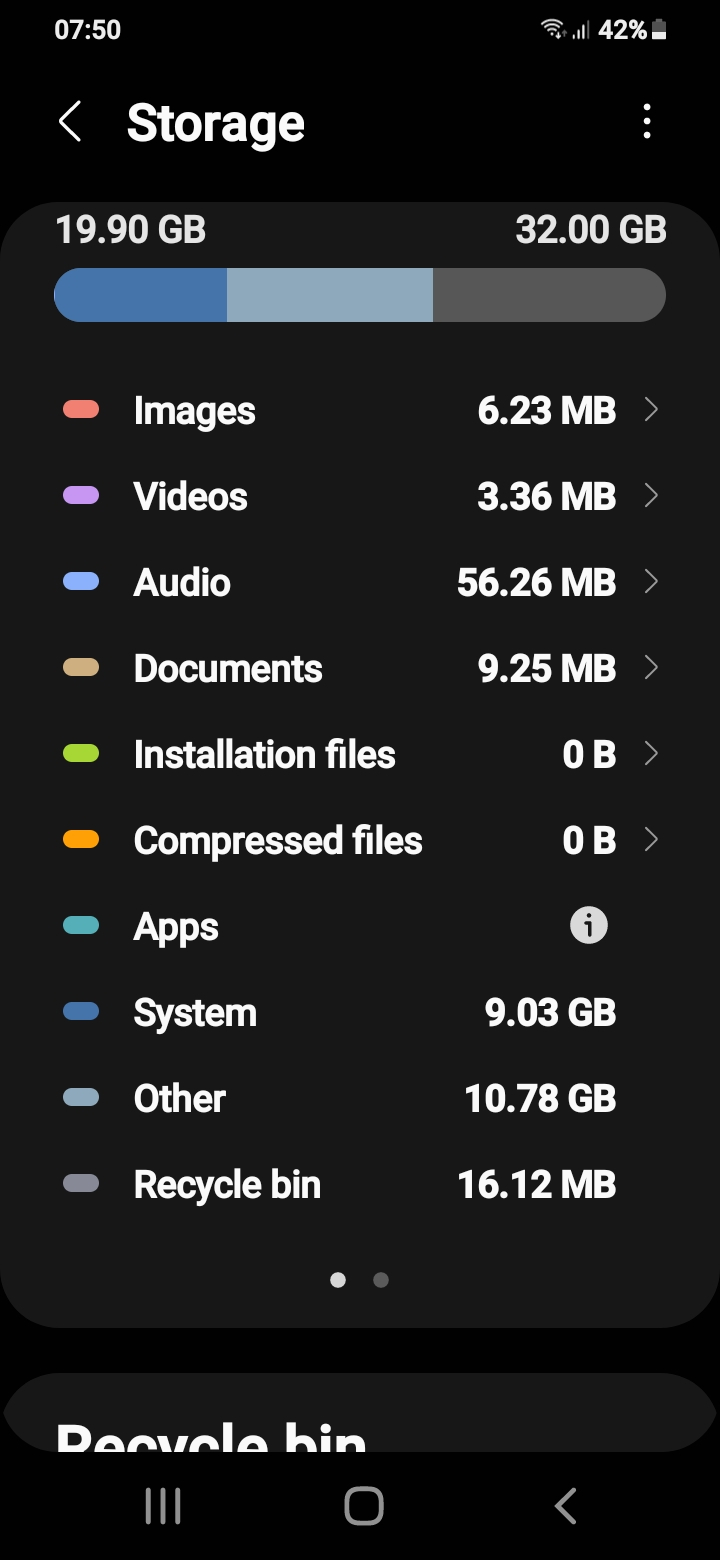
Wonder if anyone can help. My phone has 32GB of memory (i know but don't use it for much) however its now telling me i can't download Apps because i have too little space left. Ive taken almost everything off but still showing only have 3GB of storage left. When i go into Advance in Internal Storage in Settings tells me 'other' is using up 28GB. Can't think what 'other' may be? Please help!
Thanks
Thanks
0
Comments
-
I had the same problem with my samsung and it ended up being videos and pictures from whatsapp as they get saved into your storage, the way I delete them is to plug my phone into my laptop, go to android, whatsapp, media, videos then select all and delete then repeat for the pictures. You could also check other media from facebook etc whilst you are there to see if they are taking to much storage up. I must have deleted a dozen apps trying to free up storage before I realised that I had joined a whatsapp group a couple of months previously where lots of videos and pics are posted everyday but thought they were not stored on my phone. Hope this helps.0
-
Thanks for your reply. Unfortunately I'm not very good with new technology so I'm not really sure how I go about following your instructions. So I've got my phone and my laptop connected but where do I go from there. Thanks in advance0
-
Worked it out ! And yes there were a lot of pics&videos i deleted but only gave me one more GB. Still puzzled0
-
Have you tried Google's Files app? That may help determine what specifically is using up your storage.Jenni x1
-
Not familiar with Samsung but on my Xiaomi the following will show a list of everything occupying storage space with the amount taken up by each item…>Settings >My device >Storage0
-
Tried already just says 'other' it taking up almost 3/4 of the space !0
-
Prompted by the OP (I have the same phone) I've just started exploring the depths of its memory. Stumbling across Google Photos I've realised that Goggle has stored every photo I've taken since August 2013. I've never backed them up anywhere so was surprised to come across them. It's a real blessing in disguise - our very much loved English Springer Spaniel passed away 2 weeks ago and I now have a full photo album of his past 9 years. The rest of the images - they'll be going in the bin! Will be interesting to see how much memory is cleared....#2 Saving for Christmas 2024 - £1 a day challenge. £325 of £3660
-
If you haven’t done so already have you checked which particular app/group of apps is taking up unnecessary storage space?>Settings >Apps >Manage appsThis will show you every app on your phone and the storage space of each.Either uninstall that app or clear the app’s cache by…selecting the App, tapping Storage, tapping Clear cache0
-
I have the same phone, going through App cache is a good idea but OP's problem is Other, which you can't select to explore further.
My suggestion would be to try a clean up App like Avast Cleanup.0











Confirm your email address to Create Threads and Reply

Categories
- All Categories
- 353.9K Banking & Borrowing
- 254.3K Reduce Debt & Boost Income
- 455.2K Spending & Discounts
- 246.9K Work, Benefits & Business
- 603.5K Mortgages, Homes & Bills
- 178.3K Life & Family
- 261K Travel & Transport
- 1.5M Hobbies & Leisure
- 16.1K Discuss & Feedback
- 37.7K Read-Only Boards