We’d like to remind Forumites to please avoid political debate on the Forum.
This is to keep it a safe and useful space for MoneySaving discussions. Threads that are – or become – political in nature may be removed in line with the Forum’s rules. Thank you for your understanding.
📨 Have you signed up to the Forum's new Email Digest yet? Get a selection of trending threads sent straight to your inbox daily, weekly or monthly!
The Forum now has a brand new text editor, adding a bunch of handy features to use when creating posts. Read more in our how-to guide
OpenOffice Writer Headings and Subheadings View

RealGem
Posts: 569 Forumite




in Techie Stuff
Hi, I need to stop paying for Microsoft Word, so have downloaded OpenOffice.
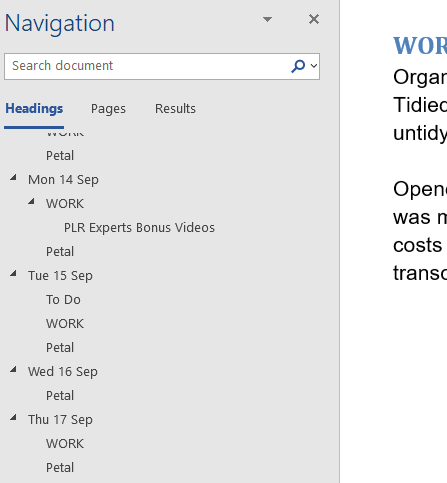
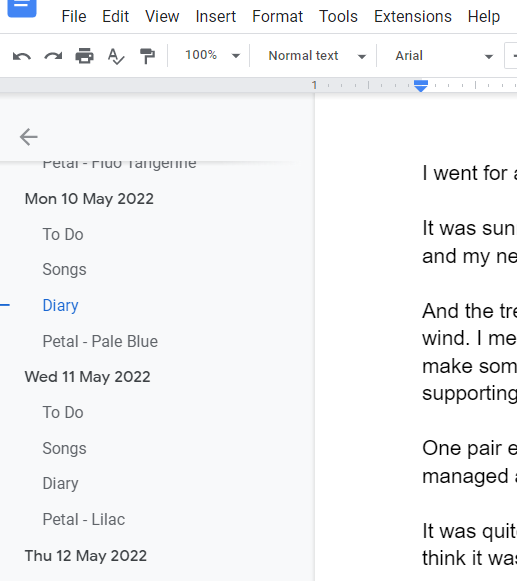
But one feature I use in Word and Google Docs is the left column showing Headings and Subheadings. I thought it was called Outline, but that could be something different.
Anyway, it looks like this in Word:
And like this in Google Docs.
I need something similar in OpenOffice Writer. Is that possible please?
(I have tried many times using old versions of MS Office and they always stop working, and force me to work online, so I am not interested in any versions of MS Office). I want a word processor that is completely offline and OFF-Microsoft!
Thank you
But one feature I use in Word and Google Docs is the left column showing Headings and Subheadings. I thought it was called Outline, but that could be something different.
Anyway, it looks like this in Word:
And like this in Google Docs.
I need something similar in OpenOffice Writer. Is that possible please?
(I have tried many times using old versions of MS Office and they always stop working, and force me to work online, so I am not interested in any versions of MS Office). I want a word processor that is completely offline and OFF-Microsoft!
Thank you
Look at it this way... In a hundred years who's gonna care?
0
Comments
-
https://wiki.openoffice.org/wiki/Documentation/UserGuide/Writer/Navigator - this feature works differently in OpenOffice than it does in Word so it'll show you everything.As for your other comment re: old versions of Office, you're obviously doing something wrong because no version of Office requires you to "work online", save for initial activation and setup (and in the case of 2013 onwards occasionally internet checks, but certainly no need to stay online).1
-
I suggest you take a look at Libre Office which is a fully updated and supported version of Open Office and is also free to use.
https://www.libreoffice.org/
1 -
Thanks That sticks to the sidebar which is very similar.Neil_Jones said:https://wiki.openoffice.org/wiki/Documentation/UserGuide/Writer/Navigator - this feature works differently in OpenOffice than it does in Word so it'll show you everything.As for your other comment re: old versions of Office, you're obviously doing something wrong because no version of Office requires you to "work online", save for initial activation and setup (and in the case of 2013 onwards occasionally internet checks, but certainly no need to stay online).
And re MS Office. I have an official Office 2010 disc and upgraded to 2016, but the documents just stopped working. And they made me get Office 365 which I did, but now I'm skint I refuse to pay every year for it.Look at it this way... In a hundred years who's gonna care?0

Confirm your email address to Create Threads and Reply

Categories
- All Categories
- 354.2K Banking & Borrowing
- 254.3K Reduce Debt & Boost Income
- 455.3K Spending & Discounts
- 247.2K Work, Benefits & Business
- 603.8K Mortgages, Homes & Bills
- 178.4K Life & Family
- 261.3K Travel & Transport
- 1.5M Hobbies & Leisure
- 16.1K Discuss & Feedback
- 37.7K Read-Only Boards