We’d like to remind Forumites to please avoid political debate on the Forum.
This is to keep it a safe and useful space for MoneySaving discussions. Threads that are – or become – political in nature may be removed in line with the Forum’s rules. Thank you for your understanding.
📨 Have you signed up to the Forum's new Email Digest yet? Get a selection of trending threads sent straight to your inbox daily, weekly or monthly!
The Forum now has a brand new text editor, adding a bunch of handy features to use when creating posts. Read more in our how-to guide
Excel Formula

Kido250
Posts: 107 Forumite


in Techie Stuff
I'm trying to create a formula to show me when dates for returning documents are coming up/over due. I've got the basic formula for highlighting the cells when they are coming up/overdue using conditional formating. However I'd like to take it a stage further and when we have returned the documents then they change back to unfilled and non-bold formatting. I've enclosed a mock up of the spreadsheet as I may not be making much sense without it.
Thanks for any help.
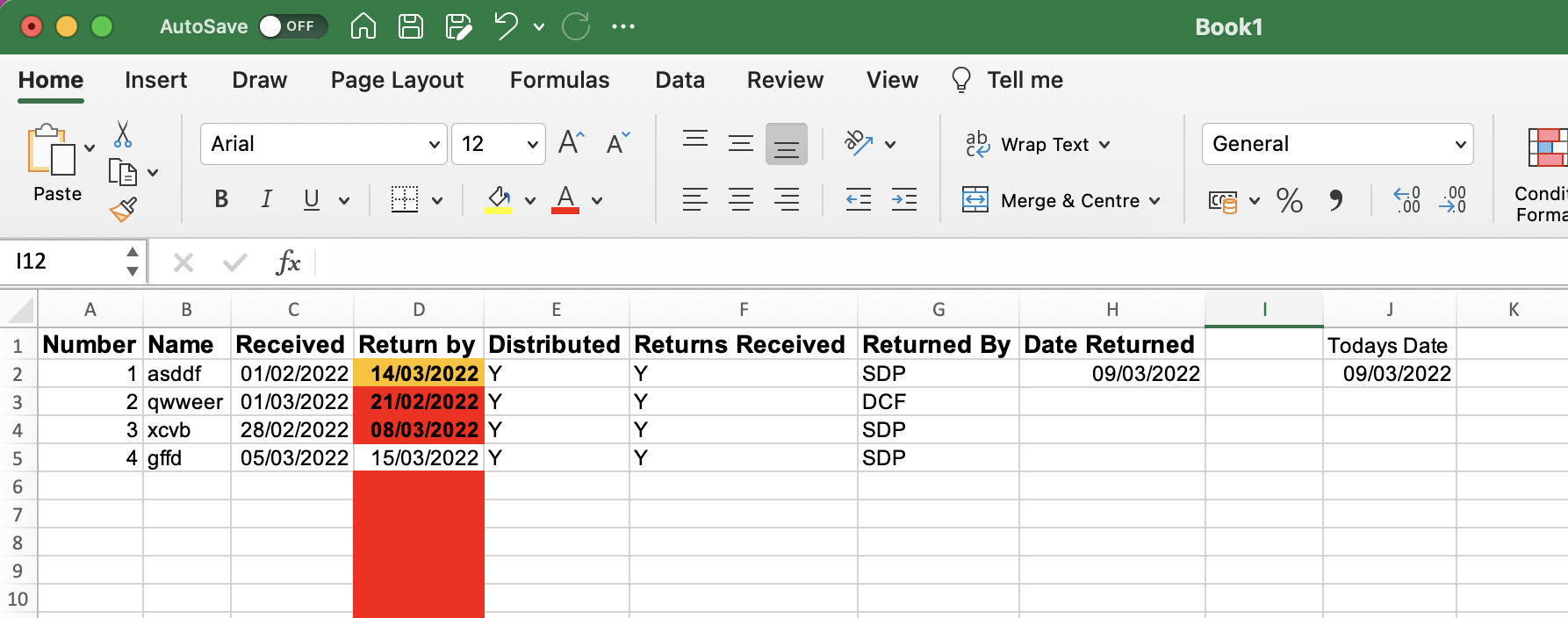
Thanks for any help.
0
Comments
-
Create a new conditional formatting rule by formula (forget the exact name in the Windows version of Excel) for the selected area of =$H2<>"" and then select/leave it as no formatting. Go into Manage Rules of conditional formatting, move it to the top and tick the box at the end that says Stop If True
That way if you have a returned date (ie the return date field isn't blank) it applies the null formatting and doesn't look at the later rules.2 -
Sorry but I think I must be missing something obvious. It doesn't seem to work for me. I've gone into conditional formatting in column D and put the formula in as above, moved it to the top and put the tick to stop if true. I've then put a date in cell H2 but nothing has changed. Apologies if I've missed the obvious. Thanks.0
-
If you were filling the whole of column D, rather than starting from D2 then you'd change it to be =$H1<>"" otherwise you'll have an offset by 1 row1
-
Works great now. Thanks. One other question. Is there a formula I can put in so when the cell in column D doesn't have a date in it it stays unformatted?0



Confirm your email address to Create Threads and Reply

Categories
- All Categories
- 353.5K Banking & Borrowing
- 254.1K Reduce Debt & Boost Income
- 455K Spending & Discounts
- 246.6K Work, Benefits & Business
- 602.9K Mortgages, Homes & Bills
- 178.1K Life & Family
- 260.6K Travel & Transport
- 1.5M Hobbies & Leisure
- 16K Discuss & Feedback
- 37.7K Read-Only Boards