We’d like to remind Forumites to please avoid political debate on the Forum.
This is to keep it a safe and useful space for MoneySaving discussions. Threads that are – or become – political in nature may be removed in line with the Forum’s rules. Thank you for your understanding.
📨 Have you signed up to the Forum's new Email Digest yet? Get a selection of trending threads sent straight to your inbox daily, weekly or monthly!
The Forum now has a brand new text editor, adding a bunch of handy features to use when creating posts. Read more in our how-to guide
Want to become a Forum Ambassador? Visit the Community Noticeboard for details on how to apply
How to transfer video from camcorder

TELLIT01
Posts: 18,554 Forumite




in Techie Stuff
My old desktop PC had a firewire card to enable the camcorder to be connected and content downloaded and edited. The PC died and I now have a laptop, and no way to connect the camcorder. I've done some searching and can't see an obvious solution. Can anybody advise on how to do this?
0
Comments
-
You could see if there is such a thing as a firewire to USB capture lead or device.
What other audio / video outputs does the camcorder have other than firewire?0 -
Similarly, what medium does the camcorder record to? The model of camcorder might be useful here too.0
-
Camcorder records to mini DV. Make and model I'll have to check. It hasn't been used in years. I'm retired now so have time to work on the tapes, one of which I came across in a drawer, which is what brought the whole thing to mind.
0 -
getting a firewire adaptor for your laptop is going to be the easiest option but remember there were various flavours of Firewire so you'll need to ensure you get the right thing for your needs. I've an ageing external drive that uses Firewire 800 so its connected to a hub along with my monitor etc and the hub connects to the laptop with a thunderbolt cable.1
-
This is the only definitive guide I'd follow - fire wire will not directly convert to USB for many reasons, this video explains everything, please watch it before buying any Firewire to USB device so you don't waste any money - they won't work.
You can only link Firewire to Thunderbolt.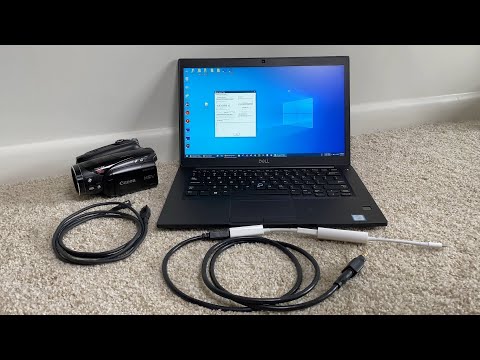 https://www.youtube.com/watch?v=GASIuX1mqwE
After watching this I decided to buy a Sony RDR-HXD770 which has a native iLink port, record all my MiniDV directly to the hard disk on this device, burn to DVD and then finally rip from DVD on my PC.
0 -
Thanks everybody. There are local companies advertising services to transfer content to disk or DVD. I think I'll look at these as alternative solutions. There aren't many tapes involved.
0 -
Sounds like you are now sorted but if you change your mind and decide to try yourself then am right in the middle of transferring my 30 or so MiniDV tapes to my lap top so have very recent experience of this.
I gave up on doing it digitally via firewire after trying various ways and bought this USB to analog adapter for £9 off amazon - I thought it was worth a go for very minimal cost. Its analog and not digital but to be honest, all the videos look perfectly fine.
https://www.amazon.co.uk/gp/product/B087RMXVNK
Using some free software called OBS - im about half way through them now!
If you dont have a camcorder to Red/White/Yellow cable then his one will probably connect to your camera
https://www.amazon.co.uk/OpenII-Extension-Splitter-Camcorder-Speakers/dp/B07Y8GBKLW
connect up - press record on free OBS software on lap top, press play on camcorder, and it just works (for me)
0 -
Thank you for the suggestion Ant555. I may give that a try - very little to lose at that price.
0




Confirm your email address to Create Threads and Reply

Categories
- All Categories
- 353.9K Banking & Borrowing
- 254.3K Reduce Debt & Boost Income
- 455.2K Spending & Discounts
- 246.9K Work, Benefits & Business
- 603.5K Mortgages, Homes & Bills
- 178.3K Life & Family
- 261K Travel & Transport
- 1.5M Hobbies & Leisure
- 16.1K Discuss & Feedback
- 37.7K Read-Only Boards