We’d like to remind Forumites to please avoid political debate on the Forum.
This is to keep it a safe and useful space for MoneySaving discussions. Threads that are – or become – political in nature may be removed in line with the Forum’s rules. Thank you for your understanding.
📨 Have you signed up to the Forum's new Email Digest yet? Get a selection of trending threads sent straight to your inbox daily, weekly or monthly!
The Forum now has a brand new text editor, adding a bunch of handy features to use when creating posts. Read more in our how-to guide
Getting a laptop with no free memory to boot

frivolous_fay
Posts: 13,302 Forumite




in Techie Stuff
Hi,
I'm looking at an old Toshiba laptop which I've dealt with before. Last time,
all the available hard disc space had been taken up with music (mainly) and it had got to the point where it would no longer boot.
Using a combination of an XP disc and sheer luck, I managed to get it to boot, deleted a bunch of files, and got it working normally again.
Guess what... it's full again. Trouble is, I can't remember exactly what I did last time - I've got it booting from the CDR, but I'm not sure which of the choices to then go for:
-To Setup Windows XP now
-To repair a Windows XP installation using recovery console
-To quit setup without installing windows XP (I tried this, obviously it didn't help)
Before these options came up, it did scroll through a lot of messages telling me it was installing files from the disc, so I thought it might have picked up what it needed to boot, but it seems not. Naturally, my brief is to try to save the important data on there...
Hope one of you geniuses (genii?) can set me on the right track. TIA...
Forgot to mention... it won't boot in safe mode or with a last known good config.
I'm looking at an old Toshiba laptop which I've dealt with before. Last time,
all the available hard disc space had been taken up with music (mainly) and it had got to the point where it would no longer boot.
Using a combination of an XP disc and sheer luck, I managed to get it to boot, deleted a bunch of files, and got it working normally again.
Guess what... it's full again. Trouble is, I can't remember exactly what I did last time - I've got it booting from the CDR, but I'm not sure which of the choices to then go for:
-To Setup Windows XP now
-To repair a Windows XP installation using recovery console
-To quit setup without installing windows XP (I tried this, obviously it didn't help)
Before these options came up, it did scroll through a lot of messages telling me it was installing files from the disc, so I thought it might have picked up what it needed to boot, but it seems not. Naturally, my brief is to try to save the important data on there...
Hope one of you geniuses (genii?) can set me on the right track. TIA...
Forgot to mention... it won't boot in safe mode or with a last known good config.
My TV is broken! 
Edit: refunded £515 for TV 1.5 years out of warranty - thank you Sale of Goods Act! :j
Edit: refunded £515 for TV 1.5 years out of warranty - thank you Sale of Goods Act! :j
0
Comments
-
Can you boot it to a command line prompt using a boot CD and delete files from the DOS prompt?0
-
Safe mode with command line is an option, but I haven't tried it... think you're talking about something different though? The options in my post above are the only ones that display after I boot from the CDR. (Which is a full Windows disc, not a boot one afaik)
I have three types of safe mode as options, plus Last Known Good,
plus Start Windows Normally... most of these I know don't work.My TV is broken!
Edit: refunded £515 for TV 1.5 years out of warranty - thank you Sale of Goods Act! :j0 -
Repair using the Recovery Console.
That should give you a DOS(-like) prompt so that you can navigate around the hard disk and delete some files to free up space. While you're there, may be worth running chkdsk to make sure your drive isn't corrupted before you attempt to boot from the HD0 -
I think we're stuffed.
Recover Console tells you the command to exit, gives a command prompt, and, err... nothing else.
I took a pic of the blue screen error that flashes up for a split second while it's in its boot loop.
O/H thinks the MBR is corrupted.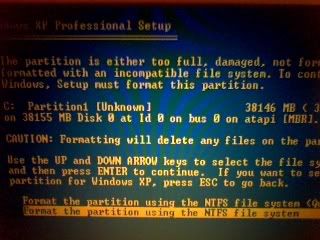 My TV is broken!
Edit: refunded £515 for TV 1.5 years out of warranty - thank you Sale of Goods Act! :j0 -
try
chkdsk c: /F/R
at the recovery console command prompt
That screen looks like you are in the middle of a windows reinstall btw, not a normal boot.Ever get the feeling you are wasting your time? :rolleyes:0 -
Sorry... wrong screenshot. The one above was the end result of me trying 'Setup'
The one I intended to post said Unmountable _boot_volumeMy TV is broken!
Edit: refunded £515 for TV 1.5 years out of warranty - thank you Sale of Goods Act! :j0 -
albertross wrote: »chkdsk c: /F/R
at the recovery console command prompt
It doesn't recognise it. O/H suggested a couple of commands to try at that prompt and it didn't recognise any of them. Just EXIT
The prompt is showing as C:\> (sorry if that's a really obvious thing to mention)My TV is broken!
Edit: refunded £515 for TV 1.5 years out of warranty - thank you Sale of Goods Act! :j0 -
are you sure?
try
chkdsk
or
help
http://www.microsoft.com/resources/documentation/windows/xp/all/proddocs/en-us/recovery_console_cmds.mspx?mfr=trueEver get the feeling you are wasting your time? :rolleyes:0 -
Dont click the first option to repair.
Click the Setup windows XP first option, then after that it should give the option to repair existing windows install. This is a non destructive one that should keep all your settings and documents etc.0 -
Tried chkdsk again, nothing.
Tried help, got a list of commands.
tried chkdsk again... got a grinding noise from CD drive followed by 'The volume appears to be in good condition ...etc'
tried chkdsk c: - same message as above
tried chkdsk c: /f/r again - The parameter is not validMy TV is broken!
Edit: refunded £515 for TV 1.5 years out of warranty - thank you Sale of Goods Act! :j0


This discussion has been closed.
Confirm your email address to Create Threads and Reply

Categories
- All Categories
- 353.8K Banking & Borrowing
- 254.3K Reduce Debt & Boost Income
- 455.2K Spending & Discounts
- 246.9K Work, Benefits & Business
- 603.4K Mortgages, Homes & Bills
- 178.2K Life & Family
- 260.9K Travel & Transport
- 1.5M Hobbies & Leisure
- 16K Discuss & Feedback
- 37.7K Read-Only Boards