We’d like to remind Forumites to please avoid political debate on the Forum.
This is to keep it a safe and useful space for MoneySaving discussions. Threads that are – or become – political in nature may be removed in line with the Forum’s rules. Thank you for your understanding.
📨 Have you signed up to the Forum's new Email Digest yet? Get a selection of trending threads sent straight to your inbox daily, weekly or monthly!
The Forum now has a brand new text editor, adding a bunch of handy features to use when creating posts. Read more in our how-to guide
Laptop to TV issue

Baby_Mechanic_1
Posts: 33 Forumite


in Techie Stuff
My TV doesn't play sound from the videos on my laptop, the sound comes through the laptop's speakers.
I'm sure my TV used to play the sound, so I'm wondering if I've hit a 'wrong' button along the way.
I've had a mooch in the 'Sounds' settings, but can't see anything that might help.
Any thoughts/suggestions gladly accepted.
Ta muchly
I'm sure my TV used to play the sound, so I'm wondering if I've hit a 'wrong' button along the way.
I've had a mooch in the 'Sounds' settings, but can't see anything that might help.
Any thoughts/suggestions gladly accepted.
Ta muchly
0
Comments
-
The laptop needs to be connected with HDMI to play sound.If its connected via VGA cable/15 piin cable it will not play sound because that cable cannot carry sound.1
-
And how are you conecting it?Only HDMI would carry sound. Anything else would need a second cable. (including dvi to hdmi wither way).1
-
My apologies - connected by HDMI.0
-
Normally going to control panel then sound and then the playback tab will let you choose the output.1
-
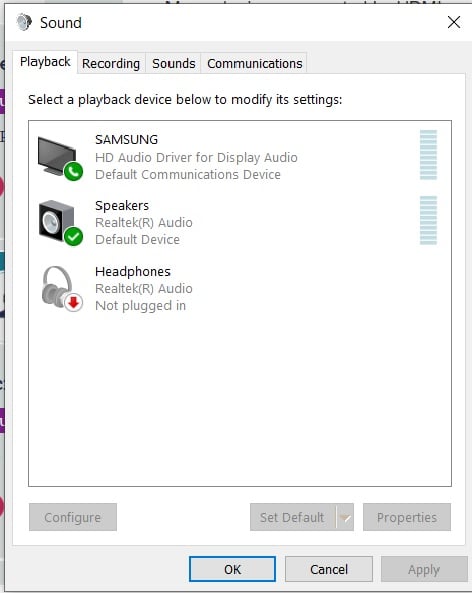
This is what I have showing when I go to 'Sounds' and then playback tab.
0 -
Select the Samsung as the default playback device.

(When it's not connected the Speakers will revert to be the default).Jenni x1 -
That worksJenni_D said:Select the Samsung as the default playback device.
(When it's not connected the Speakers will revert to be the default).
But why ?0 -
Isn't it obvious?Jenni x0
-
Because Windows has always been crap at switching audio sources.
 Or the more likely cause is is a driver update has come down through Windows Update and because your TV wasn't connected at the time the computer forgets all about it and so won't switch source.0





Confirm your email address to Create Threads and Reply

Categories
- All Categories
- 353.8K Banking & Borrowing
- 254.3K Reduce Debt & Boost Income
- 455.2K Spending & Discounts
- 246.9K Work, Benefits & Business
- 603.4K Mortgages, Homes & Bills
- 178.2K Life & Family
- 260.9K Travel & Transport
- 1.5M Hobbies & Leisure
- 16K Discuss & Feedback
- 37.7K Read-Only Boards