We’d like to remind Forumites to please avoid political debate on the Forum.
This is to keep it a safe and useful space for MoneySaving discussions. Threads that are – or become – political in nature may be removed in line with the Forum’s rules. Thank you for your understanding.
📨 Have you signed up to the Forum's new Email Digest yet? Get a selection of trending threads sent straight to your inbox daily, weekly or monthly!
The Forum now has a brand new text editor, adding a bunch of handy features to use when creating posts. Read more in our how-to guide
We're aware that some users are currently experiencing errors on the Forum. Our tech team is working to resolve the issue. Thanks for your patience.
Screen shots of emails , I need to print them

jay1964
Posts: 29 Forumite



in Techie Stuff
I took screen shots of emails and I now need to print them off , they are printing out the size of a photograph and even with my glasses on they are very hard to read .I need to refer to them ( in court ) so need them to print off bigger.hope this makes sense. I have them on my iPad and not sure how to enlarge them . I do have a laptop with windows 10 but not really that good at working it …….could I email to myself again on the laptop , I have a hotmail account on there .
thanks
thanks
Smile and be happy, things can usually get worse!
0
Comments
-
should ya should have said the emails were all sent originally to my iCloud email account ,if that helpsSmile and be happy, things can usually get worse!0
-
You can email yourself - I do so often. Pics from my mobile - Documents that I want to be available in meetings when I don't have my laptop so I can read them on my phone.At one time I had an email account dedicated to storing documents.1
-
Can't you just print the email directly from you ipad?
4.8kWp 12x400W Longhi 9.6 kWh battery Giv-hy 5.0 Inverter, WSW facing Essex . Aint no sunshine ☀️ Octopus gas fixed dec 24 @ 5.74 tracker again+ Octopus Intelligent Flux leccy
CEC Email energyclub@moneysavingexpert.com2 -
I tried logging on to my iCloud as above but they’ve been deleted …..debitcardmayhem said:Can't you just print the email directly from you ipad?…………...
I tried logging into my iCloud account but they must have been deleted from my email …. Suppose as I knew I had screen shots of them I thought I could refer to those . I didn’t know they would print off sooo small …….oooh I’m so silly
many thanksSmile and be happy, things can usually get worse!0 -
Do you mean email the docs I have as screen shots and refer to them there ? I may have to do that but I’d feel happier if I could actually print them
that was in reply to grey critic …… thanksSmile and be happy, things can usually get worse!0 -
What format are they saved in ?Likely best to either e-mail them to yourself or connect your ipad to your computer and download them then you can manipulate the file for printing with whichever program is best depending on the type of document format.0
-
I just secret shot the emails and saved them in my photos , but when I print them they ar3 so tiny . They are less than 1/4 of an A4 page …. I need to be able to read them …I tried emailing them to myself but as they were saved as pictures they still printed out really smallmolerat said:What format are they saved in ?Likely best to either e-mail them to yourself or connect your ipad to your computer and download them then you can manipulate the file for printing with whichever program is best depending on the type of document format.Smile and be happy, things can usually get worse!0 -
You need to set the correct paper size in the printer settings in your iPad - set it to A4 and it will fill the page.jay1964 said:
I just secret shot the emails and saved them in my photos , but when I print them they ar3 so tiny . They are less than 1/4 of an A4 page …. I need to be able to read them …I tried emailing them to myself but as they were saved as pictures they still printed out really smallmolerat said:What format are they saved in ?Likely best to either e-mail them to yourself or connect your ipad to your computer and download them then you can manipulate the file for printing with whichever program is best depending on the type of document format.
Your settings screen may differ slightly from this, you will need to figure that bit out yourself because I don't have a printer online at the moment to test with.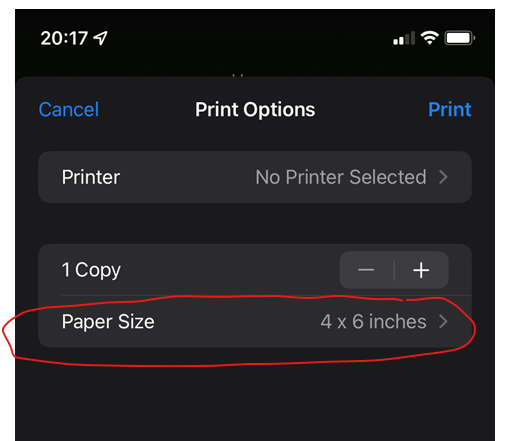
1 -
I'm not sure if the paper size is the issue. from what I can tell as the OP is printing a screenshot that os probably in landscape format, it is placing it across the portrait sheet and therefore only taking up a small amount of that sheet. Maybe changing the printer to print in landscape might help.
Another option that I think someone above alluded to is to print the actual emails (after having sent them to yourself) rather than screenshots. I have used screenshots myself in the past and they rarely give good results when printed out.Retired at age 56 after having "light bulb moment" due to reading MSE and its forums. Have been converted to the "budget to zero" concept and use YNAB for all monthly budgeting and long term goals.2 -
[Deleted User] said:
You need to set the correct paper size in the printer settings in your iPad - set it to A4 and it will fill the page.jay1964 said:
I just secret shot the emails and saved them in my photos , but when I print them they ar3 so tiny . They are less than 1/4 of an A4 page …. I need to be able to read them …I tried emailing them to myself but as they were saved as pictures they still printed out really smallmolerat said:What format are they saved in ?Likely best to either e-mail them to yourself or connect your ipad to your computer and download them then you can manipulate the file for printing with whichever program is best depending on the type of document format.
Your settings screen may differ slightly from this, you will need to figure that bit out yourself because I don't have a printer online at the moment to test with.
I don’t seem to have that paper size on my iPad when printing …..I don5 know what else to do ….. I tried emailing the docs to my hotmail email on the laptop but I’m strugglin* to print them from there too[Deleted User] said:
You need to set the correct paper size in the printer settings in your iPad - set it to A4 and it will fill the page.jay1964 said:
I just secret shot the emails and saved them in my photos , but when I print them they ar3 so tiny . They are less than 1/4 of an A4 page …. I need to be able to read them …I tried emailing them to myself but as they were saved as pictures they still printed out really smallmolerat said:What format are they saved in ?Likely best to either e-mail them to yourself or connect your ipad to your computer and download them then you can manipulate the file for printing with whichever program is best depending on the type of document format.
Your settings screen may differ slightly from this, you will need to figure that bit out yourself because I don't have a printer online at the moment to test with.Smile and be happy, things can usually get worse!0







Confirm your email address to Create Threads and Reply

Categories
- All Categories
- 354.5K Banking & Borrowing
- 254.4K Reduce Debt & Boost Income
- 455.4K Spending & Discounts
- 247.4K Work, Benefits & Business
- 604.2K Mortgages, Homes & Bills
- 178.5K Life & Family
- 261.6K Travel & Transport
- 1.5M Hobbies & Leisure
- 16K Discuss & Feedback
- 37.7K Read-Only Boards