We’d like to remind Forumites to please avoid political debate on the Forum.
This is to keep it a safe and useful space for MoneySaving discussions. Threads that are – or become – political in nature may be removed in line with the Forum’s rules. Thank you for your understanding.
📨 Have you signed up to the Forum's new Email Digest yet? Get a selection of trending threads sent straight to your inbox daily, weekly or monthly!
The Forum now has a brand new text editor, adding a bunch of handy features to use when creating posts. Read more in our how-to guide
Windows10 Administrator login?

goodValue
Posts: 513 Forumite




in Techie Stuff
A year or two ago I saw a post that made me think I should create an Administrator account.
Until now I haven't used it.
A couple of days ago I logged in as Administrator, and I haven't had the option to login as Administrator since then.
When starting up, there is usually large pieces of text at the bottom left of the screen to choose between normal user and Administrator. Now, I don't get that, and it goes straight to a password screen for the normal user.
Something else unusual happened in the last couple of days - when shutting down there was a message saying someone else was using the machine, and was I sure that I wanted to shut down. I said yes, thinking it would be no problem.
Was I somehow logged in as both the normal user and Administrator?
And am I somehow perpetually logged in as Administrator?
Until now I haven't used it.
A couple of days ago I logged in as Administrator, and I haven't had the option to login as Administrator since then.
When starting up, there is usually large pieces of text at the bottom left of the screen to choose between normal user and Administrator. Now, I don't get that, and it goes straight to a password screen for the normal user.
Something else unusual happened in the last couple of days - when shutting down there was a message saying someone else was using the machine, and was I sure that I wanted to shut down. I said yes, thinking it would be no problem.
Was I somehow logged in as both the normal user and Administrator?
And am I somehow perpetually logged in as Administrator?
0
Comments
-
All (local) accounts by default in 10 are administrator.There is an account called "Administrator" but its hidden by default (and also hides if another account was created in the meantime)0
-
Go into your user settings to see what is happening:
1. Right click on the start button and select "Computer Management"
2. As per screenshot below go to System Tools > Local users and groups > Users
3. Open the "Administrator" account and have a look at the properties as per screenshot below:
4. See if the "Account is disabled" is ticked
5. Also what other users do you see on the list?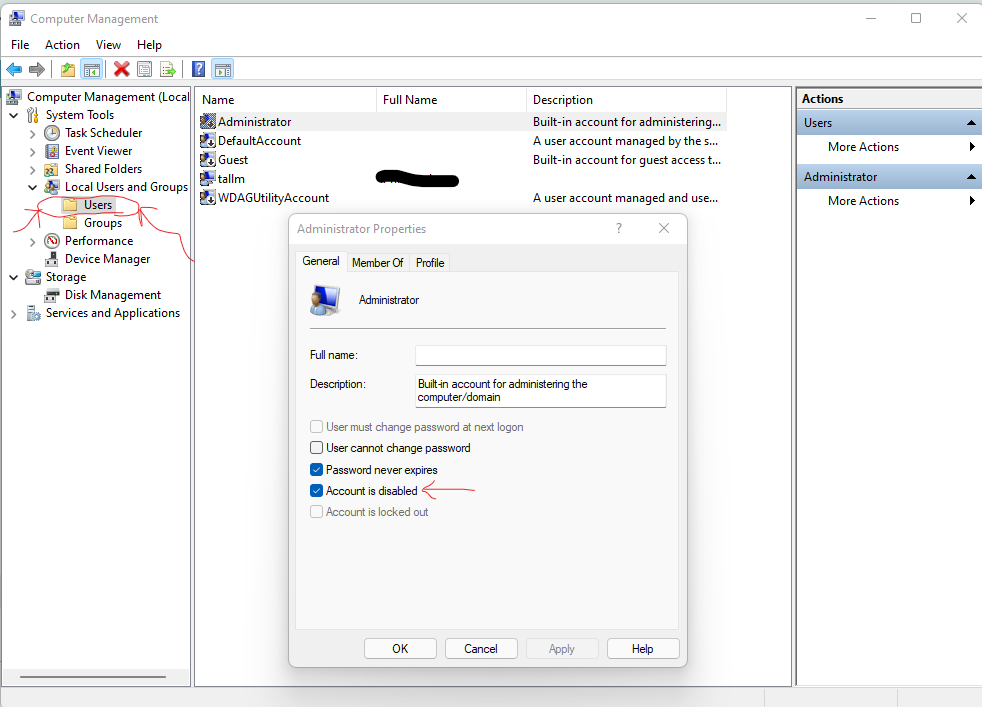
However, my advice is always disable the administrator account for security reasons. It has a specific SID (security identifier) of 500 which some malware attacks target.
You can set your normal user account to have administrator privileges instead as per screenshot below: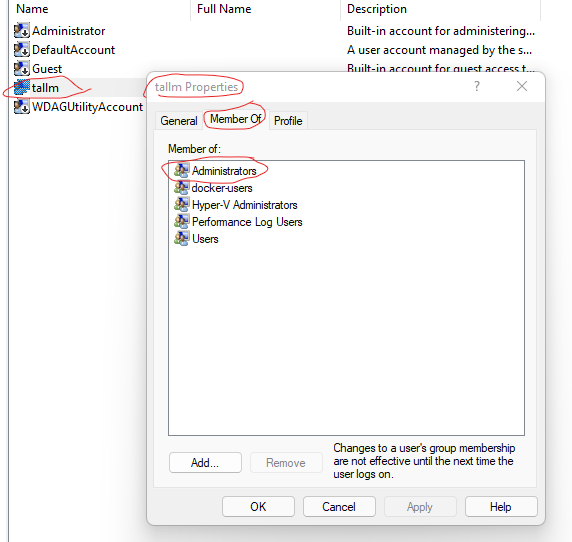
If you do insist on enabling the administrator account, have a very long and complex password (as you should for all accounts anyway but especially ones with Administrator privileges).
1 -
Thank you so much, this has been very enlightening.
Yes, the Administrator account was disabled, which explains why I was confused.
The other users were similar to yours, with tallm replaced by defaultUser() and User.
User was the only account that was enabled.
I was surprised to see that User was a Member only of Administrators. That means I've always been effectively logging in as an Administrator?
I don't want to have these privileges all of the time in case I make a mistake, so I added the Users group to the Members of.
So when I next logon, I should get the option of logging in as an Administrator or User?0 -
You shouldn't have the administrator account enabled but rather use a user account which has admin rights.4.29kWp Solar system, 45/55 South/West split in cloudy rainy Cumbria.0
-
Short answer is leave everything as it was, it is ok.goodValue said:Thank you so much, this has been very enlightening.
Yes, the Administrator account was disabled, which explains why I was confused.
The other users were similar to yours, with tallm replaced by defaultUser() and User.
User was the only account that was enabled.
I was surprised to see that User was a Member only of Administrators. That means I've always been effectively logging in as an Administrator?
I don't want to have these privileges all of the time in case I make a mistake, so I added the Users group to the Members of.
So when I next logon, I should get the option of logging in as an Administrator or User?
There has to be at least one user with admin privileges. For normal home use, that would be the main user who logs into the computer. There is nothing bad about having admin privileges for your home usage, in fact you need them to do many things like installing software and changing some settings.
In the scenario of a business or shared computer / server then only certain trusted users would have admin rights and everyone else would just be a user with lower privileges, but this is your computer so you are the administrator - all the power is yours!
In other words, unless you have a reason to change things then don't, and I can't see any reason you need to be changing things.
2 -
There is a reason I thought I needed Administrator privileges (to take control of some folders).
But if I understand you correctly, I don't have to make any changes to be able do that now.0 -
No changes - your account seems to be Admin so leave it at that.0
-
I personally have two accounts set up on my personal PC - one with "administrator" rights and one with "user" rights. I log into the "user" account for day to day stuff and when I need to do anything with admin rights I either specifically log into that account, or just enter the admin password when prompted. It's probably overkill, and there's no particular need to do it the way I have - logging in with the admin account makes little practical difference - but it makes me think twice about what I'm doing so I don't accidently do anything I shouldn't be doing.
0 -
I'm still confused over this as I still cannot do what I wanted.
I have an old Windows system hard drive that was passed on to me a few years ago.
I want to use it to make copies of my personal files, but cannot delete the system files on it.!
When I try, I get a pop-up error message:
You require permission from DESKTOP-xxxxxxx\Administrator to make changes to this file
But I thought that I was the Administrator!!
0 -
You are the administrator of your PC, but those files belong to a different PC that you are not an administrator of.goodValue said:I'm still confused over this as I still cannot do what I wanted.
I have an old Windows system hard drive that was passed on to me a few years ago.
I want to use it to make copies of my personal files, but cannot delete the system files on it.!
When I try, I get a pop-up error message:
You require permission from DESKTOP-xxxxxxx\Administrator to make changes to this file
But I thought that I was the Administrator!!
You need to change the ownership of the files in order for your current PC to be able to administer those files.
To be honest, it would be simpler just to re-format the old drive and start a fresh, just restore any of the personal files from your backup copy.
But if you want to take ownership and delete them, this is how to do it:
1. Right click the folder you want to take ownership of
2. Go to security tab
3. Click Advanced
4. Click "Change" next to owner
5. Enter you user in the object box
6. Click ok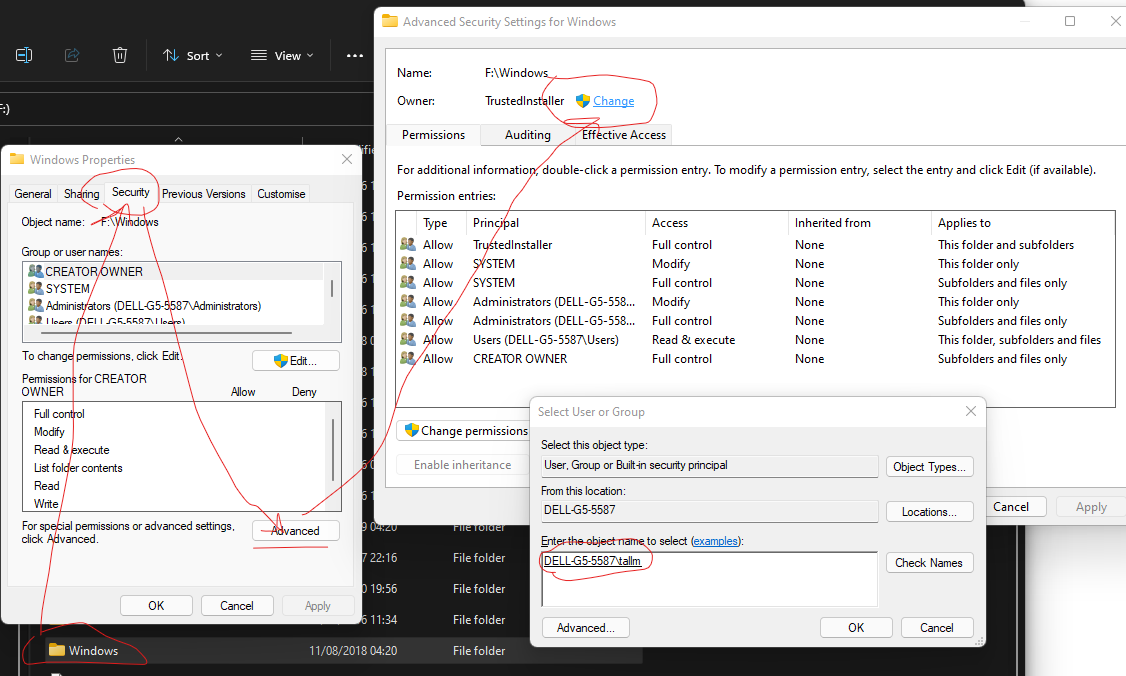
Then ensure you tick this: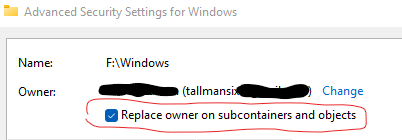
Click "Apply"
Say yes to this: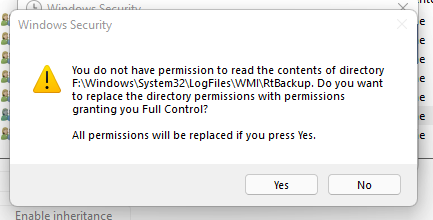
You will see a box like this for a few minutes going through all the files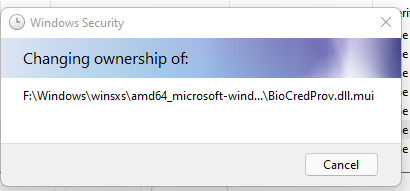
Click change permissions: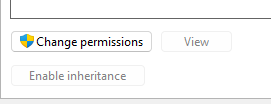
Then click "Enable Inheritance" and the tick box below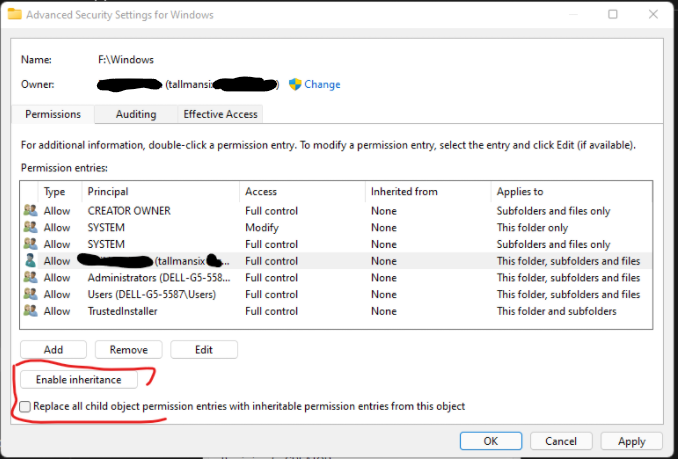
Then check your user has "Full Control", if not click on it and select the tick boxes.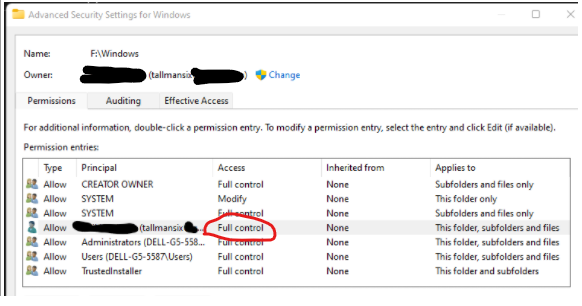
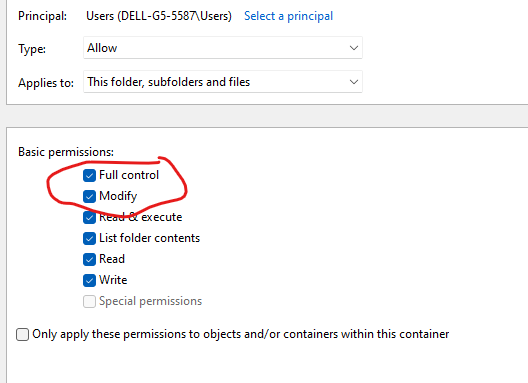
Click ok, then apply, it will prompt for confirmation, click ok then you will see: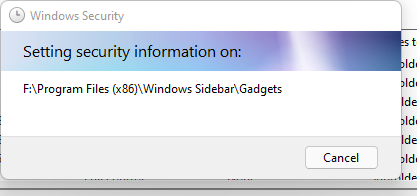
And you should be good to go...
EDITED: Kept seeing personal info I'd left in the screenshots so had a few edits!
2






Confirm your email address to Create Threads and Reply

Categories
- All Categories
- 353.5K Banking & Borrowing
- 254.2K Reduce Debt & Boost Income
- 455.1K Spending & Discounts
- 246.6K Work, Benefits & Business
- 603K Mortgages, Homes & Bills
- 178.1K Life & Family
- 260.6K Travel & Transport
- 1.5M Hobbies & Leisure
- 16K Discuss & Feedback
- 37.7K Read-Only Boards