We’d like to remind Forumites to please avoid political debate on the Forum.
This is to keep it a safe and useful space for MoneySaving discussions. Threads that are – or become – political in nature may be removed in line with the Forum’s rules. Thank you for your understanding.
📨 Have you signed up to the Forum's new Email Digest yet? Get a selection of trending threads sent straight to your inbox daily, weekly or monthly!
The Forum now has a brand new text editor, adding a bunch of handy features to use when creating posts. Read more in our how-to guide
Help with Excel formula/formatting

Brie
Posts: 16,313 Ambassador




in Techie Stuff
Yo Techies! Hopefully you can help with this. It's one of those things I do about once every 3 years and have to reinvent the process each time.
OK so I've got a spreadsheet with a column of names.
I need to input a name into another column and I need to guarantee it matches exactly a name in the other column.
So say you have a list of club members and need to record when each pays their sub. So I need to put "Bob" in a column and have the formula tell me if this is the right name or is he actually listed as Robert. Just need an error message to pop up to prompt me to check rather than think at the end of the year that Robert has never paid.
OK so I've got a spreadsheet with a column of names.
I need to input a name into another column and I need to guarantee it matches exactly a name in the other column.
So say you have a list of club members and need to record when each pays their sub. So I need to put "Bob" in a column and have the formula tell me if this is the right name or is he actually listed as Robert. Just need an error message to pop up to prompt me to check rather than think at the end of the year that Robert has never paid.
I’m a Forum Ambassador and I support the Forum Team on Debt Free Wannabe, Old Style Money Saving and Pensions boards. If you need any help on these boards, do let me know. Please note that Ambassadors are not moderators. Any posts you spot in breach of the Forum Rules should be reported via the report button, or by emailing forumteam@moneysavingexpert.com. All views are my own and not the official line of MoneySavingExpert.
Click on this link for a Statement of Accounts that can be posted on the DebtFree Wannabe board: https://lemonfool.co.uk/financecalculators/soa.php
Check your state pension on: Check your State Pension forecast - GOV.UK
"Never retract, never explain, never apologise; get things done and let them howl.” Nellie McClung
⭐️🏅😇🏅🏅🏅
Click on this link for a Statement of Accounts that can be posted on the DebtFree Wannabe board: https://lemonfool.co.uk/financecalculators/soa.php
Check your state pension on: Check your State Pension forecast - GOV.UK
"Never retract, never explain, never apologise; get things done and let them howl.” Nellie McClung
⭐️🏅😇🏅🏅🏅
0
Comments
-
Data validation is an good option for this, you can even make the "paid their subs" column use a drop down to ensure you only select names that are actually in the members list.
1. Highlight as many rows as you will need in the "paid subs" column
2. Go to Data > Data Validation in the menu
3. Select "List" in the "Allow" options
4. Select your list of names of members in the source box - allow a few extra rows if you ever add to the members list
5. Press ok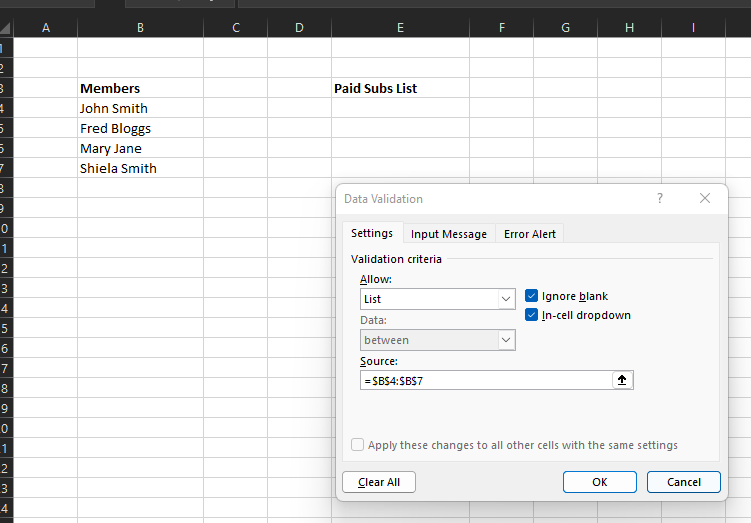
Now when you want to enter something in the "Paid Subs List" column you will get a drop down of names to choose from: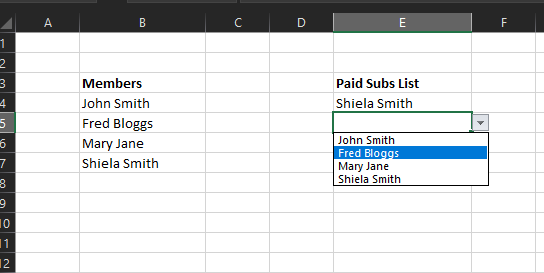
You can type the name in if you prefer or the drop down list is too long, that will work as well, but if you type a name that is not exactly matching the members list you will get this message: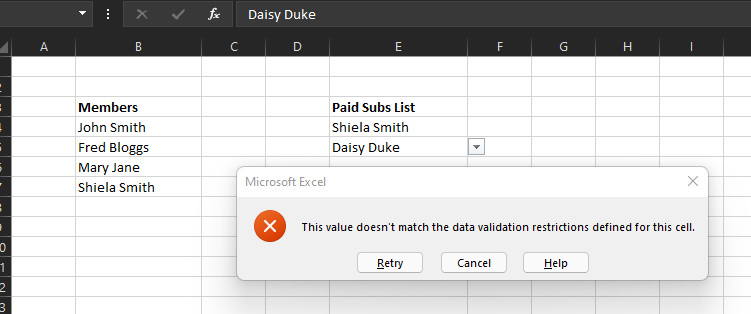
3 -
^^^ this.As usual a good response from tallmansix.The only things I would add is that you can make it more complex to highlight typed entries that do not match your members list (but probably not necessary). I have found that Data validation, depending I think upon Excel version, sometimes does not always as described above.A more complex method is to add conditional formatting that highlights (all the time ) entries not in your members list - not just at data entry time. You can also then catch duplicates in entry or even members that have no entry. Probably overkill for a short simple list but very usefull.Plus adding a name to your list. So that, instead of the data validation referencing $B$4:$B$7 (as in the above example) you can call your list of members "Members_List" -or some other suitable name!. This is done via menu option for Named ranges. It then means that when your members list changes you just type in a new member and then change the range that is the list.....and not all the. Data Validation cells. It is also more intuitive.If your list is on a separate sheet (rather than side by side as in the above) it is even easier as you can just insert a row and type in the new member and it is all done for you............and then sort it alphabetically to make it easier to find any members who might change their names....which does happen!2
-
Thanks very much @[Deleted User]
That was exactly what I needed.
@Heedtheadvice
I had looked at named ranges but I didn't want to make things more complex than necessary as I'm not the only one using the spreadsheet. And I'd probably forget what I'd done when someone else messes it up and I'd have to ask for help again on how to repair it all!!!I’m a Forum Ambassador and I support the Forum Team on Debt Free Wannabe, Old Style Money Saving and Pensions boards. If you need any help on these boards, do let me know. Please note that Ambassadors are not moderators. Any posts you spot in breach of the Forum Rules should be reported via the report button, or by emailing forumteam@moneysavingexpert.com. All views are my own and not the official line of MoneySavingExpert.
Click on this link for a Statement of Accounts that can be posted on the DebtFree Wannabe board: https://lemonfool.co.uk/financecalculators/soa.php
Check your state pension on: Check your State Pension forecast - GOV.UK
"Never retract, never explain, never apologise; get things done and let them howl.” Nellie McClung
⭐️🏅😇🏅🏅🏅0 -
Understood.Only one real answer, master workbook and working copies with backups!! That way you can write notes in a sheet in the Master.But if you want simplicity a regular series of backups is great.0
![[Deleted User]](https://us-noi.v-cdn.net/6031891/uploads/defaultavatar/nFA7H6UNOO0N5.jpg)



Confirm your email address to Create Threads and Reply

Categories
- All Categories
- 353.5K Banking & Borrowing
- 254.1K Reduce Debt & Boost Income
- 455K Spending & Discounts
- 246.6K Work, Benefits & Business
- 602.9K Mortgages, Homes & Bills
- 178.1K Life & Family
- 260.6K Travel & Transport
- 1.5M Hobbies & Leisure
- 16K Discuss & Feedback
- 37.7K Read-Only Boards