We’d like to remind Forumites to please avoid political debate on the Forum.
This is to keep it a safe and useful space for MoneySaving discussions. Threads that are – or become – political in nature may be removed in line with the Forum’s rules. Thank you for your understanding.
📨 Have you signed up to the Forum's new Email Digest yet? Get a selection of trending threads sent straight to your inbox daily, weekly or monthly!
The Forum now has a brand new text editor, adding a bunch of handy features to use when creating posts. Read more in our how-to guide
Photo print issue

binft
Posts: 39 Forumite


Hi,
Wondered if someone can help me, not sure if the correct board. I ordered a glass print of a photo I have online and it got delivered today. Overall I'm pretty happy with the quality except the image seems really washed out. Now I don't know if this is a printer quality issue or is this something that happens when a photo is enlarged? See below for comparisons
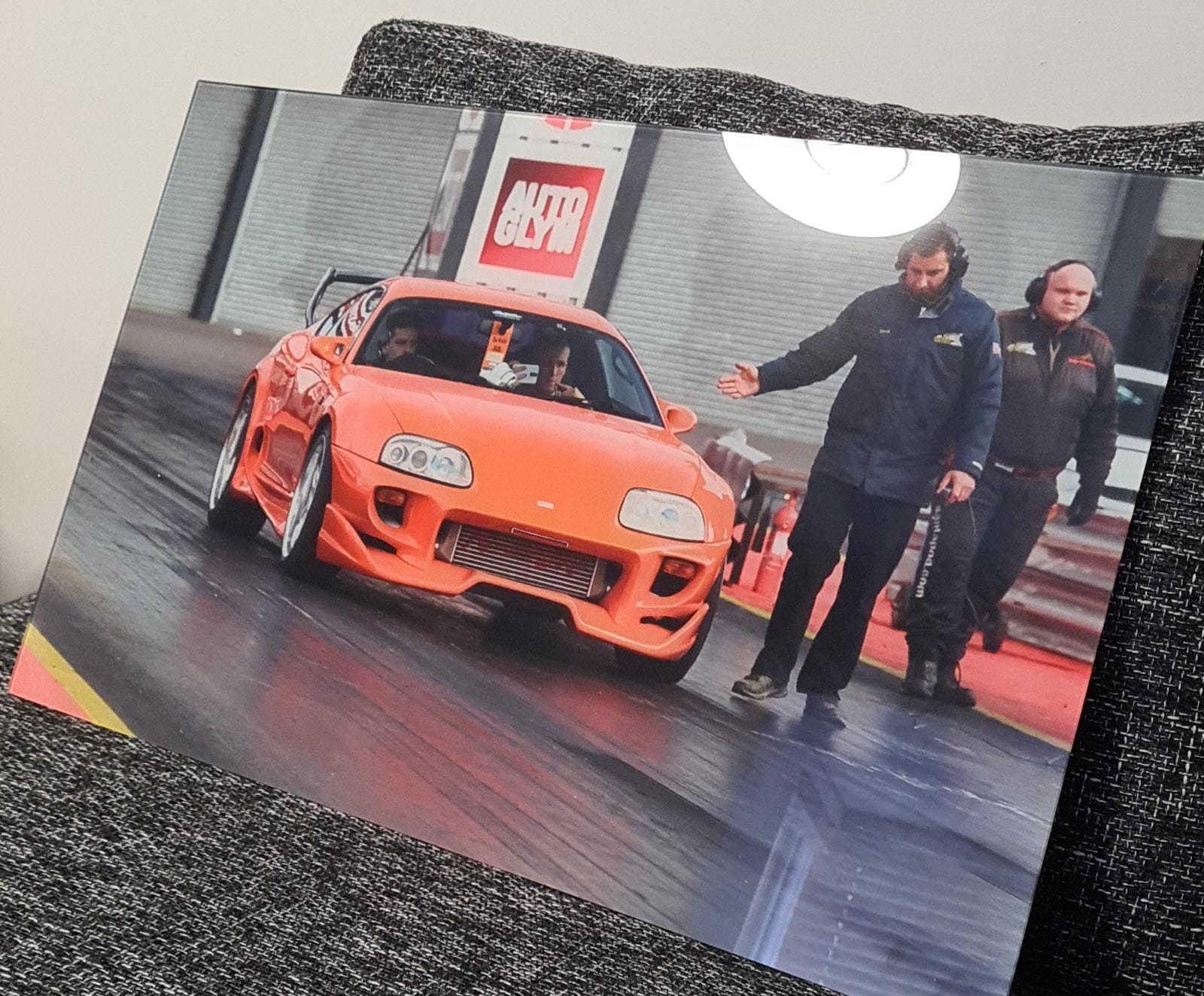
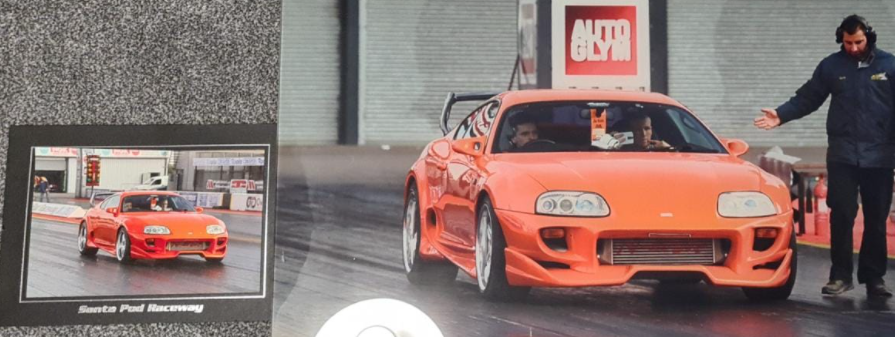
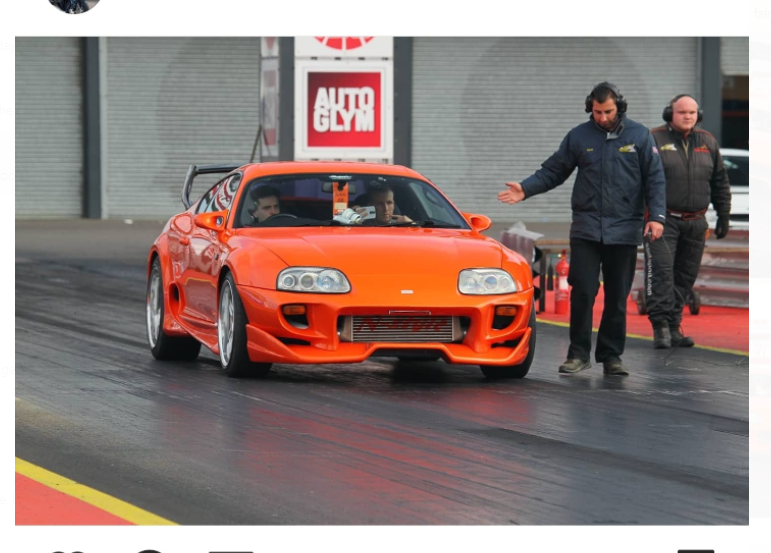
As you can the see the car colour is much more vibrant in my digital photo but also on the small print that I actually bought at the time. I emailed them the original picture file which is in a 4896x3264 resolution (5.5MB) 72DPI. Should I contact them to ask why it is like this? I'm not sure if this is normal when enlarging prints.
Wondered if someone can help me, not sure if the correct board. I ordered a glass print of a photo I have online and it got delivered today. Overall I'm pretty happy with the quality except the image seems really washed out. Now I don't know if this is a printer quality issue or is this something that happens when a photo is enlarged? See below for comparisons
As you can the see the car colour is much more vibrant in my digital photo but also on the small print that I actually bought at the time. I emailed them the original picture file which is in a 4896x3264 resolution (5.5MB) 72DPI. Should I contact them to ask why it is like this? I'm not sure if this is normal when enlarging prints.
0
Comments
-
Just email them and ask why. Most will re-do things like this if they feel it is substandard.Should've = Should HAVE (not 'of')
Would've = Would HAVE (not 'of')
No, I am not perfect, but yes I do judge people on their use of basic English language. If you didn't know the above, then learn it! (If English is your second language, then you are forgiven!)0 -
Quality can get worse as photo is enlarged. Depends on the original size.
Also material it is printed on can have a effect on how it appears.Life in the slow lane0 -
The material its printed onto is likely the cause.0
-
Could be the printer settings need adjusting, best ask them and see what they say0
-
Quality is impacted by enlargement but not saturation.
What material its printed on and how its intended to be used will significantly impact the apparent saturation. We've used a semi-professional service before and they send you a colour profile for the intended materials so you can adjust to compensate if you want to.0 -
This is the response I received from them today, can't complain really I guess
Hello, The printing machine we use (Durst®) from Germany is known as the highest quality UV printing machine on the market. Our inks sourced also from one of the best ink brands in UK. this colour differences is quite normal. It's not possible to print exact same colours unfortunately. We see you are not happy with it. So if you want we can change the colours a bit to catch similar tint and dispatch you again but please remember still may not be like original colours.
0








Confirm your email address to Create Threads and Reply

Categories
- All Categories
- 354.8K Banking & Borrowing
- 254.5K Reduce Debt & Boost Income
- 455.6K Spending & Discounts
- 247.6K Work, Benefits & Business
- 604.5K Mortgages, Homes & Bills
- 178.6K Life & Family
- 262.1K Travel & Transport
- 1.5M Hobbies & Leisure
- 16.1K Discuss & Feedback
- 37.7K Read-Only Boards