We’d like to remind Forumites to please avoid political debate on the Forum.
This is to keep it a safe and useful space for MoneySaving discussions. Threads that are – or become – political in nature may be removed in line with the Forum’s rules. Thank you for your understanding.
📨 Have you signed up to the Forum's new Email Digest yet? Get a selection of trending threads sent straight to your inbox daily, weekly or monthly!
The Forum now has a brand new text editor, adding a bunch of handy features to use when creating posts. Read more in our how-to guide
increase wifi

JohnSwift10
Posts: 545 Forumite




in Techie Stuff
I have a raspberry pi using a 12 volt lead acid battery that I use to control an automatic watering system in my greenhouse.
It works OK because the control program autoruns whenever the pi boots.
The problem is my wifi does not reach my greenhouse so if I want to make any alterations to the watering program I have to dismantle my watering system and bring the pi indoors.
I cannot move my router any closer to my greenhouse.
I have a laptop and an Android tablet but they lose the wifi signal 3 feet away from the greenhouse door.
So what would be the cheapest and easiest way to get wifi to my greenhouse?
Could I somehow use my laptop or tablet to increase the range of my wifi, it only needs to work when I want to make any alterations to the watering program?
It works OK because the control program autoruns whenever the pi boots.
The problem is my wifi does not reach my greenhouse so if I want to make any alterations to the watering program I have to dismantle my watering system and bring the pi indoors.
I cannot move my router any closer to my greenhouse.
I have a laptop and an Android tablet but they lose the wifi signal 3 feet away from the greenhouse door.
So what would be the cheapest and easiest way to get wifi to my greenhouse?
Could I somehow use my laptop or tablet to increase the range of my wifi, it only needs to work when I want to make any alterations to the watering program?
0
Comments
-
We use one of theseNo Pies or wifi required, just a couple of AA batteries

1 -
Use a mobile phone as a wifi repeater? Some mobiles will allow you to turn on wifi and hotspot simultaneously (most don't). If not then use Wifi Repeater app. Some more stuff here https://gadgetstouse.com/blog/2021/05/31/ways-to-use-phone-as-wifi-repeater/
DISCLAIMER : Not tried this personally.0 -
If you have or can provide a power point at, say, half way or more between your router and green house then a wifi repeater is probably the easiest option. (I am guessing you will either not want to go down the above green timer route mentioned above or are perhaps monitoring growing medium wetness or just want to use the pie out of interest).Similarly you can use an old router (spare or second hand) positioned in a similar position as a cheap option. It needs to be one where you can go into the admin settings and disable the DHCP so that it just acts as a hub thus giving you a new wirelesss transmission location much closer. Not 100% sure but guess most routers can be so set. I use an old bt one. If you do not have one they can be picked up very cheaply on fleabay. Best if you can connect it to your existing one via an ethernet cable but if not even an older home hub mains extender would be more than adequate. Speed will not be an issue. (I even use one for connecting my smart tv and it works fine fo 99.9% of the time but they can be a bit flaky for some).0
-
Do you need to connect it to WiFi because it needs internet access and you want to adjust the program from eg a website? If so, just use your smartphone (if you have one) as a hotspot and to access the website from the phone as well.
0 -
Easiest and cheapest (free) way is creating a mobile hotspot on your laptop and sit somewhere that the laptop can get Wi-Fi from the main router and the Pi can see the laptop - probably halfway between the two.
I've just done it as a proof of concept on my own Raspberry Pi as per the screenshot below.- First you will need to configure the Raspberry Pi to connect to your new hotspot on the laptop as this won't have the same SSID or username and password as your main Wi-Fi so bring it in the house one last time to configure.
- Navigate to Mobile Hotspot in the Windows settings and switch on as per screenshot below - ADDED use the same SSID and password as your main Wifi
- Connect to your RPI as you normally do and add a new network to its Wi-Fi which matches all the details on the Windows Mobile Hotspot screen.
- Test it out by disconnecting the RPI from your normal Wi-Fi, it should now auto connect to the new hot spot Wi-Fi
When positioned such that the laptop can get Wi-Fi from the main router and the RPI can connect to the laptop it will connect automatically. - Note it will have a new IP address on a different subnet so depending on how you connect, you will need to reconfigure - in my case just a different IP address in Putty for the SSH connection that I used. You will only be able to connect to it from your laptop - no other device on your network will be able to see it.
I use DHCP reservation on my main network - if your PI has a static IP address then this step might be a bit different (and might not work either because the hotspot is on a different subnet - recommend DHCP reservation as per my setup because the RPI will just obtain a new IP address from your laptop Hotspot). - Once confirmed working - put back on the greenhouse and test again.
- Note the IP address may be different each time you connect so you may need to check in the hotspot screen for the list of connected devices to check.
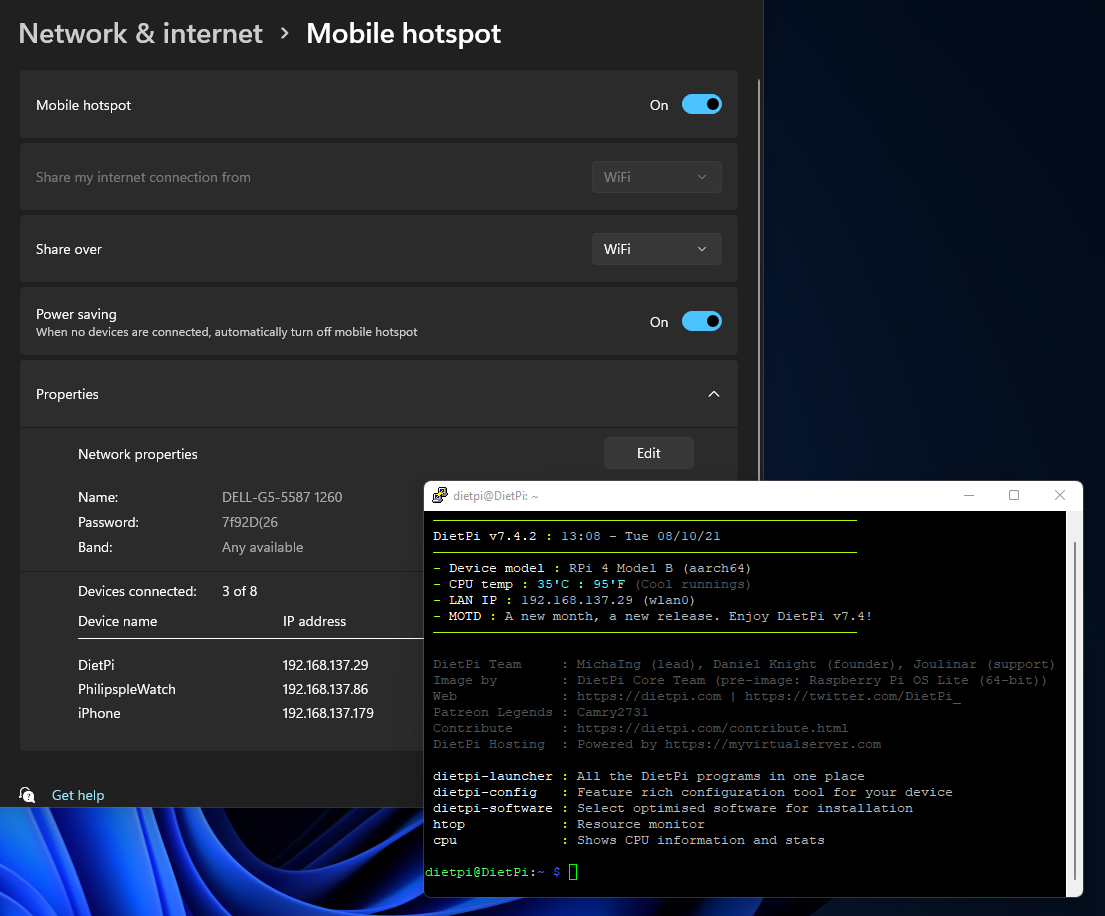
ETA: Does the PI have 5Ghz Wi-Fi? If not you will need to override the settings in Windows Hotspot to use 2.4Ghz using the Edit button.
2.4Ghz might be better anyway because it will have a slightly longer range than 5Ghz if you are a long way from the RPI.0 - First you will need to configure the Raspberry Pi to connect to your new hotspot on the laptop as this won't have the same SSID or username and password as your main Wi-Fi so bring it in the house one last time to configure.
-
So do I but it does not take into account that the growbags can need watering more than that is set up for.J_B said:We use one of theseNo Pies or wifi required, just a couple of AA batteries
One day in the hot weather I came home and my tomatoes were wilting as the growbags needed more water.
My pi waters when needed not at set times.0 -
I do not need internet access just wifipbartlett said:Do you need to connect it to WiFi because it needs internet access and you want to adjust the program from eg a website? If so, just use your smartphone (if you have one) as a hotspot and to access the website from the phone as well.0 -
JohnSwift10 said:
I do not need internet access just wifipbartlett said:Do you need to connect it to WiFi because it needs internet access and you want to adjust the program from eg a website? If so, just use your smartphone (if you have one) as a hotspot and to access the website from the phone as well.So why not set your laptop as a WiFi hotspot and connect the Pi to that?Then you can change the programming in the Pi as needed. The Pi doesn't need internet or WiFi access to run, so won't that be a free way to sort it out? Once you've debugged/modified the programme, you won't need to do it again.
I’m a Forum Ambassador and I support the Forum Team on the In My Home MoneySaving, Energy and Techie Stuff boards. If you need any help on these boards, do let me know. Please note that Ambassadors are not moderators. Any posts you spot in breach of the Forum Rules should be reported via the report button, or by emailing forumteam@moneysavingexpert.com.
All views are my own and not the official line of MoneySavingExpert.
0 -
What is the distance? You could also connect your laptop with an ethernet cable whilst debugging.Using a short cable if you sit in the greenhouse, or a long cable if you sit in the house.And if you have a pi zero, then you'd need a USB to ethernet adapter0
-
Set up a wifi hotspot on your laptop- disconnect from your home wifi, set up the hotspot with the same name as your home ssid , that should allow you to ssh to your pi (when you are in range of course
4.8kWp 12x400W Longhi 9.6 kWh battery Giv-hy 5.0 Inverter, WSW facing Essex . Aint no sunshine ☀️ Octopus gas fixed dec 24 @ 5.74 tracker again+ Octopus Intelligent Flux leccy
CEC Email energyclub@moneysavingexpert.com1








Confirm your email address to Create Threads and Reply

Categories
- All Categories
- 353.5K Banking & Borrowing
- 254.1K Reduce Debt & Boost Income
- 455K Spending & Discounts
- 246.6K Work, Benefits & Business
- 602.9K Mortgages, Homes & Bills
- 178.1K Life & Family
- 260.6K Travel & Transport
- 1.5M Hobbies & Leisure
- 16K Discuss & Feedback
- 37.7K Read-Only Boards