We’d like to remind Forumites to please avoid political debate on the Forum.
This is to keep it a safe and useful space for MoneySaving discussions. Threads that are – or become – political in nature may be removed in line with the Forum’s rules. Thank you for your understanding.
📨 Have you signed up to the Forum's new Email Digest yet? Get a selection of trending threads sent straight to your inbox daily, weekly or monthly!
The Forum now has a brand new text editor, adding a bunch of handy features to use when creating posts. Read more in our how-to guide
Repetitive Text

Terrysdelight
Posts: 1,202 Forumite




in Techie Stuff
Hi
Is there a way to stop repeating the same text? Many years ago (the good old days of wordperfect 5.1) you could assign a macro key. You would simply use the macro key, instead of typing out the same old text over and over again.
Is there a way to stop repeating the same text? Many years ago (the good old days of wordperfect 5.1) you could assign a macro key. You would simply use the macro key, instead of typing out the same old text over and over again.
0
Comments
-
Well, just don't type it is the usual way
 What are you doing when this happens? Is this a phone, a computer? Something else?1
 -
OK, sorry.
I'm helping a friend with invoicing. Using PC. I have to keep typing the word Response. And also Labour and Travel. On every single invoice and it is getting really boring :-(
0 -
Yes there is - going to assume you are using Microsoft Word as you haven't mentioned what you are using in your question:
First of all define auto text entries in the Insert > Quickparts
https://support.microsoft.com/en-us/office/create-reusable-text-snippets-0bc40cab-f49c-4e06-bcb2-cd43c1674d1b
You can use these auto text entries with a couple of clicks of the mouse but if you prefer keyboard then you can go a step further to link each auto text to a specific keystroke combination:
https://www.howtogeek.com/241581/how-to-add-shortcut-keys-to-autotext-entries-in-word/
1 -
Thank you.[Deleted User] said:Yes there is - going to assume you are using Microsoft Word as you haven't mentioned what you are using in your question:
First of all define auto text entries in the Insert > Quickparts
https://support.microsoft.com/en-us/office/create-reusable-text-snippets-0bc40cab-f49c-4e06-bcb2-cd43c1674d1b
You can use these auto text entries with a couple of clicks of the mouse but if you prefer keyboard then you can go a step further to link each auto text to a specific keystroke combination:
https://www.howtogeek.com/241581/how-to-add-shortcut-keys-to-autotext-entries-in-word/
The invoicing is actually done in QuickBooks - any ideas? I am helping a friend but its a bit like the blind leading the blind 0
0 -
If it's in Microsoft then the answer is autocorrect. I assign some letters to a oft repeated phrase and it works for me in Word, Excel & Outlook. so if I type "aana" as soon as I hit the space button it changes to "address amended, notepad added" which I got tired of typing out 20 times a day. Hopefully QuickBooks has something similar. Might be in their dictionary or something??I’m a Forum Ambassador and I support the Forum Team on Debt Free Wannabe, Old Style Money Saving and Pensions boards. If you need any help on these boards, do let me know. Please note that Ambassadors are not moderators. Any posts you spot in breach of the Forum Rules should be reported via the report button, or by emailing forumteam@moneysavingexpert.com. All views are my own and not the official line of MoneySavingExpert.
Click on this link for a Statement of Accounts that can be posted on the DebtFree Wannabe board: https://lemonfool.co.uk/financecalculators/soa.php
Check your state pension on: Check your State Pension forecast - GOV.UK
"Never retract, never explain, never apologise; get things done and let them howl.” Nellie McClung
⭐️🏅😇🏅🏅🏅1 -
If its an older version of Quickbooks (before they started going down the cloud route) you could edit the template and then it will appear on every invoice going forward, but that may not be what you want.You could make use of something like AutoHotKey as this user did:
I don't believe Quickbooks itself (assuming this is a standalone desktop version) supports Macros or similar functionality but the above thread suggests it will work with it, providing you feed it a script first.
1 -
Ok I'm going to assume you are using Windows 10 as you haven't mentioned it but you can use the multiple clipboard feature which might be an easy option:Terrysdelight said:
Thank you.[Deleted User] said:Yes there is - going to assume you are using Microsoft Word as you haven't mentioned what you are using in your question:
First of all define auto text entries in the Insert > Quickparts
https://support.microsoft.com/en-us/office/create-reusable-text-snippets-0bc40cab-f49c-4e06-bcb2-cd43c1674d1b
You can use these auto text entries with a couple of clicks of the mouse but if you prefer keyboard then you can go a step further to link each auto text to a specific keystroke combination:
https://www.howtogeek.com/241581/how-to-add-shortcut-keys-to-autotext-entries-in-word/
The invoicing is actually done in QuickBooks - any ideas? I am helping a friend but its a bit like the blind leading the blind
Press WinKey - C to copy the text you want to the clipboard and then WinKey-V which will pop up with all the recent copied items.
If click the "Pin" icon the ones you need most will stay at the top so every time you hit WinKey -V this box will pop up: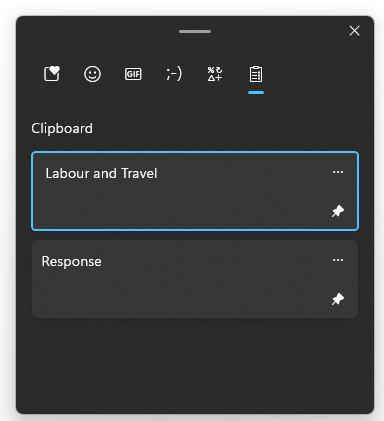
2 -
Thank you everyone. Have just learnt some time saving tips.0




Confirm your email address to Create Threads and Reply

Categories
- All Categories
- 353.5K Banking & Borrowing
- 254.1K Reduce Debt & Boost Income
- 455K Spending & Discounts
- 246.6K Work, Benefits & Business
- 602.9K Mortgages, Homes & Bills
- 178.1K Life & Family
- 260.6K Travel & Transport
- 1.5M Hobbies & Leisure
- 16K Discuss & Feedback
- 37.7K Read-Only Boards