We’d like to remind Forumites to please avoid political debate on the Forum.
This is to keep it a safe and useful space for MoneySaving discussions. Threads that are – or become – political in nature may be removed in line with the Forum’s rules. Thank you for your understanding.
📨 Have you signed up to the Forum's new Email Digest yet? Get a selection of trending threads sent straight to your inbox daily, weekly or monthly!
The Forum now has a brand new text editor, adding a bunch of handy features to use when creating posts. Read more in our how-to guide
Toshiba Satellite Upgrade

Explorer87
Posts: 104 Forumite



in Techie Stuff
Hi
So I've got an older Toshiba Satellite C50D-xxxx, it's been doing well but has been slowing down slowly.
I've not exactly got he cash for a new laptop but need to keep it up to speed. I run defrag and disk clean up, it always gets up dated, it also has Ccleaner. All my files are stored on dropbox and one drive. Are there any other programs I could use?
In terms of physical hardware is it easy to put a new RAM board in? I don't need to spend ages installing it?
Thanks
So I've got an older Toshiba Satellite C50D-xxxx, it's been doing well but has been slowing down slowly.
I've not exactly got he cash for a new laptop but need to keep it up to speed. I run defrag and disk clean up, it always gets up dated, it also has Ccleaner. All my files are stored on dropbox and one drive. Are there any other programs I could use?
In terms of physical hardware is it easy to put a new RAM board in? I don't need to spend ages installing it?
Thanks
1
Comments
-
You don't say how much RAM you currently have, nor which version of Windows (?) you havePresumably, you have an 'old fashioned' HDD which you ought to consider replacing with an SSD
1 -
Remove HDD, put in SSD (120GB minimum size), install Windows10 from scratch (license covered by previous installation).
Put HDD in a caddy to access files.
Minimum RAM/memory needed is 4GB.1 -
RAM is 4gb, windows is 10J_B said:You don't say how much RAM you currently have, nor which version of Windows (?) you havePresumably, you have an 'old fashioned' HDD which you ought to consider replacing with an SSD1 -
Zero risk, minimum spend - clean install windows10 to SSD, eg. £16 http://www.amazon.co.uk/PNY-CS900-INTERNAL-FLASH-DRIVE/dp/B01KFLH1WS/ Some clever person will hand-hold you through the upgrade. step1. download Windows10 to 8GB usb stick, put in SSD and boot from usb...Explorer87 said:
RAM is 4gb, windows is 10J_B said:You don't say how much RAM you currently have, nor which version of Windows (?) you havePresumably, you have an 'old fashioned' HDD which you ought to consider replacing with an SSD
2 -
Use ccleaner to remove as much as possible from start up. Google anything you don't recognise. Do you use malwarebytes?Explorer87 said:Hi
So I've got an older Toshiba Satellite C50D-xxxx, it's been doing well but has been slowing down slowly.
I've not exactly got he cash for a new laptop but need to keep it up to speed. I run defrag and disk clean up, it always gets up dated, it also has Ccleaner. All my files are stored on dropbox and one drive. Are there any other programs I could use?
1 -
Yeah might need my hand holding for that bit. What about all the programs like office that ive bought and dont have product keys for? Will they get transferred over?grumpycrab said:
Zero risk, minimum spend - clean install windows10 to SSD, eg. £16 http://www.amazon.co.uk/PNY-CS900-INTERNAL-FLASH-DRIVE/dp/B01KFLH1WS/ Some clever person will hand-hold you through the upgrade. step1. download Windows10 to 8GB usb stick, put in SSD and boot from usb...Explorer87 said:
RAM is 4gb, windows is 10J_B said:You don't say how much RAM you currently have, nor which version of Windows (?) you havePresumably, you have an 'old fashioned' HDD which you ought to consider replacing with an SSD0 -
grumpycrab said:Some clever person will hand-hold you through the upgrade. step1. download Windows10 to 8GB usb stick, put in SSD and boot from usb...
Or look here .... https://www.tenforums.com/tutorials/1950-clean-install-windows-10-a.html
0 -
Malwarebytes, I did. Will find it again.Norman_Castle said:
Use ccleaner to remove as much as possible from start up. Google anything you don't recognise. Do you use malwarebytes?Explorer87 said:Hi
So I've got an older Toshiba Satellite C50D-xxxx, it's been doing well but has been slowing down slowly.
I've not exactly got he cash for a new laptop but need to keep it up to speed. I run defrag and disk clean up, it always gets up dated, it also has Ccleaner. All my files are stored on dropbox and one drive. Are there any other programs I could use?
ta all
0 -
Explorer87 said:Hi
So I've got an older Toshiba Satellite C50D-xxxx, it's been doing well but has been slowing down slowly.
I've not exactly got he cash for a new laptop but need to keep it up to speed. I run defrag and disk clean up, it always gets up dated, it also has Ccleaner. All my files are stored on dropbox and one drive. Are there any other programs I could use?
In terms of physical hardware is it easy to put a new RAM board in? I don't need to spend ages installing it?
Thanks
Is there a good reason why you decided to only post part of the model number?
SSD, as aforementioned, is the solution; not RAM.
Likelihood is that you purchased a laptop with a pitiful AMD E1 CPU. SSD is the only way forward. As illustrated by the video above, the physical swap is very simple, even for a novice, taking no more than a few minutes.
You can retrieve your program product keys in advance in so you can reinstall them afterwards. https://www.belarc.com/products_belarc_advisor
Of course if you are feeling lazy and don't want to get the best out of the laptop, you can clone the old HDD to the new SSD; but it isn't the recommended path in your case.1 -
Office won't get transferred over unless its Office 365. key finder as above but then you'll need the office program itself; any other programs you might have trouble installing from scratch?Explorer87 said:Yeah might need my hand holding for that bit. What about all the programs like office that ive bought and dont have product keys for? Will they get transferred over?
Cloning is another option but a little more difficult and you may need a bigger SSD. How much space is USED on your C: drive?0




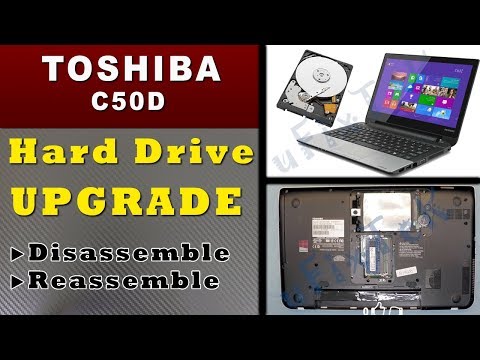 https://www.youtube.com/watch?v=s-xDFYqKLf4


Confirm your email address to Create Threads and Reply

Categories
- All Categories
- 353.8K Banking & Borrowing
- 254.3K Reduce Debt & Boost Income
- 455.2K Spending & Discounts
- 246.9K Work, Benefits & Business
- 603.4K Mortgages, Homes & Bills
- 178.2K Life & Family
- 260.9K Travel & Transport
- 1.5M Hobbies & Leisure
- 16K Discuss & Feedback
- 37.7K Read-Only Boards