We’d like to remind Forumites to please avoid political debate on the Forum.
This is to keep it a safe and useful space for MoneySaving discussions. Threads that are – or become – political in nature may be removed in line with the Forum’s rules. Thank you for your understanding.
📨 Have you signed up to the Forum's new Email Digest yet? Get a selection of trending threads sent straight to your inbox daily, weekly or monthly!
The Forum now has a brand new text editor, adding a bunch of handy features to use when creating posts. Read more in our how-to guide
Forcing 4k Videos

scaredofdebt
Posts: 1,663 Forumite



in Techie Stuff
Hi,
I'm currently using Vimeo to host some video that is 4k but I've noticed if the internet connection isn't great they serve it at a lower resolution.
Is there a way of forcing it to be 4k, can I host it myself or something?
I realise that there may be a wait involved and that's fine.
Thanks,
David
Make £2018 in 2018 Challenge - Total to date £2,108
0
Comments
-
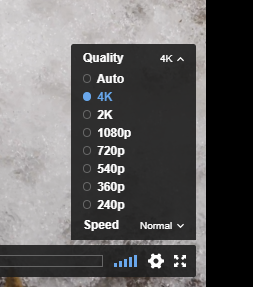
Try clicking the cog icon at the bottom right of the video and select 4K:
1 -
Thanks, I was aware of that but I want to force it to be 4k, the viewers have no technical knowledge and they won't do that.
Make £2018 in 2018 Challenge - Total to date £2,1080 -
Ahh right, yes I see what you mean. It's the common way of doing things on streaming sites nowadays - the adaptive bandwidth.scaredofdebt said:Thanks, I was aware of that but I want to force it to be 4k, the viewers have no technical knowledge and they won't do that.
If you forced it to 4K then some viewers would have a poor experience with buffering if their internet or hardware wasn't up to it. If they don't have a 4K screen it will be pointless as well - many people don't even watch videos in full screen mode as well.
If they do have the bandwidth and a 4K screen, Vimeo will adapt and play at full resolution though.
I just watched a 4K on Vimeo and it was averaging around 20 mbps but was pulling around 150 mbps to start the video in order to buffer about 10 seconds. It was also hammering the hardware, using about 40-50% of the internal HD630 Intel GPU, less when I switch it over to my Nvidia graphics card - about 15%.
What I'm trying to say is that if your users aren't technical enough to click a cog and get 4K, I doubt they will have the know how to deal with problems when their internet connection is saturated and their PC is bogging down with all the processing load - best to let the adaptive bitrate do its magic.2 -
scaredofdebt said:Thanks, I was aware of that but I want to force it to be 4k, the viewers have no technical knowledge and they won't do that.I wouldn't force 4k resolution even if you were able to.The end result will be painful for those on slower connections and spend more time stopping and starting than the length of the video.Upload it in 4k and let the site/browser decide the optimum speed. If it means viewers see the video in potatovision, that's not your problem.1
-
Many may not have a 4k display and so forcing a larger file which cannot be displayed (at worst) or needs to be scaled (at best) is a waste Vs sending the right size file in the first place.
You can obviously buy web hosting, most free ones probably wouldn't support concurrent multimedia streaming, and put the video on a webpage at 4k only but you'll have the above mentioned problems and some devices may not support it at all.1




Confirm your email address to Create Threads and Reply

Categories
- All Categories
- 353.5K Banking & Borrowing
- 254.2K Reduce Debt & Boost Income
- 455.1K Spending & Discounts
- 246.6K Work, Benefits & Business
- 603K Mortgages, Homes & Bills
- 178.1K Life & Family
- 260.6K Travel & Transport
- 1.5M Hobbies & Leisure
- 16K Discuss & Feedback
- 37.7K Read-Only Boards