We’d like to remind Forumites to please avoid political debate on the Forum.
This is to keep it a safe and useful space for MoneySaving discussions. Threads that are – or become – political in nature may be removed in line with the Forum’s rules. Thank you for your understanding.
📨 Have you signed up to the Forum's new Email Digest yet? Get a selection of trending threads sent straight to your inbox daily, weekly or monthly!
The Forum now has a brand new text editor, adding a bunch of handy features to use when creating posts. Read more in our how-to guide
ADDING PHOTOS ON INSTAGRAM USING A LAPTOP (using a browser)

pebblebeach8
Posts: 603 Forumite




in Techie Stuff
I don't know if anyone can help, but I have two instagram accounts, a personal one and another which I use to write product testing reviews. The product testing one is open in opera and has the + for adding photos from my laptop (I also logged into the product testing one in Google and the + also came up). I thought I would sign into my personal account in Opera but the + does not come up.
I am using Instagram on a laptop and in a browser (tried using the app, downloaded from Microsoft store, but still don't have option of adding photos)
Does anyone know why I have the option to post photos on one account and not the other? I have tried googling this and can't find the answer.
Thanks to all those that post.
0
Comments
-
Instagram don't really support upload from a PC natively. It only works when the website is in mobile browser mode rather than desktop - are you using the same mode for both accounts?
You can press F12 in Chrome and click the mobile button to simulate a mobile browser.
There are some workarounds, there is an API available that some developers have made use to provide a software app such as Uplet and Deskgram.
Alternatively you can use Bluestacks to run the Android mobile app directly on your PC and get access to all the feature available on the mobile app version.1 -
Deleted_User said:Instagram don't really support upload from a PC natively. It only works when the website is in mobile browser mode rather than desktop - are you using the same mode for both accounts?
You can press F12 in Chrome and click the mobile button to simulate a mobile browser.
There are some workarounds, there is an API available that some developers have made use to provide a software app such as Uplet and Deskgram.
Alternatively you can use Bluestacks to run the Android mobile app directly on your PC and get access to all the feature available on the mobile app version.I logged out of the product testing one in opera and logged into my personal one in Opera but the + still didn't appear. I have looked at both account settings and can't see any difference. I did try the F12 but that just bought a load of "data" up with no mobile button to press.Thanks for your help, I think I will just stick to using it on my mobile phone.Thanks to all those that post.0 -
Sorry - the mobile button isn't obvious - shown in the photo below, after pressing it, press F12 again to get rid of the data.pebblebeach8 said:Deleted_User said:Instagram don't really support upload from a PC natively. It only works when the website is in mobile browser mode rather than desktop - are you using the same mode for both accounts?
You can press F12 in Chrome and click the mobile button to simulate a mobile browser.
There are some workarounds, there is an API available that some developers have made use to provide a software app such as Uplet and Deskgram.
Alternatively you can use Bluestacks to run the Android mobile app directly on your PC and get access to all the feature available on the mobile app version.I logged out of the product testing one in opera and logged into my personal one in Opera but the + still didn't appear. I have looked at both account settings and can't see any difference. I did try the F12 but that just bought a load of "data" up with no mobile button to press.Thanks for your help, I think I will just stick to using it on my mobile phone.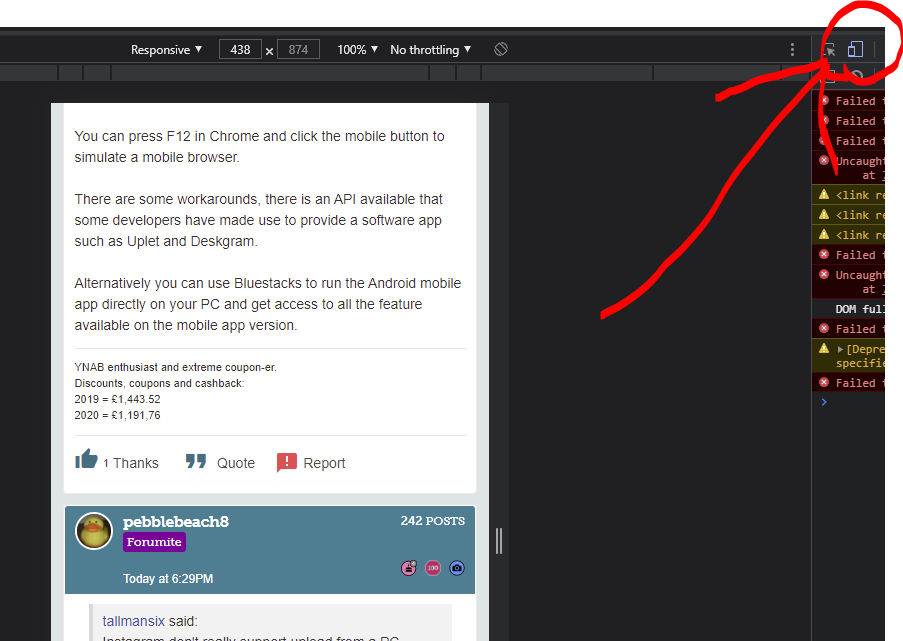
1 -
[Deleted User] said:
Sorry - the mobile button isn't obvious - shown in the photo below, after pressing it, press F12 again to get rid of the data.pebblebeach8 said:[Deleted User] said:Instagram don't really support upload from a PC natively. It only works when the website is in mobile browser mode rather than desktop - are you using the same mode for both accounts?
You can press F12 in Chrome and click the mobile button to simulate a mobile browser.
There are some workarounds, there is an API available that some developers have made use to provide a software app such as Uplet and Deskgram.
Alternatively you can use Bluestacks to run the Android mobile app directly on your PC and get access to all the feature available on the mobile app version.I logged out of the product testing one in opera and logged into my personal one in Opera but the + still didn't appear. I have looked at both account settings and can't see any difference. I did try the F12 but that just bought a load of "data" up with no mobile button to press.Thanks for your help, I think I will just stick to using it on my mobile phone.
Thanks, tried that but still didn't work. Maybe it is something to do with the acutal Instagram set up as I logged into Google Chrome with the 2nd account and the + came up. The screenshot below shows both accounts open in Chrome. Probably one of those weird/annoying things that happens, good to know about the F12 function though. Thanks to all those that post.1
![[Deleted User]](https://us-noi.v-cdn.net/6031891/uploads/defaultavatar/nFA7H6UNOO0N5.jpg)


Confirm your email address to Create Threads and Reply

Categories
- All Categories
- 353.6K Banking & Borrowing
- 254.2K Reduce Debt & Boost Income
- 455.1K Spending & Discounts
- 246.6K Work, Benefits & Business
- 603K Mortgages, Homes & Bills
- 178.1K Life & Family
- 260.7K Travel & Transport
- 1.5M Hobbies & Leisure
- 16K Discuss & Feedback
- 37.7K Read-Only Boards