We’d like to remind Forumites to please avoid political debate on the Forum.
This is to keep it a safe and useful space for MoneySaving discussions. Threads that are – or become – political in nature may be removed in line with the Forum’s rules. Thank you for your understanding.
📨 Have you signed up to the Forum's new Email Digest yet? Get a selection of trending threads sent straight to your inbox daily, weekly or monthly!
The Forum now has a brand new text editor, adding a bunch of handy features to use when creating posts. Read more in our how-to guide
Video thumbnails - some just icons

Laz123
Posts: 1,742 Forumite




in Techie Stuff
I've tried everything. Some of my videos are just icons not thumbnails. I tried the Folder option route; always show icons never thumbnails with the box unchecked. I used the Media Preview Configuration app, I used the Icaros app, I tried changing the default player from Media Player Classic to SM Player then to VLC Player. The videos with just icons are MP4 the same file format as those that have thumbnails. I even used the Thumbnail Cache Reset app.
Any ideas?
0
Comments
-
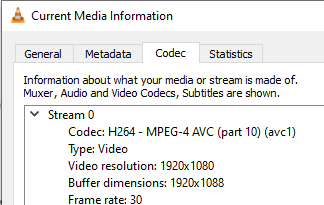
MP4 is a file container, rather than a codec.Open one of the videos that doesn't have a thumbnail in VLC, then press Ctrl+J. What does it say under "Codec"?
 poppy101
 -
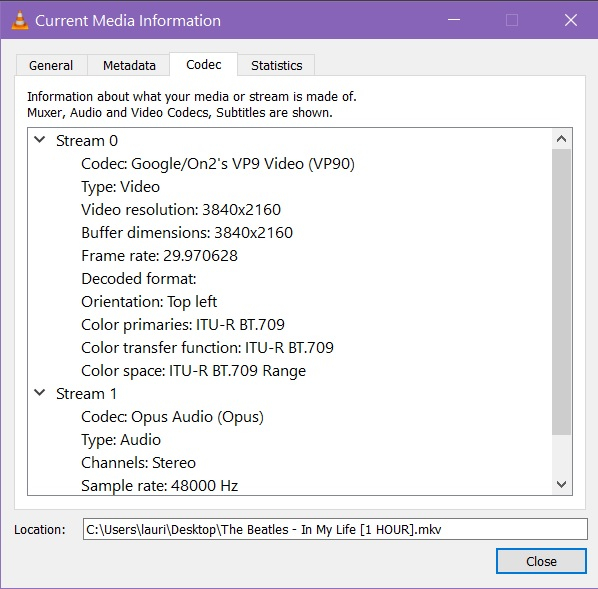
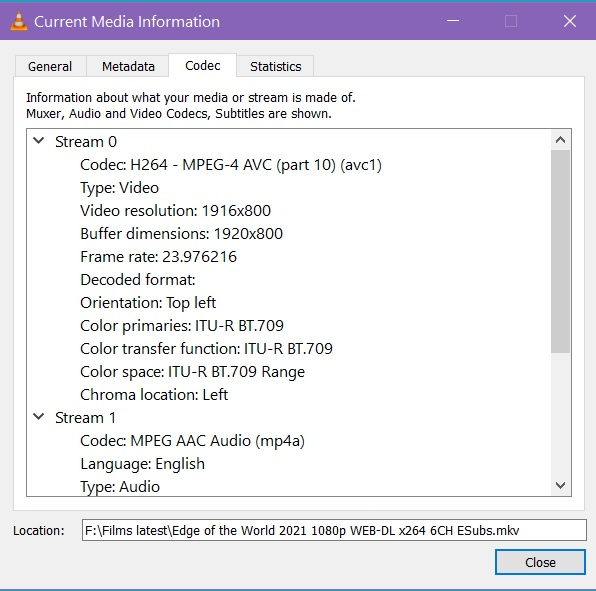
The problem mostly seems to have been rectified, with only a very few affected now.These are two:
 But you've taught me something valuable. Thanks very much.0
 -
For VP9 files try installing the free VP9 Microsoft Windows extension from the Microsoft Store. This should allow Windows to read the files natively and generate the thumbnailspoppy101
-
Thanks for your help.
0


Confirm your email address to Create Threads and Reply

Categories
- All Categories
- 353.6K Banking & Borrowing
- 254.2K Reduce Debt & Boost Income
- 455.1K Spending & Discounts
- 246.7K Work, Benefits & Business
- 603.1K Mortgages, Homes & Bills
- 178.1K Life & Family
- 260.7K Travel & Transport
- 1.5M Hobbies & Leisure
- 16K Discuss & Feedback
- 37.7K Read-Only Boards