We’d like to remind Forumites to please avoid political debate on the Forum.
This is to keep it a safe and useful space for MoneySaving discussions. Threads that are – or become – political in nature may be removed in line with the Forum’s rules. Thank you for your understanding.
📨 Have you signed up to the Forum's new Email Digest yet? Get a selection of trending threads sent straight to your inbox daily, weekly or monthly!
The Forum now has a brand new text editor, adding a bunch of handy features to use when creating posts. Read more in our how-to guide
Standing order question
Comments
-
I'm sorry but Nationwide do have the option to do what you want.blue.peter said:Over62 said:I just make the standing order open ended and cancel it manually when it's no longer needed.I see the merit of this, but I prefer to leave as much to run automatically as possible. There's always the risk that I could be unable to put the manual stop on it - e.g., because I'm in the ICU with Covid-19, or in a coma after an RTA. Yes, I know that those are pretty unlikely, but I like to eliminate all risks of this type where I can. I shouldn't need to do things like this manually. This is why I have DDs to pay my credit cards in full, too.I guess that the real issue here is the fact that I've used a system for 45 years (with Midland, Barclays, First Direct, Santander and TSB), and it's worked for me, but Nationwide does things differently.
An initial payment amount and date.
Ongoing payment amounts and frequency of those payments
Final payment amount and date..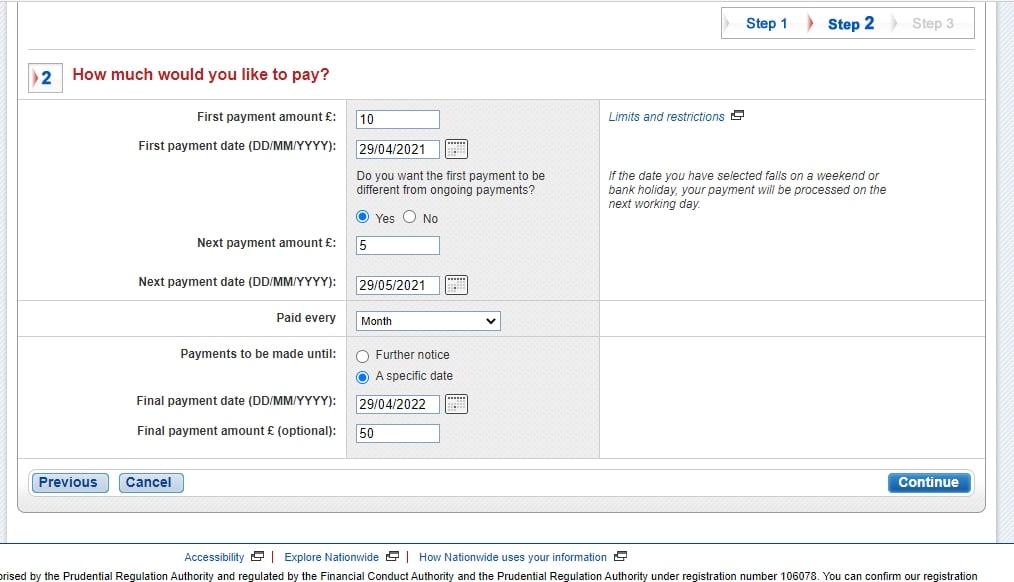
1 -
kaMelo said:I'm sorry but Nationwide do have the option to do what you want.
An initial payment amount and date.
Ongoing payment amounts and frequency of those payments
Final payment amount and date..I'm afraid you've missed the point. If you go back and read my original post, you'll see that I was aware of this functionality, and used it.It's now become clear that I used it incorrectly because I was familiar enough with the way that other banks operate standing orders, and assumed (wrongly) that Nationwide operated in the same way. Yes, I was a bit careless in not properly reading the Nationwide input dialog. Sometimes, decades of experience isn't enough.I've now gone back and amended two of the other three standing orders that I have on my Nationwide account. (The third didn't need it, because it's set up on an "until further notice" basis.)
0 -
I didn't miss the point, rather didn't articulate it correctly. You stated;blue.peter said:kaMelo said:I'm sorry but Nationwide do have the option to do what you want.
An initial payment amount and date.
Ongoing payment amounts and frequency of those payments
Final payment amount and date..I'm afraid you've missed the point. If you go back and read my original post, you'll see that I was aware of this functionality, and used it.It's now become clear that I used it incorrectly because I was familiar enough with the way that other banks operate standing orders, and assumed (wrongly) that Nationwide operated in the same way. Yes, I was a bit careless in not properly reading the Nationwide input dialog. Sometimes, decades of experience isn't enough.I've now gone back and amended two of the other three standing orders that I have on my Nationwide account. (The third didn't need it, because it's set up on an "until further notice" basis.)blue.peter said:This is probably a pretty basic question, but it'd be nice to know the answer.How do banks handle the ending of standing orders? I've never known what to put as the end date for one. If I want the last monthly payment to be made on, say, 6 April and say that that's the "until" date for the instruction, will the bank make the payment due on 6 April, or will they make the final payment on 6 March? I've never known the answer to this for certain (though I can guess it), so, for over 45 years, I've chosen an end date a few days after the last payment due, but before the one after. This has always worked well... until today.I've been funding a monthly saver with Halifax by standing order from my Nationwide current account. The last payment was due on 6 April, and was paid then. I set an end date for the instruction of 9 April (i.e., today). For reasons beyond my comprehension, Nationwide made an additional payment today. It was immediately reversed - I'm guessing because Halifax rejected it - so there's no problem. I'm just curious as to what on Earth Nationwide was up to, and wondering if I could have handled the setting up better.
Which is exactly what I would expect to happen when choosing this option, the payments happen monthly (or whatever interval you chose) and there is a final payment in line with the final payment amount and date.
I suppose your final question is the important one.
You can achieve the same outcome setting up a standing order in a few different ways but whichever you choose to use I would always expect any specified end date to be the final payment date in addition and on top of any regular interval payments. This has always been my experience with whichever bank I've set up a standing order including Nationwide.
Your implication was that Nationwide operate standing orders differently to other banks is what I was responding to as that's not correct.
In my experience they start, operate and end in exactly the same way as other banks do.
0 -
In my experience, they do not. If I set up a standing order with any bank with which I have previously held an account (see list above) on the basis of monthly payments to 6 April, but an end date for the order of 9 April, they would not have made an extra payment on 9 April. Only Nationwide has done this to me in the 45 or so years that I've had a bank account.kaMelo said:
In my experience they start, operate and end in exactly the same way as other banks do.
0 -
Okay, and I'm happy to be proved wrong here as I will have learned something if this is the case, which bank allows you to sent an end date that is not also a payment date?blue.peter said:
In my experience, they do not. If I set up a standing order with any bank with which I have previously held an account (see list above) on the basis of monthly payments to 6 April, but an end date for the order of 9 April, they would not have made an extra payment on 9 April. Only Nationwide has done this to me in the 45 or so years that I've had a bank account.kaMelo said:
In my experience they start, operate and end in exactly the same way as other banks do.1 -
As I said above: Midland (1974?-78), Barclays (1978-90), First Direct (1990-2015), Santander (2015-19) and TSB (2020 - present). There may be others of which I have no experience.kaMelo said:Okay, and I'm happy to be proved wrong here as I will have learned something if this is the case, which bank allows you to sent an end date that is not also a payment date?
0 -
Okay, having tried with multiple banks I'm willing to concede it's possible depending on the institution.
Santander, Barclays, TSB, First Direct and HSBC all allow end dates that don't fall within the payment pattern as you stated.
RBS, NatWest, Lloyds, Halifax. BoS and more specifically Nationwide this cannot be done.
(Lloyds/Haifax/BoS) It is impossible to set an end date that is not also a payment date in that it only allows end dates that falls within the payment frequency. .They only allow an end date that falls outside the payment frequency specifically for a final payment.
Nationwide/RBS/Natwest , in choosing a specified end date it is also shown as a payment date, it's impossible to set an end date that is not a payment date.
I was wrong, it is possible to set an end date that is not also a payment date with some banks. However it's a fairly even split so to suggest Nationwide is an outlier in incorrect.
Interestingly Nationwide is not one of those where you can do so, it's actually impossible to do.2 -
It simply varies by bank and is why need to read the screens carefully.
The Nationwide one is pretty clear that the final payment may differ from the main schedule.
In particular, I believe it reflects that if you are using standing orders to pay down certain things, the last payment may be a different value - essentially whatever the remainder is after you've finished the evenly balanced payments.2









Confirm your email address to Create Threads and Reply

Categories
- All Categories
- 353.5K Banking & Borrowing
- 254.1K Reduce Debt & Boost Income
- 455K Spending & Discounts
- 246.6K Work, Benefits & Business
- 602.9K Mortgages, Homes & Bills
- 178K Life & Family
- 260.5K Travel & Transport
- 1.5M Hobbies & Leisure
- 16K Discuss & Feedback
- 37.7K Read-Only Boards