We’d like to remind Forumites to please avoid political debate on the Forum.
This is to keep it a safe and useful space for MoneySaving discussions. Threads that are – or become – political in nature may be removed in line with the Forum’s rules. Thank you for your understanding.
📨 Have you signed up to the Forum's new Email Digest yet? Get a selection of trending threads sent straight to your inbox daily, weekly or monthly!
The Forum now has a brand new text editor, adding a bunch of handy features to use when creating posts. Read more in our how-to guide
How can i check the tax paid via PAYE is correct, online calculators are are all different

pete1975
Posts: 199 Forumite




in Cutting tax
morning, I ve had issues in the past with tax code changes due to taxable benefits increasing. I was hoping this was the last month before the start of the new tax year that i have to worry about what my monthly pay would be.
i've tried various tax calculators online and the tax amount is different to what is showing on my wage slip.
Feb and march pay slips are the same tax code 611L
I received £209 gross more in march due to pay increase but the tax amount in Feb is £426 and tax in march is £816
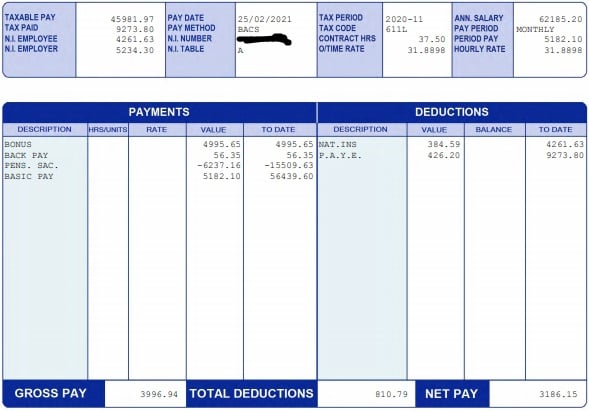
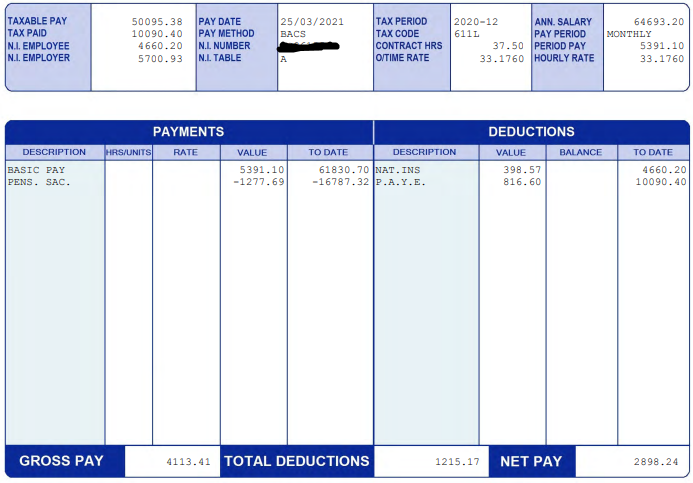
Ive run the numbers through the MSE tax calculator but still doesnt match my pay slip..
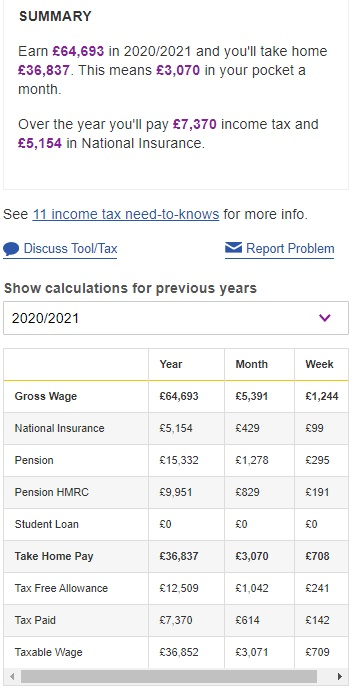
i've tried various tax calculators online and the tax amount is different to what is showing on my wage slip.
Feb and march pay slips are the same tax code 611L
I received £209 gross more in march due to pay increase but the tax amount in Feb is £426 and tax in march is £816
Ive run the numbers through the MSE tax calculator but still doesnt match my pay slip..
0
Comments
-
YTD to M11 and M12 stand alone and YTD are both spot on by my spreadsheet. M11 stand alone doesn't seem to work but that is likely down to the large pension deduction having an effect on previous months. Putting the wrong figures into a tax calculator doesn't help. Your salary for tax purposes is £50K not £64K and although you deduct the pension that gives a wrong NI deduction affecting the net.
1 -
Yes - the Gross Pay at the bottom is actually the taxable pay in this instance - adds to the confusion somewhat. This appears to be £50095.38.
Also - the full personal allowance is used in the calculator but the code is 611L?1 -
hi thanks for trying to explain it to me, ive put those figures in the calculator which still doesnt match my wage slip, not far out. On first checking its looks as if i have paid over 400 more tax this monthmolerat said:YTD to M11 and M12 stand alone and YTD are both spot on by my spreadsheet. M11 stand alone doesn't seem to work but that is likely down to the large pension deduction having an effect on previous months. Putting the wrong figures into a tax calculator doesn't help. Your salary for tax purposes is £50K not £64K and although you deduct the pension that gives a wrong NI deduction affecting the net.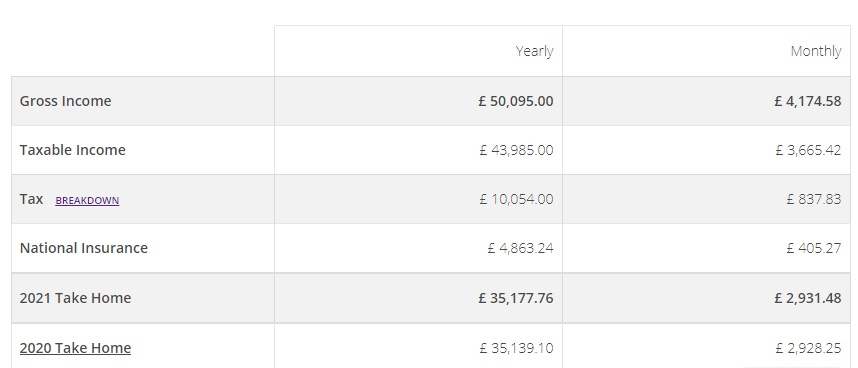
0 -
thanks, yep thats correct completely forgot about that. i couldn't find how to adjust the MSE calculator on tax code so ive calculated it onpurdyoaten2 said:Yes - the Gross Pay at the bottom is actually the taxable pay in this instance - adds to the confusion somewhat. This appears to be £50095.38.
Also - the full personal allowance is used in the calculator but the code is 611L?
https://www.thesalarycalculator.co.uk/salary.php
0 -
Had a look at the tax calculator you used and it appears that you forgot to set the tax year. This tax figure is for 21/22 which appears to be the default setting. You need to change it to 20/21 when you will get a tax figure of £10094.15 which suggests to me that they do not have the annual PAYE allowance set quite right; but that is about as close as you will get with nearly all tax calculators. They nearly all assume that your income for the year is paid equally through the year which for a lot of people this makes no difference. Problems arise with the monthly figures if you have earnings that change month by month if that results in some months having earnings above the monthly 40% tax band and some below it as in your case. PAYE adjusts for these changes so that you may pay some 40% tax but if your taxable earnings drop some of that 40% tax is repaid to you. This means you cannot rely on the monthly figures you get from the calculators though the annual figures will be near enough.pete1975 said:
hi thanks for trying to explain it to me, ive put those figures in the calculator which still doesnt match my wage slip, not far out. On first checking its looks as if i have paid over 400 more tax this monthmolerat said:YTD to M11 and M12 stand alone and YTD are both spot on by my spreadsheet. M11 stand alone doesn't seem to work but that is likely down to the large pension deduction having an effect on previous months. Putting the wrong figures into a tax calculator doesn't help. Your salary for tax purposes is £50K not £64K and although you deduct the pension that gives a wrong NI deduction affecting the net.
If you do want an accurate calculator that will give you a figure that matches PAYE for both annual and monthly figures you can use this one here but you do have to put in a bit more detail.
http://payecalculator.hmrc.gov.uk/PAYE0.aspx
1 -
great thankyou so much for taking the time to explain it, makes perfect sense to me.chrisbur said:
Had a look at the tax calculator you used and it appears that you forgot to set the tax year. This tax figure is for 21/22 which appears to be the default setting. You need to change it to 20/21 when you will get a tax figure of £10094.15 which suggests to me that they do not have the annual PAYE allowance set quite right; but that is about as close as you will get with nearly all tax calculators. They nearly all assume that your income for the year is paid equally through the year which for a lot of people this makes no difference. Problems arise with the monthly figures if you have earnings that change month by month if that results in some months having earnings above the monthly 40% tax band and some below it as in your case. PAYE adjusts for these changes so that you may pay some 40% tax but if your taxable earnings drop some of that 40% tax is repaid to you. This means you cannot rely on the monthly figures you get from the calculators though the annual figures will be near enough.pete1975 said:
hi thanks for trying to explain it to me, ive put those figures in the calculator which still doesnt match my wage slip, not far out. On first checking its looks as if i have paid over 400 more tax this monthmolerat said:YTD to M11 and M12 stand alone and YTD are both spot on by my spreadsheet. M11 stand alone doesn't seem to work but that is likely down to the large pension deduction having an effect on previous months. Putting the wrong figures into a tax calculator doesn't help. Your salary for tax purposes is £50K not £64K and although you deduct the pension that gives a wrong NI deduction affecting the net.
If you do want an accurate calculator that will give you a figure that matches PAYE for both annual and monthly figures you can use this one here but you do have to put in a bit more detail.
http://payecalculator.hmrc.gov.uk/PAYE0.aspx0



![[Deleted User]](https://us-noi.v-cdn.net/6031891/uploads/defaultavatar/nFA7H6UNOO0N5.jpg)



Confirm your email address to Create Threads and Reply

Categories
- All Categories
- 354.6K Banking & Borrowing
- 254.5K Reduce Debt & Boost Income
- 455.5K Spending & Discounts
- 247.5K Work, Benefits & Business
- 604.4K Mortgages, Homes & Bills
- 178.6K Life & Family
- 261.9K Travel & Transport
- 1.5M Hobbies & Leisure
- 16.1K Discuss & Feedback
- 37.7K Read-Only Boards