We’d like to remind Forumites to please avoid political debate on the Forum.
This is to keep it a safe and useful space for MoneySaving discussions. Threads that are – or become – political in nature may be removed in line with the Forum’s rules. Thank you for your understanding.
📨 Have you signed up to the Forum's new Email Digest yet? Get a selection of trending threads sent straight to your inbox daily, weekly or monthly!
The Forum now has a brand new text editor, adding a bunch of handy features to use when creating posts. Read more in our how-to guide
How to disable pinch zoom on laptop

mayfieldgirl
Posts: 26 Forumite



in Techie Stuff
I'd be really grateful if someone could help me disable the pinch zoom on the touchpad on my Lenovo laptop. I have googled it but don't seem to have the screens come up that they direct you to. I type mouse and touchpad into the search and click on the top result but can't seem to get any further. Thank you.
0
Comments
-
Depends on the touchpad additional software you have installed. These work in slightly different ways. Elan, Synaptics, Elan, are the three most common ones. Any of these show up when you type them into search?0
-
Click on the settings for your particular touchpad and look there. If you have a touchpad icon on the taskbar, right click it and untick the 'Enable Gestures' option, if it's there.0
-
Thank you both. It comes up as Elan. When I right click on the icon on the taskbar I get a mouse properties box pop up.0
-
Not when you right click you don't, you've double clicked 😉mayfieldgirl said:Thank you both. It comes up as Elan. When I right click on the icon on the taskbar I get a mouse properties box pop up.
No matter, in the properties window there should be a tab for the Touchpad. Click on that, select settings and disable the gestures.0 -
.
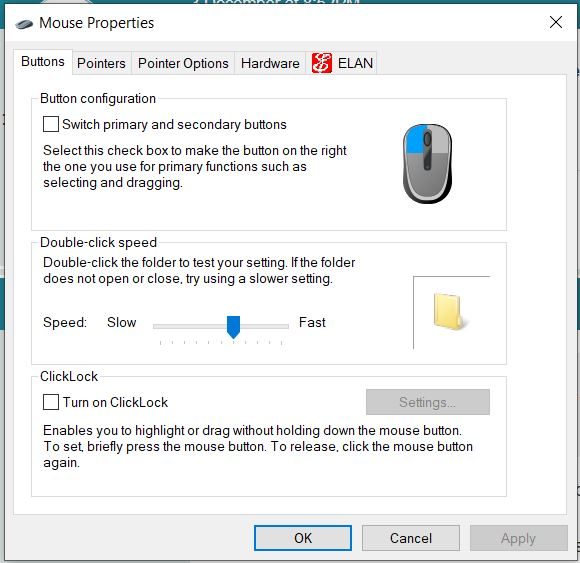
Thanks. This is what comes up when I right click.
0 -
OK, right-clicking aside. As I described, click on the tab marked ELAN at the top and in there will be settings specific to the touchpad which include disabling all gestures or you can disable just the pinch to zoom one.mayfieldgirl said:.
Thanks. This is what comes up when I right click.1 -
Have clicked disable so hopefully ok. Thanks so much for your help. My sanity is restored.0




Confirm your email address to Create Threads and Reply

Categories
- All Categories
- 354.3K Banking & Borrowing
- 254.4K Reduce Debt & Boost Income
- 455.4K Spending & Discounts
- 247.2K Work, Benefits & Business
- 603.9K Mortgages, Homes & Bills
- 178.4K Life & Family
- 261.4K Travel & Transport
- 1.5M Hobbies & Leisure
- 16.1K Discuss & Feedback
- 37.7K Read-Only Boards