We’d like to remind Forumites to please avoid political debate on the Forum.
This is to keep it a safe and useful space for MoneySaving discussions. Threads that are – or become – political in nature may be removed in line with the Forum’s rules. Thank you for your understanding.
📨 Have you signed up to the Forum's new Email Digest yet? Get a selection of trending threads sent straight to your inbox daily, weekly or monthly!
The Forum now has a brand new text editor, adding a bunch of handy features to use when creating posts. Read more in our how-to guide
Use laptop with two additional monitors and NOT laptop screen? Only 1 HDMI slot
Comments
-
Thank you, that's exactly what I'm trying to achieve. So your hub has a spare HDMI slot and a spare USB slots too, is that right? Would you happen to know the make/model of your hub so I can see if they do one for normal sized USB ports.MidlandsGlory said:My wife is working here now on her HP laptop on two screen (extended mode), the laptop is closed up and on end in a bookend. We use a USB hub that gives an extra output (HDMI) to one screen and an HDMI cable from the laptop itself to the other, works fine. The hub gives a couple more USB ports for the full size keyboard and mouse so makes hooking up easy, two cables.
Our hub connects to a small USB-C port on the laptop, but I am sure you can get ones that hook into a normal size USB 3.0 port if you have those instead. No drivers were needed (Windows 10)
0 -
Have you asked your IT department? They might even have a docking station in a cupboard they can give youWorking_in_pyjamas said:
Thanks for that, much appreciated - I see there’s no HDMI slot but it says about using two screens. Does anybody know what I’d need to use two screens and NOT the laptop screen? Can I use the HDMI slot on the side of the laptop as well as using the new connectors on the docking station?[Deleted User] said:Hi,here's the link, [link removed to quote]
unforeseen said:
I was hoping it won’t need drivers being a Lenovo product (wishful thinking?!). The laptop is super locked down and there’ll be no way to download drivers to it.
I use one of those with my HP Elitebook. Works a treat.[Deleted User] said:Hi,here's the link, [link removed to quote]
If you don't get the driver disc with it then just search for Displaylink in Google and get the latest drivers from their site.2 -
Yes I forgot to mention that (hdmi port)Working_in_pyjamas said:
Thank you, that's exactly what I'm trying to achieve. So your hub has a spare HDMI slot and a spare USB slots too, is that right? Would you happen to know the make/model of your hub so I can see if they do one for normal sized USB ports.MidlandsGlory said:My wife is working here now on her HP laptop on two screen (extended mode), the laptop is closed up and on end in a bookend. We use a USB hub that gives an extra output (HDMI) to one screen and an HDMI cable from the laptop itself to the other, works fine. The hub gives a couple more USB ports for the full size keyboard and mouse so makes hooking up easy, two cables.
Our hub connects to a small USB-C port on the laptop, but I am sure you can get ones that hook into a normal size USB 3.0 port if you have those instead. No drivers were needed (Windows 10)
Its this one 5 in 1
https://www.ebay.co.uk/itm/7in1-Type-C-USB-C-Hub-Dual-Adapter-3-1-port-Card-Reader-4K-HDMI-For-MacBook-Pro/183996933278
I was hoping you had a usb-C sorry to give false hope but can't find any USB 3.0 versions, perhaps its a 'feature' only of USB-C ports?1 -
They normally pull the drivers from the Internet automatically. Win10 is pretty good at that.Working_in_pyjamas said:
Thanks for that, much appreciated - I see there’s no HDMI slot but it says about using two screens. Does anybody know what I’d need to use two screens and NOT the laptop screen? Can I use the HDMI slot on the side of the laptop as well as using the new connectors on the docking station?[Deleted User] said:Hi,here's the link, [link removed to quote]
unforeseen said:
I was hoping it won’t need drivers being a Lenovo product (wishful thinking?!). The laptop is super locked down and there’ll be no way to download drivers to it.
I use one of those with my HP Elitebook. Works a treat.[Deleted User] said:Hi,here's the link, [link removed to quote]
If you don't get the driver disc with it then just search for Displaylink in Google and get the latest drivers from their site.
You're only problem may be that if it is a works laptop then any lockdown measures they have put on it could prevent driver installation.2 -
That's a problem with many work PCs ... for example one of my customers was provided with remote access into our cloud-based test environment (what we call VEP - Virtual Engineering Platform); such access required a VPN connection to be established between his PC and my company's server, and this required a driver/browser extension to be installed/enabled ... he had to get his IT department to enable that for him before he could use the link.unforeseen said:You're only problem may be that if it is a works laptop then any lockdown measures they have put on it could prevent driver installation.1 -
Thanks all, I don't have the USB-C slot so looks like the adapter which @MidlandsGlory is successfully using wouldn't be compatible. For those mentioning drivers and equipment being locked down, I'm certain the laptop will be locked down and IT wouldn't allow drivers to be downloaded, even if they could assist remotely.So I'm looking for something like my keyboard and mouse which literally plug in and work straight away, no downloads needed - I think the docking station would be the best but need to check how the screens would be attached as the one I linked to doesn't have a HDMI slot, despite saying it can accomodate two screens.0
-
Excuse my ignorance but how does the laptop work with lid closed ? I thought that closing the lid shut off the laptopMidlandsGlory said:
My wife is working here now on her HP laptop on two screen (extended mode), the laptop is closed up and on end in a bookend. We use a USB hub that gives an extra output (HDMI) to one screen and an HDMI cable from the laptop itself to the other, works fine. The hub gives a couple more USB ports for the full size keyboard and mouse so makes hooking up easy, two cables.Working_in_pyjamas said:
Thanks for that, much appreciated - I see there’s no HDMI slot but it says about using two screens. Does anybody know what I’d need to use two screens and NOT the laptop screen? Can I use the HDMI slot on the side of the laptop as well as using the new connectors on the docking station?[Deleted User] said:Hi,here's the link, [link removed to quote]
unforeseen said:
I was hoping it won’t need drivers being a Lenovo product (wishful thinking?!). The laptop is super locked down and there’ll be no way to download drivers to it.
I use one of those with my HP Elitebook. Works a treat.[Deleted User] said:Hi,here's the link, [link removed to quote]
If you don't get the driver disc with it then just search for Displaylink in Google and get the latest drivers from their site.
Our hub connects to a small USB-C port on the laptop, but I am sure you can get ones that hook into a normal size USB 3.0 port if you have those instead. No drivers were needed (Windows 10)
1 -
Hi,there are different options for when you close the lid, you will find them in Power Options.3
-
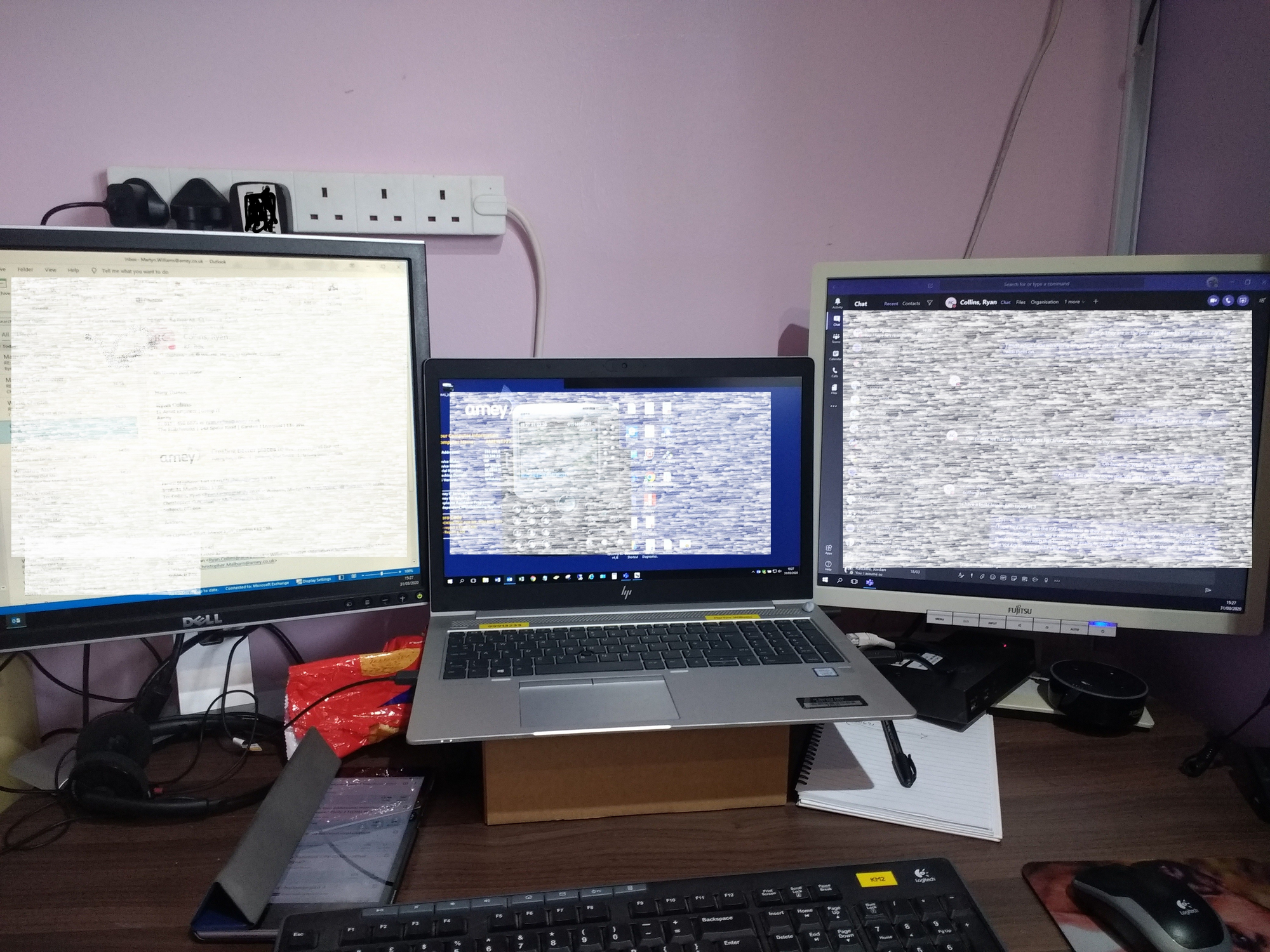
This is my current work setup at home while I'm on lockdown. Using a lenovo dock1 -
OK, well you have two USB 3.0 ports on the laptop?Working_in_pyjamas said:Thanks all, I don't have the USB-C slot so looks like the adapter which @MidlandsGlory is successfully using wouldn't be compatible. For those mentioning drivers and equipment being locked down, I'm certain the laptop will be locked down and IT wouldn't allow drivers to be downloaded, even if they could assist remotely.So I'm looking for something like my keyboard and mouse which literally plug in and work straight away, no downloads needed - I think the docking station would be the best but need to check how the screens would be attached as the one I linked to doesn't have a HDMI slot, despite saying it can accomodate two screens.
So how about one of these (USB 3.0 to hdmi) on one port..
https://www.ebay.co.uk/itm/USB-3-0-to-HDMI-1080P-Video-Graphic-Adapter-Converter-Cable-for-PC-HDTV-Laptops/163773048825
Then any old cheap USB hub from anywhere with at least two or more ports in the other, with the keyboard and mouse plugged in that.
Then a straight HDMI lead from the laptop to the second monitor.
Set extended display mode and away you go.
My wife and I both have heavily locked down laptops from different employers but don't have problems with drivers when connecting hardware.2











This discussion has been closed.
Confirm your email address to Create Threads and Reply

Categories
- All Categories
- 354.8K Banking & Borrowing
- 254.5K Reduce Debt & Boost Income
- 455.6K Spending & Discounts
- 247.6K Work, Benefits & Business
- 604.5K Mortgages, Homes & Bills
- 178.6K Life & Family
- 262.1K Travel & Transport
- 1.5M Hobbies & Leisure
- 16.1K Discuss & Feedback
- 37.7K Read-Only Boards