We’d like to remind Forumites to please avoid political debate on the Forum.
This is to keep it a safe and useful space for MoneySaving discussions. Threads that are – or become – political in nature may be removed in line with the Forum’s rules. Thank you for your understanding.
📨 Have you signed up to the Forum's new Email Digest yet? Get a selection of trending threads sent straight to your inbox daily, weekly or monthly!
The Forum now has a brand new text editor, adding a bunch of handy features to use when creating posts. Read more in our how-to guide
Excel formula?

DavyJones61
Posts: 85 Forumite
in Techie Stuff
I use the formula
=IF(DATEDIF(TODAY(),C7,"y")<>1,DATEDIF(TODAY(),C7,"y")&" Years ",DATEDIF(TODAY(),C7,"y")&"Year ")&IF(DATEDIF(TODAY(),C7,"ym")<>1,DATEDIF(TODAY(),C7,"ym")&" Months ",DATEDIF(TODAY(),C7,"ym")&" Month ")&IF(INT((DATEDIF(TODAY(),C7,"md")/7))<>1,INT((DATEDIF(TODAY(),C7,"md")/7))&" Weeks ",INT((DATEDIF(TODAY(),C7,"md")/7))&" Week ")&IF(MOD(DATEDIF(TODAY(),C7,"md"),7)<>1,MOD(DATEDIF(TODAY(),C7,"md"),7)&" Days",MOD(DATEDIF(TODAY(),C7,"md"),7)&" Day")
to calculate the years months weeks and days between two dates, today 25th March 2019 and 9th June 2019.
however it is giving the answer as
0 Years 2 Months 2 Weeks 1 Day
which is incorrect.
How can I correct it?
=IF(DATEDIF(TODAY(),C7,"y")<>1,DATEDIF(TODAY(),C7,"y")&" Years ",DATEDIF(TODAY(),C7,"y")&"Year ")&IF(DATEDIF(TODAY(),C7,"ym")<>1,DATEDIF(TODAY(),C7,"ym")&" Months ",DATEDIF(TODAY(),C7,"ym")&" Month ")&IF(INT((DATEDIF(TODAY(),C7,"md")/7))<>1,INT((DATEDIF(TODAY(),C7,"md")/7))&" Weeks ",INT((DATEDIF(TODAY(),C7,"md")/7))&" Week ")&IF(MOD(DATEDIF(TODAY(),C7,"md"),7)<>1,MOD(DATEDIF(TODAY(),C7,"md"),7)&" Days",MOD(DATEDIF(TODAY(),C7,"md"),7)&" Day")
to calculate the years months weeks and days between two dates, today 25th March 2019 and 9th June 2019.
however it is giving the answer as
0 Years 2 Months 2 Weeks 1 Day
which is incorrect.
How can I correct it?
0
Comments
-
It is correct.
25th April = 1 month
25th May = 2 months
9th June is a further 2 weeks and 1 day
What answer are you expecting?0 -
That can't be the simplest formula?"The Holy Writ of Gloucester Rugby Club demands: first, that the forwards shall win the ball; second, that the forwards shall keep the ball; and third, the backs shall buy the beer." - Doug Ibbotson0
-
I just googled a website that says it's 76 days, or 2 months & 15 days. Which suggests to me that your formula is correct.
Do you need the answer in the form of "x years, x months, x weeks and x days" for a reason?:heartpuls Mrs Marleyboy :heartpuls
MSE: many of the benefits of a helpful family, without disadvantages like having to compete for the tv remote Proud Parents to an Aut-some son 0
 -
There's only two reasons I can think of that you think the calculation is wrong.
1) You've miscounted the days yourself.
2) Timezones are involved, though by default Excel won't have anything to do with them but even then it should only be half a day out if that so for the purposes of this it'll still be correct and possibly rounded.
But yes I'd love to know what you think the answer should be.0 -
Hi,
try this,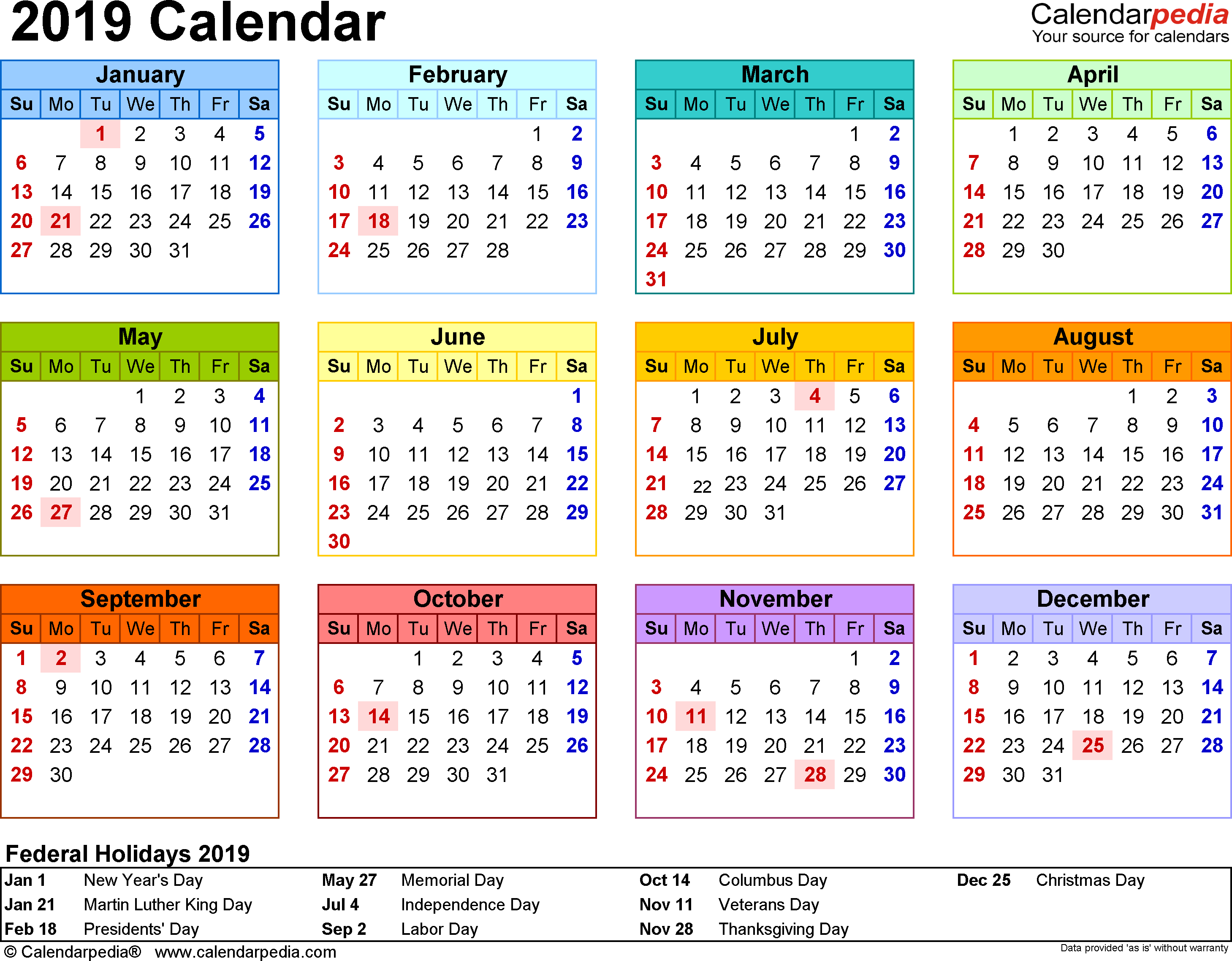
draw a circle round 25th March, stroke off and count days to 9th June.
What's your answer?0 -
It's correctDavyJones61 wrote: »0 Years 2 Months 2 Weeks 1 Day
https://www.timeanddate.com/date/durationresult.html?d1=25&m1=3&y1=2019&d2=9&m2=6&y2=20190 -
Sorry, I was calculating it wrong, the excel formula is correct, I thought it should be 2 months and 2 weeks.0
-
If you try it today you'll now get the answer you expected.DavyJones61 wrote: »I thought it should be 2 months and 2 weeks. 0
0







This discussion has been closed.
Confirm your email address to Create Threads and Reply

Categories
- All Categories
- 353.5K Banking & Borrowing
- 254.1K Reduce Debt & Boost Income
- 455K Spending & Discounts
- 246.6K Work, Benefits & Business
- 602.9K Mortgages, Homes & Bills
- 178.1K Life & Family
- 260.6K Travel & Transport
- 1.5M Hobbies & Leisure
- 16K Discuss & Feedback
- 37.7K Read-Only Boards