We’d like to remind Forumites to please avoid political debate on the Forum.
This is to keep it a safe and useful space for MoneySaving discussions. Threads that are – or become – political in nature may be removed in line with the Forum’s rules. Thank you for your understanding.
📨 Have you signed up to the Forum's new Email Digest yet? Get a selection of trending threads sent straight to your inbox daily, weekly or monthly!
The Forum now has a brand new text editor, adding a bunch of handy features to use when creating posts. Read more in our how-to guide
How do I use a laptop with my desktop PC?

pseudopensioner
Posts: 638 Forumite



in Techie Stuff
OK don't jump on me, I'm a pensioner and my bones are fragile!
I have a PC with internet connection via BT, my daughter has a company laptop and needs to have a connection..
Can someone point me/us to where I can get the info to have them both working from the same connection, ie cables,etc.
I'm sure it's easy when you know how, but I haven't got a clue where to start.
I feel stupid enough already, so please don't berate me.
I have a PC with internet connection via BT, my daughter has a company laptop and needs to have a connection..
Can someone point me/us to where I can get the info to have them both working from the same connection, ie cables,etc.
I'm sure it's easy when you know how, but I haven't got a clue where to start.
I feel stupid enough already, so please don't berate me.
0
Comments
-
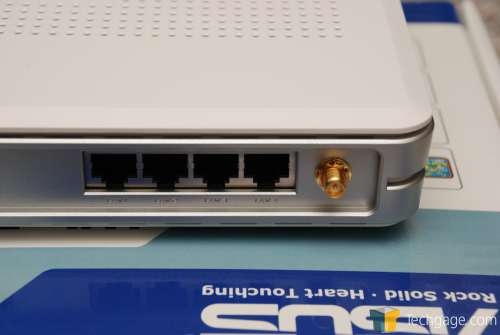
Does you Router(Internet connection box) have any of these sockets?
 0
0 -
All I have at the moment is a Thompson Speed Touch Modem provide by BT which only has the one socket as in the picture, I will be getting wireless broadband shortly.0
-
The modem (as you've found out), will only provide one PC with a connection at a time.
The easiest way (assuming your daughter's laptop has a wireless networking card) is to purchase a wireless router. The router will allow you share the same connection between two or more machines... just remember to follow the instructions provided to make sure you encrypt your network traffic with either WEP or WPA.0 -
If your existing modem/router has only 1 Ethernet socket then you could share the internet connection by buying an Ethernet switch, e.g. http://www.ebuyer.com/product/35437 and 2 Ethernet cables to connect the PC and laptop to it.
If you want to go wireless or have the potential for wireless, replace the existing modem/router with a wireless ADSL modem router, e.g. the Netgear DG834G.0 -
Thank you for the info everyone , I will try to organise connection via ethernet cables until I have the wireless broadband connection.
Daughter sends her thanks also.0
This discussion has been closed.
Confirm your email address to Create Threads and Reply

Categories
- All Categories
- 354K Banking & Borrowing
- 254.3K Reduce Debt & Boost Income
- 455.2K Spending & Discounts
- 247K Work, Benefits & Business
- 603.6K Mortgages, Homes & Bills
- 178.3K Life & Family
- 261.1K Travel & Transport
- 1.5M Hobbies & Leisure
- 16.1K Discuss & Feedback
- 37.7K Read-Only Boards