We’d like to remind Forumites to please avoid political debate on the Forum.
This is to keep it a safe and useful space for MoneySaving discussions. Threads that are – or become – political in nature may be removed in line with the Forum’s rules. Thank you for your understanding.
📨 Have you signed up to the Forum's new Email Digest yet? Get a selection of trending threads sent straight to your inbox daily, weekly or monthly!
The Forum now has a brand new text editor, adding a bunch of handy features to use when creating posts. Read more in our how-to guide
windows 10 takes long time to start up

mr_accountant
Posts: 823 Forumite




takes round 3 mins plus to start up, though is quick from hibernate ( which is what i do atm)
pc is:
e8400 cpu 3.00 ghz dual core
4gb ram, pc2 6400
windows 10 pro clean install, ver 1803. x64
2gb gigabyte gt630 graphics cards (more on this later)
quick start is ticked in the power box, takes around 5 mins without quick start
it seems to stick on the desktop page for a couple of mins
i have so far;
task manager, only a couple of google tasks set for once a week.
startup items, only windows defender.
tried windows defender off on startup, but no difference
only thing i can see is in device manager a few items are yellow
nividia gt630 graphics card (though it is recognized in the display settings) it is still as yellow in device manage, tried to update driver but says latest driver is downloaded
also ide controllers and strorage controllers are yellow
any ideas?
pc is:
e8400 cpu 3.00 ghz dual core
4gb ram, pc2 6400
windows 10 pro clean install, ver 1803. x64
2gb gigabyte gt630 graphics cards (more on this later)
quick start is ticked in the power box, takes around 5 mins without quick start
it seems to stick on the desktop page for a couple of mins
i have so far;
task manager, only a couple of google tasks set for once a week.
startup items, only windows defender.
tried windows defender off on startup, but no difference
only thing i can see is in device manager a few items are yellow
nividia gt630 graphics card (though it is recognized in the display settings) it is still as yellow in device manage, tried to update driver but says latest driver is downloaded
also ide controllers and strorage controllers are yellow
any ideas?
0
Comments
-
What is the make and model of the machine ?0
-
-
Download the latest driver manually for the graphics card, uninstall and reboot then reinstall. Also what sort of hard drive do you have? Might be worth installing a SSD a boot drive.0
-
Download the latest driver manually for the graphics card, uninstall and reboot then reinstall. Also what sort of hard drive do you have? Might be worth installing a SSD a boot drive.
ive tried to do a manual download of the latest driver, download OK but trying to install the message comes up not compatible (or something on this lines cant remember the exact wording)
also tried to down a manual download on the gigabyte and NVIDIA sites, both drivers are the same but wont install
not sure if this is the problem, just a theory
the drive is just a 250gb 3.5" drive.0 -
Could be the Windows 10 version 1803 slowness problem, in part at least.0
-
mr_accountant wrote: »hp dx2420 tower
That's the problem. It's REALLY old so it will be slow unfortunately. Might be time, if you can afford to, to upgrade.0 -
Of course the age of the device is not the issue, but anyone willingly running a mechanical spinning disc drive in this day and age must hate himself or just like making cups of tea.
The likelihood is that you have installed the OS in PATA or IDE mode. It needs to be set to AHCI or RAID. Then to run a clean install.
https://support.hp.com/bg-en/document/c02961221
Whether you can do that via your BIOS may be another story. Perhaps, according to this; https://www.manualslib.com/manual/371187/Compaq-Dx2420-Microtower-Pc.html?page=10 or download here
Look here for a possible solution if your drive is connected to SATA 1, but the option for AHCI is not shown in the BIOS setup;
SSD for 20 squid, connected via SATA cable to the SATA 1 port and installed with AHCI enabled will improve the start up time to 30 seconds or less.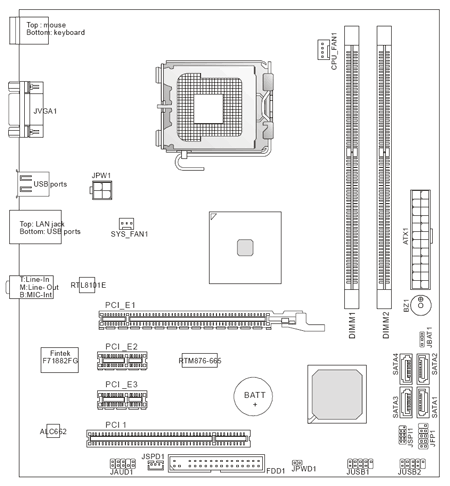
In the meantime, try these Chipset Drivers; https://www.driverscape.com/files/misc/INF_allOS_9.4.0.1027.exe
and this for USB Storage; https://www.driverscape.com/files/misc/Realtek_Card_Reader_Driver_10.0.370.102.zip0 -
once you have the correct drivers installed...
top of the page is a spyware sticky. though it is basically Malware bytes + ccleaner
loads of small files on the drive?0 -
You may also need to update the BIOS, but now you are running a 64 bit OS, it's advisable to update it via DOS.
Have a look to see which BIOS version is being run on your PC.0 -
thanks for the responses, i will reply in chronological order from post 8
i cant fine the ACHI or raid option in the bios, only sata1, as you suggested i tried the cntr f10, cntl f11 trick as per the video but could not get the detailed bios screen, though now the initial blue screen with the options (e.g. press f10 to enter setup, f11 recovery etc) has disappeared
i will have a look a the SSD, though the new 256gb ones are closer to £40 then £20 on a quick search
just done scan with defender, malware and SAS, no viruses
the bios is the latest v5.31, also W7 ran on x64
I may think about SSD though as i just clean installed W10 and set it up as its a pain to do it again, in the meantime i will use hibernate, restarts up in less than 20 secs0






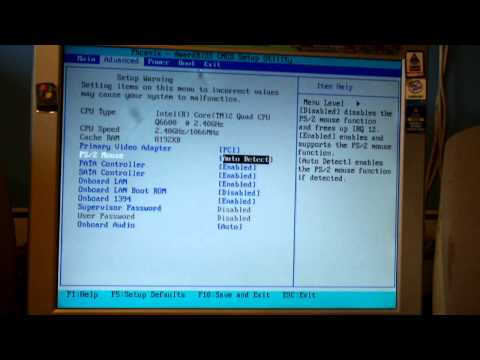 https://www.youtube.com/watch?v=qSi0Xc4RcUc
This discussion has been closed.
Confirm your email address to Create Threads and Reply

Categories
- All Categories
- 353.9K Banking & Borrowing
- 254.3K Reduce Debt & Boost Income
- 455.2K Spending & Discounts
- 247K Work, Benefits & Business
- 603.6K Mortgages, Homes & Bills
- 178.3K Life & Family
- 261.1K Travel & Transport
- 1.5M Hobbies & Leisure
- 16.1K Discuss & Feedback
- 37.7K Read-Only Boards