Ready, steady… save!
You don’t need a chart to join in. Here are 2 ways to record your savings:
1. Cross it off
Pop a chart into your first post. Saved an amount? Cross it out! Read more »
£0.01 £0.02 £0.03
2. Write it down
Skip the chart and add updates to your first post. Read more »
“Another +£3 saved today. Go me!”
Use +£ before each new saving so it counts towards your total.
📨 Have you signed up to the Forum's new Email Digest yet? Get a selection of trending threads sent straight to your inbox daily, weekly or monthly!
Pensioner friendly tablet device

scrub
Posts: 177


 Forumite
in Techie Stuff
My elderly mother would like a tablet device but she's not very tech-savvy. Is there a tablet device we could Facetime etc on that's easy to use? I heard a while back that yoga tablets had remote access which would be good so that I could sort any issues out.
We're not looking to spend a fortune but we'd pay for something simple and reliable.
We're not looking to spend a fortune but we'd pay for something simple and reliable.
0
Comments
-
buy a large Android mobile and put 'Whatsapp' on it0
-
My elderly mum couldn't really get on with an android tablet, she was forever deleting stuff and getting lost with it.
We bought her an iPad in the end, and even though it's quite a bit more expensive, she isn't able to mess it up the same.0 -
If you want Facetime it has to be an iPad, but it can be an old reconditioned one. I have now helped 3 elderly neighbours set up their iPad, and they are fine. DGMember #8 of the SKI-ers Club
Why is it I have less time now I am retired then when I worked?0 -
Reconditioned iPad 4 from what was Tesco Direct cost me just over £150. iPad 3's refurbed about £100 and iPad 2's about £60 both from a local tech store.0
-
thanks everyone but what about remote access? I don't live near my mother so would like a device that I can takeover and sort out when she accidentally does something!0
-
I would add that if you go along the ipad road, to consider installing from the app store (free) or playstore if you go otherwise, an app which gives a much improved and larger keyboard with numerals visible. The app is this
https://itunes.apple.com/gb/app/swiftkey-keyboard/id911813648?mt=8 and the keyboard thus.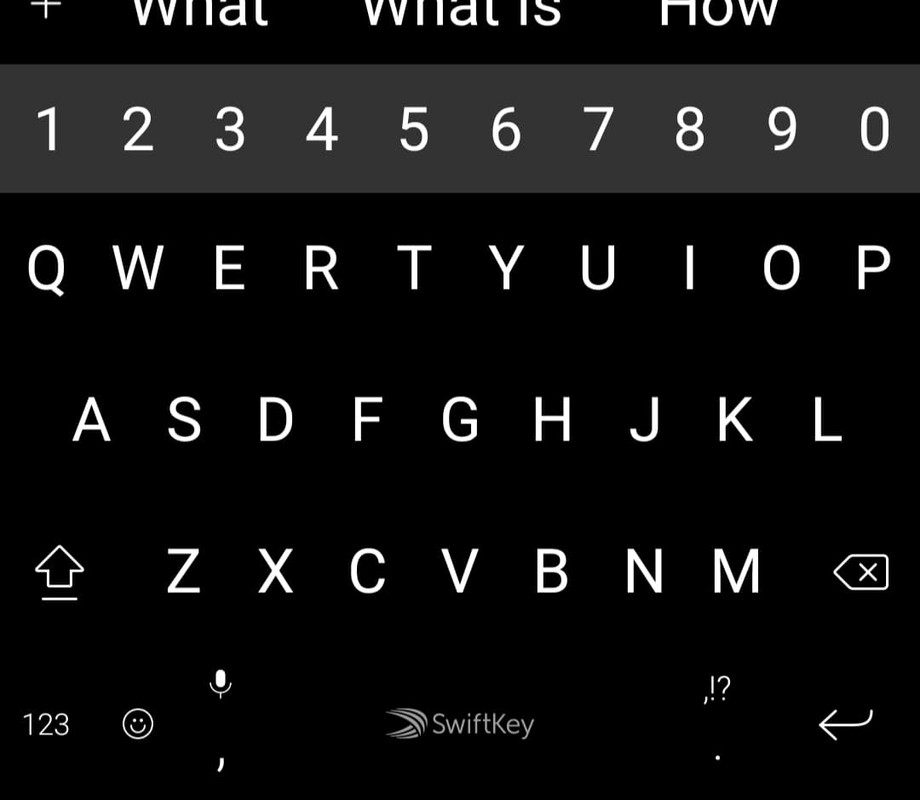 This is a system account and does not represent a real person. To contact the Forum Team email forumteam@moneysavingexpert.com0
-
My son-in-law has remotely accessed my laptop on a couple of occasions to sort something out for me, so I'm sure there must be a way for you to do the same with a tablet, especially if they have the same operating system. In my case it was Windows/Windows, but now he's become an Apple only user he refuses to help as he thinks I should change to Apple:-(0
-
TeamViewer?thanks everyone but what about remote access? I don't live near my mother so would like a device that I can takeover and sort out when she accidentally does something!
https://www.teamviewer.com/en/products/teamviewer/0 -
My son-in-law has remotely accessed my laptop on a couple of occasions to sort something out for me, so I'm sure there must be a way for you to do the same with a tablet, especially if they have the same operating system. In my case it was Windows/Windows, but now he's become an Apple only user he refuses to help as he thinks I should change to Apple:-(
Disown him immediately, and if he tries to speak to you hire a hitman ......Gettin' There, Wherever There is......
I have a dodgy "i" key, so ignore spelling errors due to "i" issues, ...I blame Apple0






This discussion has been closed.
Confirm your email address to Create Threads and Reply

Categories
- All Categories
- 355.9K Banking & Borrowing
- 255K Reduce Debt & Boost Income
- 456.2K Spending & Discounts
- 248.4K Work, Benefits & Business
- 606.1K Mortgages, Homes & Bills
- 179K Life & Family
- 263.9K Travel & Transport
- 1.5M Hobbies & Leisure
- 16.2K Discuss & Feedback
- 37.7K Read-Only Boards