We’d like to remind Forumites to please avoid political debate on the Forum.
This is to keep it a safe and useful space for MoneySaving discussions. Threads that are – or become – political in nature may be removed in line with the Forum’s rules. Thank you for your understanding.
📨 Have you signed up to the Forum's new Email Digest yet? Get a selection of trending threads sent straight to your inbox daily, weekly or monthly!
The Forum now has a brand new text editor, adding a bunch of handy features to use when creating posts. Read more in our how-to guide
Dell Laptop screen - fix estimate

grumpycrab
Posts: 5,043 Forumite




in Techie Stuff
Have a neigbours laptop - screen shows horizontal lines and flicker; colour is off from start too. Not really usable as is. External monitor is fine so guess this is a panel fault? Anybody guess cost to fix? Shame because its quite a good spec. (i5, 6GB RAM). If the panel fails totally will the laptop still be usable with external monitor?
0
Comments
-
The laptop should work with an external monitor, provided that the issue is (as it appears to be) with the inbuilt display.
Regarding replacing/repair, it could be connectors (some of those wires can be thin and fragile) or the panel itself.
These things can happen if a hinge has failed, which is then causing cables to flex more than they were designed to.
Having it professionally repaired could be expensive (random guess £150 + parts), as (depending upon the issue) it may need the whole laptop to be disassembled. OTOH, a professional might be able to diagnose it down to more easily replaceable parts (eg. a ribbon connector).
I've repaired them in the past, but it took a whole evening, plus sourcing replacement parts, so that's some sort of an indicator of effort.0 -
Thanks. Hinges look ok and hasn't been abused so tending to think its a panel issue rather than cable. But uneconomical to be professionally repaired by the sound of it.0
-
I recently put in a new screen on my Dads Dell Inspiron 15 laptop. Around £50 from Amazon and it took 10 mins to fit, pretty straightforward all in all.
https://www.amazon.co.uk/gp/product/B010GGJM3I/ref=oh_aui_detailpage_o09_s00?ie=UTF8&psc=10 -
I would look on tinternet for screen prices for that particular model and decide from there if it worth fixing .
Screens are pretty easy to swap out you could do it yourself i suspect ...
Yes an external display will still work if the panel fails0 -
ebay for panels, depending on the model around £30. If you charge £25-30 that'll be about right (although I have been called cheap before now
 ) ......Gettin' There, Wherever There is......
I have a dodgy "i" key, so ignore spelling errors due to "i" issues, ...I blame Apple 0
0 -
A while back I had to replace the screen on my wife's Inspiron 1720, bought a replacement screen off eBay, found a superb "how to" video via Google/Youtube, followed the step by step instructions, quite easy to do.0
-
Had a go at this - Dell n5050 panel swap. Some good videos online but still nerve-racking - especially the tape holding the 40-pin connector down. I hope I haven't damaged the connector...
[STRIKE]Code is LTN156AT17. Will this do? https://www.ebay.co.uk/itm/271470498805[/STRIKE]
EDIT: Exact code is LTN156AT17 7BCDOREJ05 D02 so this is what I want I think.
https://www.ebay.co.uk/itm/330740637261
Pic of my work here.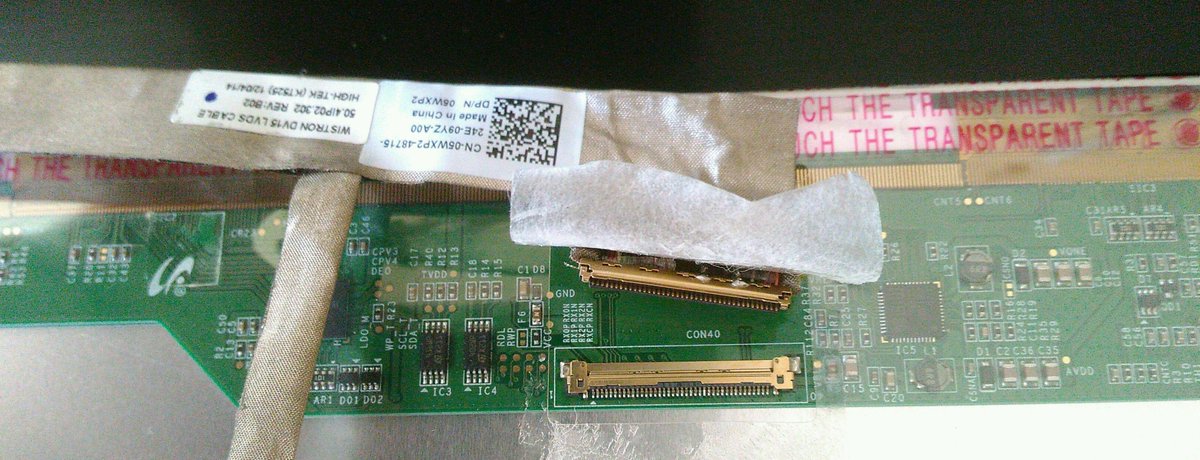 0
0 -
Dell laptops are notorious for that kind of failure but as everyone has posted, its a sub £100 repair even if you pay someone to do it. The connector isn't as fragile as grumpycrab is suggesting, just remove the tape completely, release the lock tabs, pull the connector out and when replacing just use a bit of sellotape to replace the original.This is a system account and does not represent a real person. To contact the Forum Team email forumteam@moneysavingexpert.com0
-
Good - I'm the OP! Just need to order the replacement panel. Does the following look good enough?The connector isn't as fragile as grumpycrab is suggesting,
Exact code is LTN156AT17 7BCDOREJ05 D02 so this is what I want I think.
https://www.ebay.co.uk/itm/3307406372610 -
My previous laptop was a Toshiba that got a few "thunder bugs" between the backlight and the LCD. The hardest part was figuring out how to take the screen out without damage and it looks like Grumpy Crab has that sorted.
When re-fitting, make sure it's sealed to avoid those pesky bugs getting in.0






This discussion has been closed.
Confirm your email address to Create Threads and Reply

Categories
- All Categories
- 353.6K Banking & Borrowing
- 254.2K Reduce Debt & Boost Income
- 455.1K Spending & Discounts
- 246.6K Work, Benefits & Business
- 603K Mortgages, Homes & Bills
- 178.1K Life & Family
- 260.6K Travel & Transport
- 1.5M Hobbies & Leisure
- 16K Discuss & Feedback
- 37.7K Read-Only Boards