We’d like to remind Forumites to please avoid political debate on the Forum.
This is to keep it a safe and useful space for MoneySaving discussions. Threads that are – or become – political in nature may be removed in line with the Forum’s rules. Thank you for your understanding.
📨 Have you signed up to the Forum's new Email Digest yet? Get a selection of trending threads sent straight to your inbox daily, weekly or monthly!
The Forum now has a brand new text editor, adding a bunch of handy features to use when creating posts. Read more in our how-to guide
Monitor
Comments
-
IS the plug on the end of the monitor cable that connects to the computer blue or white?
Blue=VGA
White=DVI.
VGA: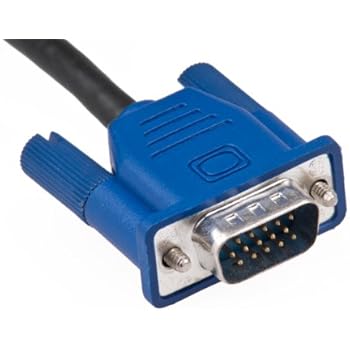
DVI: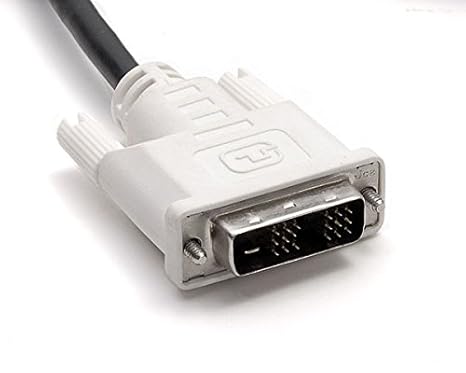 This is a system account and does not represent a real person. To contact the Forum Team email forumteam@moneysavingexpert.com0
 -
As has been written it would be best if we knew your computer's capability.
Might be a good idea to download and run Belarc Advisor. You will then get lots of info about your PC including graphics capability. You will then be able to copy and post on here for people to see the sections in question to give you a definitive answer.
It's free from https://www.belarc.com/products_belarc_advisor
and is therefore a lot cheaper than buying the wrong display!0







This discussion has been closed.
Confirm your email address to Create Threads and Reply

Categories
- All Categories
- 353.5K Banking & Borrowing
- 254.2K Reduce Debt & Boost Income
- 455K Spending & Discounts
- 246.6K Work, Benefits & Business
- 602.9K Mortgages, Homes & Bills
- 178.1K Life & Family
- 260.6K Travel & Transport
- 1.5M Hobbies & Leisure
- 16K Discuss & Feedback
- 37.7K Read-Only Boards