We’d like to remind Forumites to please avoid political debate on the Forum.
This is to keep it a safe and useful space for MoneySaving discussions. Threads that are – or become – political in nature may be removed in line with the Forum’s rules. Thank you for your understanding.
📨 Have you signed up to the Forum's new Email Digest yet? Get a selection of trending threads sent straight to your inbox daily, weekly or monthly!
The Forum now has a brand new text editor, adding a bunch of handy features to use when creating posts. Read more in our how-to guide
MS Office
Comments
-
Downloaded, installed correctly and now up and running :j:j
Thanks to all those who offered help, especially, Andy P :beer: :money:0 -
Working fine on my 64 bitFirstTimer4Me wrote: »I've opened the link, says only works with 32bit I have x64, is this not suitable? 0
0 -
I have been playing with Libre Office, seems to be the most compatible with MS Office. Have a few Office 2007s to use up on the various family computers but will use Libre on anything else.0
-
Genuine, legit and free to use MS Office 2010 Starter Edition that came pre loaded with W7 computers. Also works with Vista. Windows update will pick it up and bring it up to date. MS obviously decided that it was too good to give away so won't work with W8 or W10.
https://www.techspot.com/downloads/6255-microsoft-office-starter-2010.html if you want a basic word / excel. And to remove the ads http://www.kluug.net/office-starter-ad-remover.php
Hi Molerat,
Thanks for this tip which was great, which I took advantage of while waiting for my full version to arrive. After uninstalling the starter edition and setting up the replacement, there is still the following message on my desktop:-
"Windows 7 - Build 7601 - This copy of Windows is not genuine"
And I keep receiving notifications to authenticate it. Do you have any advice as to how I can sort these issues?
Many thanks0 -
Have you tried clicking on the notification and then following the instructions on how to activate?Hi Molerat,
Thanks for this tip which was great, which I took advantage of while waiting for my full version to arrive. After uninstalling the starter edition and setting up the replacement, there is still the following message on my desktop:-
"Windows 7 - Build 7601 - This copy of Windows is not genuine"
And I keep receiving notifications to authenticate it. Do you have any advice as to how I can sort these issues?
Many thanks0 -
Agreed, keep on doing what it says and it will eventually go away (providing you are running a genuine copy). I had this a couple of years back, it was a known glitch. I wonder if it has something to do with op's other problem. https://forums.moneysavingexpert.com/discussion/57570070
-
Agreed, keep on doing what it says and it will eventually go away (providing you are running a genuine copy). I had this a couple of years back, it was a known glitch. I wonder if it has something to do with op's other problem. https://forums.moneysavingexpert.com/discussion/5757007
Yes, it's a genuine copy, the message relates to the starter copy that I uninstalled as it began to appear as soon as I installed it, and I automatically assumed that when I uninstalled it after receiving the full version, that it would automatically go away when installing the new package. However, I will keep trying on my return from work.
Thanks for the tips0 -
Yes, it's a genuine copy, the message relates to the starter copy that I uninstalled as it began to appear as soon as I installed it, and I automatically assumed that when I uninstalled it after receiving the full version, that it would automatically go away when installing the new package. However, I will keep trying on my return from work.
Thanks for the tips
How do you know it is 'genuine'?
Download, save this application
Once saved, right click on the application and choose Run As Administrator'.
You'll see a screen like this;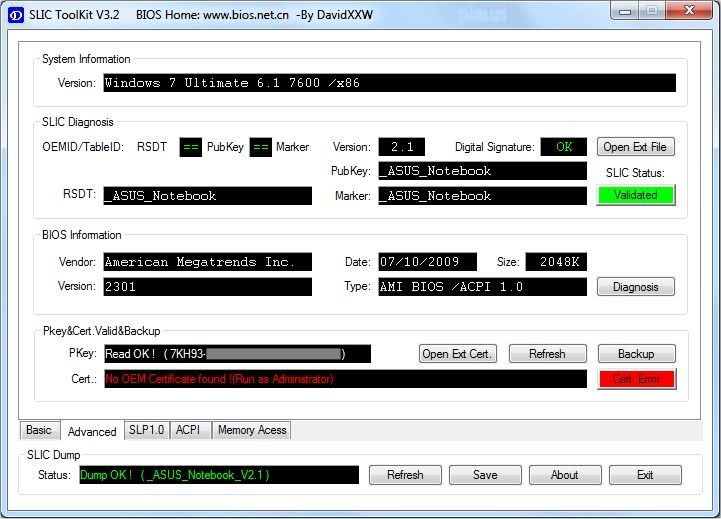
Click on the Advanced tab to see the screen above.
Which Version is shown, 2.1 or 2.0 or nothing?
Better still, post a screenshot to my PM Inbox.0 -
There is a free limited feature version of MS Office which is accessed with a browser so you have to be online to use it and, depending on how good your broadband connection is, could be slow.
https://products.office.com/en-gb/office-online/documents-spreadsheets-presentations-office-online
Have just downloaded the version, does it work for .docx documents are you aware? I have a version of my CV saved as a .docx document which Libre office was not able to handle/convert so the original formatting went all awry, is this download able to cope with these documents.0







This discussion has been closed.
Confirm your email address to Create Threads and Reply

Categories
- All Categories
- 353.5K Banking & Borrowing
- 254.1K Reduce Debt & Boost Income
- 455K Spending & Discounts
- 246.6K Work, Benefits & Business
- 602.9K Mortgages, Homes & Bills
- 178.1K Life & Family
- 260.6K Travel & Transport
- 1.5M Hobbies & Leisure
- 16K Discuss & Feedback
- 37.7K Read-Only Boards