We’d like to remind Forumites to please avoid political debate on the Forum.
This is to keep it a safe and useful space for MoneySaving discussions. Threads that are – or become – political in nature may be removed in line with the Forum’s rules. Thank you for your understanding.
📨 Have you signed up to the Forum's new Email Digest yet? Get a selection of trending threads sent straight to your inbox daily, weekly or monthly!
The Forum now has a brand new text editor, adding a bunch of handy features to use when creating posts. Read more in our how-to guide
Which cable do i need?

lolly1963
Posts: 217 Forumite


in Techie Stuff
Hi,
I have a Panasonic mini dv camcorder model nvgs11 which has a little dv hole for a cable. My Gateway laptop also has the small firewire socket and also usb ports. When i used to download to my desktop (which is now broke!) i used to use the analogue lead no probs to download content to burn to dvd.
I tried using the usb port on the laptop with the firewire (small one) connected to the camcorder with no success. Do you think i need to buy a lead with 2 small firewire bits on each end? I have studied the manual to the camcorder with no luck (really thick when reading techie stuff!) I was trying to download the dv tape to windows movie maker.Any help would be much appreciated.
Thanks very much
Lorraine
I have a Panasonic mini dv camcorder model nvgs11 which has a little dv hole for a cable. My Gateway laptop also has the small firewire socket and also usb ports. When i used to download to my desktop (which is now broke!) i used to use the analogue lead no probs to download content to burn to dvd.
I tried using the usb port on the laptop with the firewire (small one) connected to the camcorder with no success. Do you think i need to buy a lead with 2 small firewire bits on each end? I have studied the manual to the camcorder with no luck (really thick when reading techie stuff!) I was trying to download the dv tape to windows movie maker.Any help would be much appreciated.
Thanks very much
Lorraine
0
Comments
-
afaik you need the correct firewire cable. (ebay for cheap firewire cables).
make sure you have a firewire connection on the laptop.
dont think your camera has a usb socket?Get some gorm.0 -
Thanks for your reply. I have just had a look at the dv camera manual and it says it has DV Output Terminal (IEEE 1394, 4-pin). The laptop has 4 usb ports and VGA external connecor,RJ-45 port,RJ-11 port,microphone,headphone jack.
Does this make any sense? The model is Gateway MX6933b. On the laptop i had a look at the gateay documentation, and it shows a diagram of the connections on the side and points to the little connection and says 'firewire'.
Does this make any sense at all?
Many Thanks
Lorraine0 -
you need a four pin to six firewire cable0
-
Hi and Thanks for your reply.
Both of the connections on the laptop and dv camera look both the same size, both small so is that right then, four pin to 6 een though the 'holes' are the same size?
Sorry to be so thick but the times i have gone out for cables and bought the wrong ones. Such a sham my laptop doesnt have the analogue connections like my desktop had, would have been a doddle as i did actually know how to use those..well....after practise!!
Cheers
lorraine0 -
In that case you 'll probably need the 4/4 pin firewire cable
4/4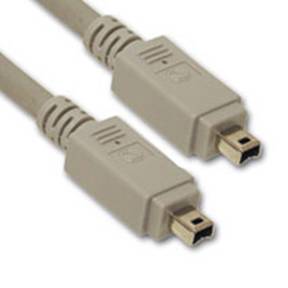
4/6 0
0 -
Looks like Red Rose Exile just got his 2 cents in as I was typing!
Anyhoo, I concur with above post.
I use the exact same method as you're trying to use, ie. using Movie Maker, to transfer & edit my movies, so feel free to give me a sout if you need any more help on that side if things.The pen is mightier than the sword, and considerably easier to write with.
-- Marty Feldman0 -
Hi,
Thanks again for all your replies. Looks like i do need the 4 pin to 4 pin, the holes look the same as the size on them ....LOL!
I will buy one this week and probably give you all a shout when i get in a mess....heheheee..
Thanks again,
Lorraine0 -
Get some gorm.0
-
Hi Guys,#Right then, i have received my cable and can get the dv tape ont laptop screen so that works. The problem that i have now is i need some software that i can burn straight on to dvd whilst the dv tape is playing.
Windows movie maker only burns to cd and not dvd, and my cyberlink program will let me burn everything else onto dvd instead of my dv tape!!
Has aybody got any 'easy to use' freeware thats any good that will do the job please. I used to have some good dvd burning software on my desktop but was all preloaded and i am not clever enough to copy the files needed for that.
I just need the correct program and away i go...LOL!!!
Thanks in advance
Lorraine...halfway there now! yippeeee.....:)0 -
try this rather nice piece of freeware,
Video DVD Maker Free 2.13.0.76
You may have to download the video to your PC first before burning. Most dvd burners won't burn on the fly0
This discussion has been closed.
Confirm your email address to Create Threads and Reply

Categories
- All Categories
- 354.8K Banking & Borrowing
- 254.5K Reduce Debt & Boost Income
- 455.6K Spending & Discounts
- 247.6K Work, Benefits & Business
- 604.6K Mortgages, Homes & Bills
- 178.6K Life & Family
- 262.2K Travel & Transport
- 1.5M Hobbies & Leisure
- 16.1K Discuss & Feedback
- 37.7K Read-Only Boards