We’d like to remind Forumites to please avoid political debate on the Forum.
This is to keep it a safe and useful space for MoneySaving discussions. Threads that are – or become – political in nature may be removed in line with the Forum’s rules. Thank you for your understanding.
📨 Have you signed up to the Forum's new Email Digest yet? Get a selection of trending threads sent straight to your inbox daily, weekly or monthly!
The Forum now has a brand new text editor, adding a bunch of handy features to use when creating posts. Read more in our how-to guide
When do you change your Printer Cartridges?
Comments
-
I used to have a Brother printer.
It often decided that I needed to change the cartridge.
One minute it would be printing perfectly then 'sorry, chum - I need a new cartridge' and the only way out was to do as I was told :mad:0 -
Some brother are designed to never get switched off as the do clean cycles if not used.
On mine when they claim low there is a bit left by the time they say no more there is just a dribble left.
Cheap compatibles still going strong, had to reset the print counter had it so long.0 -
Hang on. That's exactly my question. You have a Brother printer and it gives you two messages, one to say toner low and another to say toner empty? So I should have waited for the toner empty message?0
-
Do you have ControlCenter installed itr comes with a status monitor.
you get something like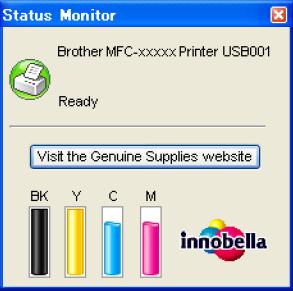
which printer do you have which carts does it take.
mine is a DCP-340W/900 series.
you have reminded me to order some before they run out, I have been using choicestationery Think compatible carts for years.0 -
getmore4less wrote: »Do you have ControlCenter installed itr comes with a status monitor.
you get something like
which printer do you have which carts does it take.
mine is a DCP-340W/900 series.
you have reminded me to order some before they run out, I have been using choicestationery Think compatible carts for years.
Thanks.
Mine is a DCP-J4120DW. I have a shortcut to 'Brother Utilities' which has, under 'Tools' a tab for 'Status Monitor' but clicking on this has never done anything. I first tried using this after installing the printer. Then and now, clicking on this results in nothing at all, no action, no messages. I'm using Win10 and I internet searched for this and found others complaining that this happened to this also, so I gave up.
So it works for you?
My replacement carts are also Think, from choicestationery.
So to ask again. Do you get a warning first, then a second 'ink empty' message?0 -
I think this thread would of been better placed in the Techie Stuff forum TBH. It might be worth you reporting it and seeing if you can get it moved.
 0
0









This discussion has been closed.
Confirm your email address to Create Threads and Reply

Categories
- All Categories
- 354.4K Banking & Borrowing
- 254.4K Reduce Debt & Boost Income
- 455.4K Spending & Discounts
- 247.3K Work, Benefits & Business
- 604K Mortgages, Homes & Bills
- 178.4K Life & Family
- 261.5K Travel & Transport
- 1.5M Hobbies & Leisure
- 16K Discuss & Feedback
- 37.7K Read-Only Boards