We’d like to remind Forumites to please avoid political debate on the Forum.
This is to keep it a safe and useful space for MoneySaving discussions. Threads that are – or become – political in nature may be removed in line with the Forum’s rules. Thank you for your understanding.
📨 Have you signed up to the Forum's new Email Digest yet? Get a selection of trending threads sent straight to your inbox daily, weekly or monthly!
The Forum now has a brand new text editor, adding a bunch of handy features to use when creating posts. Read more in our how-to guide
Taskbar won't return to usual size and place

ampersand
Posts: 9,727 Forumite




As above,
I live in a not-spot and am used to various :mad:moments, but this is a newbie.
Refreshed grauniad cricket page which jolted down, then up and now my foot-of-screen taskbar is at top and 3cms deep.
Googled solutions, like this:
http://answers.microsoft.com/en-us/windows/forum/windows_vista-desktop/how-do-i-move-the-taskbar-back-to-the-bottom-of/353233fe-8ee3-45fd-9d54-3e2d98fc0071
-but they're not working. Yes, it's windows xp. about as old as oap me:-)
The only click response extends the taskbar over halfway down the page, but this isn't consistent either.
Taskbar is NOT locked. Non-gobbledygook advice appreciated - thankyou.
I live in a not-spot and am used to various :mad:moments, but this is a newbie.
Refreshed grauniad cricket page which jolted down, then up and now my foot-of-screen taskbar is at top and 3cms deep.
Googled solutions, like this:
http://answers.microsoft.com/en-us/windows/forum/windows_vista-desktop/how-do-i-move-the-taskbar-back-to-the-bottom-of/353233fe-8ee3-45fd-9d54-3e2d98fc0071
-but they're not working. Yes, it's windows xp. about as old as oap me:-)
The only click response extends the taskbar over halfway down the page, but this isn't consistent either.
Taskbar is NOT locked. Non-gobbledygook advice appreciated - thankyou.
CAP[UK]for FREE EXPERT DEBT &BUDGET HELP:
01274 760721, freephone0800 328 0006
01274 760721, freephone0800 328 0006
'People don't want much. They want: "Someone to love, somewhere to live, somewhere to work and something to hope for."
Norman Kirk, NZLP- Prime Minister, 1972
***JE SUIS CHARLIE***
'It is difficult to free fools from the chains they revere' François-Marie AROUET
Norman Kirk, NZLP- Prime Minister, 1972
***JE SUIS CHARLIE***
'It is difficult to free fools from the chains they revere' François-Marie AROUET
0
Comments
-
If ther taskbar isn't locked, have you tried dragging it to the side of the screen and then to the bottom (as two completely separate actions including releasing the mouse button in between)?
I can't remember how it's done in XP (it's been a long time since I last used it) but I vaguely remember having to do that years ago.:wall: Flagellation, necrophilia and bestiality - Am I flogging a dead horse? :wall:
Any posts are my opinion and only that. Please read at your own risk.0 -
Thankyou rmg1 - it's now at the bottom, for which Hoorah, BUT still 3 lines deep.
Any clue to having everything back in single base line please?CAP[UK]for FREE EXPERT DEBT &BUDGET HELP:
01274 760721, freephone0800 328 0006'People don't want much. They want: "Someone to love, somewhere to live, somewhere to work and something to hope for."
Norman Kirk, NZLP- Prime Minister, 1972
***JE SUIS CHARLIE***
'It is difficult to free fools from the chains they revere' François-Marie AROUET
0 -
When you hover over the top edge of it does it not give you a double headed arrow so that you can make it bigger and smaller?
Yours
CalleyHope for everything and expect nothing!!!
Good enough is almost always good enough -Prof Barry Schwartz
If it scares you, it might be a good thing to try -Seth Godin0 -
No, 'fraid not.
Let me rephrase that calley - the d-h arrow is there, but it won't pull top line down unless to drop taskbar out of sight completely.CAP[UK]for FREE EXPERT DEBT &BUDGET HELP:
01274 760721, freephone0800 328 0006'People don't want much. They want: "Someone to love, somewhere to live, somewhere to work and something to hope for."
Norman Kirk, NZLP- Prime Minister, 1972
***JE SUIS CHARLIE***
'It is difficult to free fools from the chains they revere' François-Marie AROUET
0 -
Daft question, but could it be something to do with the screen resolution?:wall: Flagellation, necrophilia and bestiality - Am I flogging a dead horse? :wall:
Any posts are my opinion and only that. Please read at your own risk.0 -
#Daft question, but could it be something to do with the screen resolution?
Not sure what this means, sorry.CAP[UK]for FREE EXPERT DEBT &BUDGET HELP:
01274 760721, freephone0800 328 0006'People don't want much. They want: "Someone to love, somewhere to live, somewhere to work and something to hope for."
Norman Kirk, NZLP- Prime Minister, 1972
***JE SUIS CHARLIE***
'It is difficult to free fools from the chains they revere' François-Marie AROUET
0 -
#
Not sure what this means, sorry.
OP it means the resolution your computer's monitor is displaying at (i.e. 1920 x 1080, 1024 x 768 etc.)
Right click somewhere on your desktop OP and you'll see a menu with 'Display Properties' showing. Left click that and you'll see the chance to change your desktop background etc.
Under 'Settings' on the far right hand side you'll see something along the lines of this: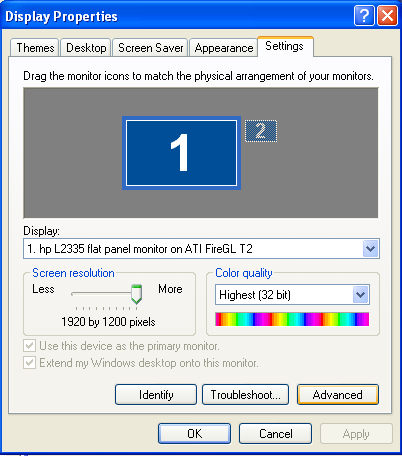
I've also found this video on YouTube for you: https://youtu.be/h45j3A8SMzY?t=1m8sIt's not your credit score that counts, it's your credit history. Any replies are my own personal opinion and not a representation of my employer.0 -
Could it be the size of the icons on the task bar?
I think most versions of Windows give the option of changing the size of the icons, memory is a bit hazy but I think using large icons increased the depth of the taskbar.0 -
Hi,
as above, right click taskbar > properties > use small taskbar buttons, and lock taskbar.0 -
Thankyou all - hadn't expected so many responses, or fact that prob.'s still ongoing, albeit at foot of page.
I just can't reduce the 7 small icons: date/time/progs etc. from 3 lines back to 1, which will restore former status quo.
Everything's been normal size throughout.
#
20aday - I see that, exactly, but what should I do with it? Checked Advance - nothing to change that I can see.CAP[UK]for FREE EXPERT DEBT &BUDGET HELP:
01274 760721, freephone0800 328 0006'People don't want much. They want: "Someone to love, somewhere to live, somewhere to work and something to hope for."
Norman Kirk, NZLP- Prime Minister, 1972
***JE SUIS CHARLIE***
'It is difficult to free fools from the chains they revere' François-Marie AROUET
0





This discussion has been closed.
Confirm your email address to Create Threads and Reply

Categories
- All Categories
- 354.1K Banking & Borrowing
- 254.3K Reduce Debt & Boost Income
- 455.3K Spending & Discounts
- 247.1K Work, Benefits & Business
- 603.7K Mortgages, Homes & Bills
- 178.3K Life & Family
- 261.2K Travel & Transport
- 1.5M Hobbies & Leisure
- 16.1K Discuss & Feedback
- 37.7K Read-Only Boards