We’d like to remind Forumites to please avoid political debate on the Forum.
This is to keep it a safe and useful space for MoneySaving discussions. Threads that are – or become – political in nature may be removed in line with the Forum’s rules. Thank you for your understanding.
📨 Have you signed up to the Forum's new Email Digest yet? Get a selection of trending threads sent straight to your inbox daily, weekly or monthly!
The Forum now has a brand new text editor, adding a bunch of handy features to use when creating posts. Read more in our how-to guide
linux experts
Comments
-
Not any longer, and not for a long time, just do not buy mark 1, model A. A few years ago they were upgraded a few times. Think even the Cpu got enhanced too. It even supports IR remote I believe?enfield_freddy wrote: »umm , I don,t get that last statement , you refer to raspberry Pis ? they only have USB access , so will be very slow.
The Banana was apparently twice as fast, not as popular in the UK, but I have not been checking the specs or marketing for over a year now.
Ah, the hp cube servers that can support 4xhdd. They were about 120w micro servers. I thought they were a waste of time, but someone did the calulation that compared to a 300w pc (and many these days are more than 300w, some going over 600w). These servers were on 'never ending' 'special offer' for about £119 after cashback. Anyway these paid for themselves, after 10 months of 24/7 electrical cost compared to a 300w. Also at the time the price per KW was cheaper too, but the servers may have gone up.
Edit:
35W server - the new version? £185
http://www.ebuyer.com/517760-hp-proliant-gen8-g1610t-microserver-712317-421
http://www.pcpro.co.uk/reviews/servers/387361/hp-proliant-microserver-gen80 -
sorry I will rephrase that , anyone can build a simple server using a Linux system , and indeed instructions are on the web how to convert a raspberry Pi , HOWEVER the only means of attaching drives (to a PI) is via USB, which is horrendously slow.0
-
Guy, please google the good old Pi. You will see a photo of the Pi2 like this
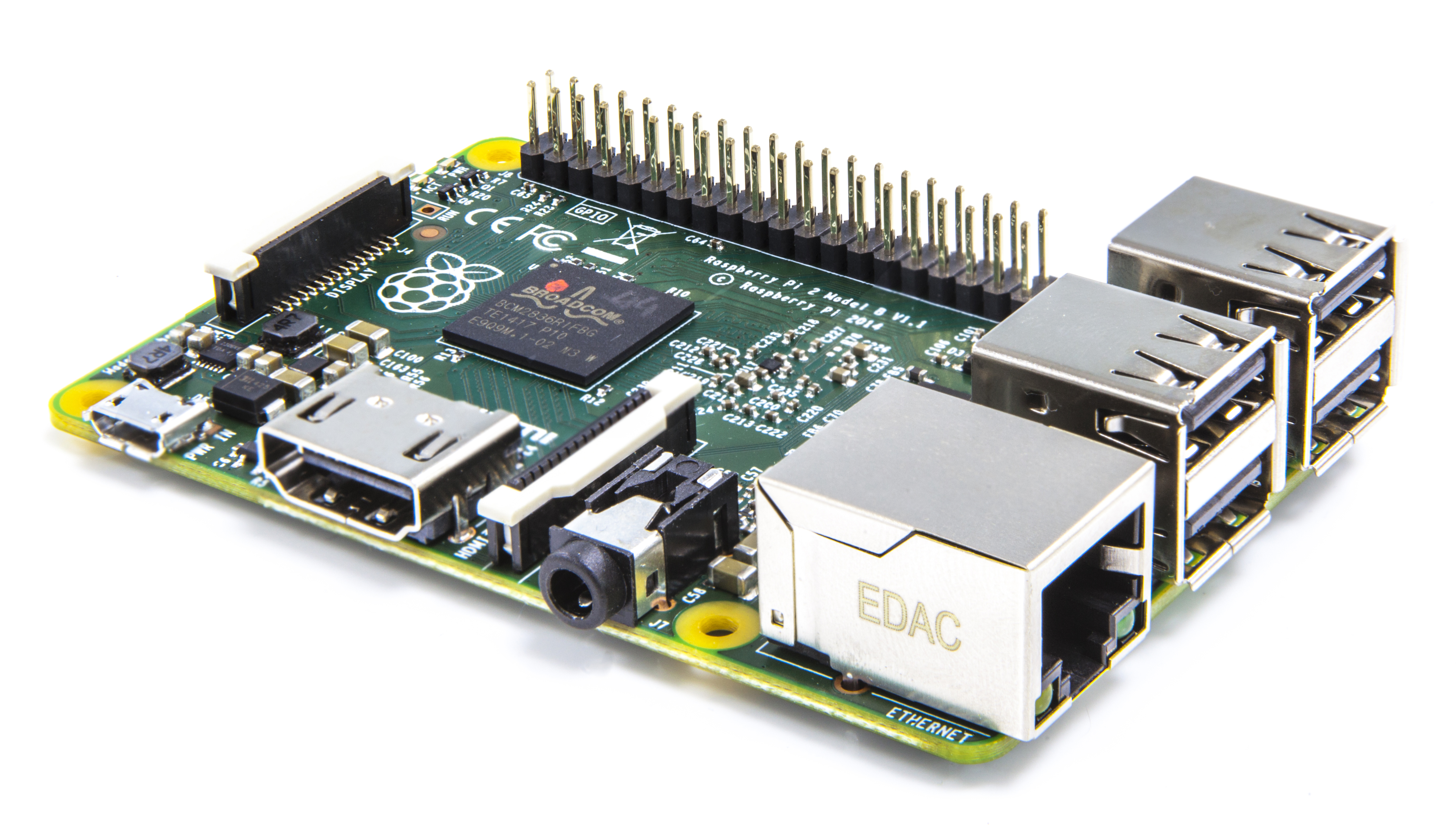
There you will find- A 900MHz quad-core ARM Cortex-A7 CPU
- 1GB RAM
- 4 USB ports
- 40 GPIO pins
- Full HDMI port
- Ethernet port
- Combined 3.5mm audio jack and composite video
- Camera interface (CSI)
- Display interface (DSI)
- Micro SD card slot
- VideoCore IV 3D graphics core
http://mymediaexperience.com/raspberry-pi-xbmc-with-raspbmc/
I would guess, and say about 5 watts to power this. Fairly sure thare are ways to get wifi working too.
Just reading that one version of Pi took 200ma, but 33% of that was to convert 5v to 3.3v. so it works on about 1watt, compared to you many watts for a PC, and costs $35us, then the is the psu, box, remote control, cables, say £75.
With this in mind, one of my friends has reportedly put the pi into his Sky box.0 -
Ive always preferred having the PC (in my case the HP Home Server) tucked away in the pantry running headerless , with Ethernet running into the broadband router (just got the Asus RT-AC68U fibre modem router combination) so its using Giga Lan ports all round and fast wireless.
Then I use the raspberry pi's on the TV's to stream through content. Its much quieter than having pc under the tv and can use the TV Remote control to operate it..0 -
bluesnake , you have missed the whole point of the original question
"how to add raid to a xbmc setup"
yup I know about the PI , yup its got an Ethernet port .
how the hell do you add extra drives to it ? raspbmc runs from a SD card , and has no physical connections to sata or ide , the only way to introduce media is via a usb OR over an Ethernet connection (maybe from a nas ,,,,, that's where we started)
the PI is pathetically slow .
as a nice footnote , and answering a question I asked a few weeks ago,
"how to use the un used space on a hard drive after a install of openelec"
I have now solved it.
previously if you installed openelec on (say) a 1t hard drive it created a 240 meg partition and the rest was waste , even if you placed the drive in a PC caddy and formatted the waste to fat / ntfs / ext / it would not boot
however if you pre format the drive in ext4 then load openelec , it creates its own 240m partition and leaves over 900m spare for media files to be added by PC.0 -
It doesn't matter which Linux you have. Stick with OpenELEC since that's the media centre. RAID set up will largely be identical to any Linux system. The actual XBMC/Kodi apps does auto start when you boot into the X server.0
-
For a HTPC as long as you are not gaming consider AMD Kabini, dirt cheap and just the job.Science isn't exact, it's only confidence within limits.0
-
Oh, and it'll be needing a widescreen display to view this page!0




This discussion has been closed.
Confirm your email address to Create Threads and Reply

Categories
- All Categories
- 354.8K Banking & Borrowing
- 254.5K Reduce Debt & Boost Income
- 455.6K Spending & Discounts
- 247.6K Work, Benefits & Business
- 604.5K Mortgages, Homes & Bills
- 178.6K Life & Family
- 262.2K Travel & Transport
- 1.5M Hobbies & Leisure
- 16.1K Discuss & Feedback
- 37.7K Read-Only Boards