We’d like to remind Forumites to please avoid political debate on the Forum.
This is to keep it a safe and useful space for MoneySaving discussions. Threads that are – or become – political in nature may be removed in line with the Forum’s rules. Thank you for your understanding.
📨 Have you signed up to the Forum's new Email Digest yet? Get a selection of trending threads sent straight to your inbox daily, weekly or monthly!
The Forum now has a brand new text editor, adding a bunch of handy features to use when creating posts. Read more in our how-to guide
How to avoid "mobile" versions of websites?

HappySeagull
Posts: 145 Forumite
in Techie Stuff
I'm happy browsing the web with my Hudl, which has a decent screen.
However, a few websites insist on transferring Hudl users to a "mobile" version - eg. m.waterstones.com. These are invariably cut-down, and difficult to navigate. :mad: They may be all a phone can manage, but tablets are perfectly capable these days.
Is there any way to fool the website into displaying the full version?
However, a few websites insist on transferring Hudl users to a "mobile" version - eg. m.waterstones.com. These are invariably cut-down, and difficult to navigate. :mad: They may be all a phone can manage, but tablets are perfectly capable these days.
Is there any way to fool the website into displaying the full version?
0
Comments
-
Just take the m. out of the address and refresh then bookmark as the full site.
Or try this....
Open your browser. Then, open up the top-left corner menu and open up the settings. Next, open up the 'Advanced' tab, and scroll down to the section called 'User Agent String'.
There should be 3 options - Tablet, Desktop, and Mobile-Phone. Select Desktop. And that's it! No other complications. All web pages should load in their full, desktop editions.Drinking Rum before 10am makes you
A PIRATE
Not an Alcoholic...!0 -
Just take the m. out of the address and refresh then bookmark as the full site.
Or try this....
Open your browser. Then, open up the top-left corner menu and open up the settings. Next, open up the 'Advanced' tab, and scroll down to the section called 'User Agent String'.
There should be 3 options - Tablet, Desktop, and Mobile-Phone. Select Desktop. And that's it! No other complications. All web pages should load in their full, desktop editions.
Unfortunately, editing the address doesn't help, because the websites automatically transfer you. (I can't even view the mobile version on a desktop!)
Good idea regarding the browser settings, but Chrome on the Hudl doesn't seem to let you change the User Agent String. Which browser are you using on which tablet? I uninstalled Firefox because it was so slow, though I use it all the time on my PC.0 -
With the page loaded press the menu key and you get the option of request desktop site.Censorship Reigns Supreme in Troll City...0
-
forgotmyname wrote: »With the page loaded press the menu key and you get the option of request desktop site.
Brilliant! I'd not spotted that settings option before, but I can tell you the full Waterstones website works perfectly!0 -
Sorry for delay.....As you have already found, it's in the Menu options....Glad you have it sorted....HappySeagull wrote: »Unfortunately, editing the address doesn't help, because the websites automatically transfer you. (I can't even view the mobile version on a desktop!)
Good idea regarding the browser settings, but Chrome on the Hudl doesn't seem to let you change the User Agent String. Which browser are you using on which tablet? I uninstalled Firefox because it was so slow, though I use it all the time on my PC.Drinking Rum before 10am makes you
A PIRATE
Not an Alcoholic...!0 -
It doesn't always work, mind - some sites are obsessed with serving up the mobile/limited version no matter how nicely you ask.
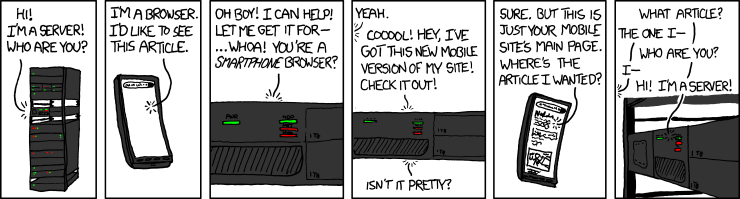 0
0 -
Another classic...
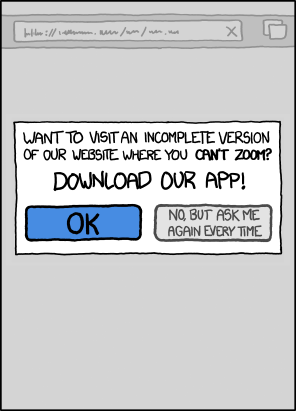 0
0 -
Another classic...
Nice one! I really don't understand this idea of having to download a new App for each company / group I want to find out about - what happened to the simple idea of using HTML / Javascript / CSS to serve the info in an appropriate format, whatever the platform?
I've deleted almost all the Apps off my Hudl, and now it doesn't slow down or drain the battery - all the updates were a nightmare!0






This discussion has been closed.
Confirm your email address to Create Threads and Reply

Categories
- All Categories
- 354.3K Banking & Borrowing
- 254.4K Reduce Debt & Boost Income
- 455.4K Spending & Discounts
- 247.3K Work, Benefits & Business
- 604K Mortgages, Homes & Bills
- 178.4K Life & Family
- 261.5K Travel & Transport
- 1.5M Hobbies & Leisure
- 16K Discuss & Feedback
- 37.7K Read-Only Boards