We’d like to remind Forumites to please avoid political debate on the Forum.
This is to keep it a safe and useful space for MoneySaving discussions. Threads that are – or become – political in nature may be removed in line with the Forum’s rules. Thank you for your understanding.
📨 Have you signed up to the Forum's new Email Digest yet? Get a selection of trending threads sent straight to your inbox daily, weekly or monthly!
The Forum now has a brand new text editor, adding a bunch of handy features to use when creating posts. Read more in our how-to guide
Desktop help advice please....
Comments
-
 768mb... :smileyhea Thank you to all that post comps - may the Comping Fairy return your time and generosity doubled!:smileyheaLaughing at our own mistakes can lengthen our own life. Laughing at someone else’s can shorten it.
 Pronoia - the wonderful feeling that everyone is conspiring to help you!! 0
 -
gojoroan2007 wrote: » 768mb...
Get some more RAM.
1GB(1x1GB) DDR2-667 PC2-5300 Non-ECC Desktop PC £6.98
or
go mad with 2GB(2x1GB) DDR2-533 PC2-4200 Non-ECC Desktop PC Memory £10.98
Coupled with a clean install, it will be faster than when brand new.0 -
Wow - thanks for all your help...I'm going to have a go... never having done it before how easy is it to fit the RAM card?
...and one last question if I may please - any recommendations for a very user friendly hard drive to back everything up on to please
many thanks,
Gordon. :smileyhea Thank you to all that post comps - may the Comping Fairy return your time and generosity doubled!:smileyheaLaughing at our own mistakes can lengthen our own life. Laughing at someone else’s can shorten it. Pronoia - the wonderful feeling that everyone is conspiring to help you!! 0 -
external hard drives are all very similar, they plug and go.
http://www.ebuyer.com/store/Storage/cat/Hard-Drive---External/subcat/-Portable---USB-3.0?sort=price+ascending&page=1
http://www.macrium.com/reflectfree.aspx!!
> . !!!! ----> .0 -
You unplug from the mains, earth yourself first by touching a tap. Then , take the side panel off(usually just a couple of screws).
Therein you'll see your Motherboard: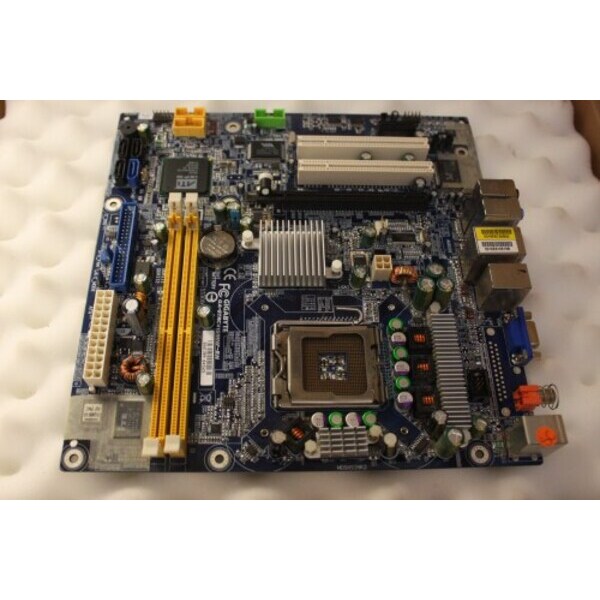
The long slots in the picture is where your RAM is situated. They will be both populated. One with a 512MB module and the other with a 256MB module.
You'll need to press the white tabs down at either side to eject the old RAM.
Then slot the new RAM in, taking note that it only goes in one way(note the cut-out between the contacts)
It's a ten minute job.
If you have just bought a single module, replace the 256MB module to bring you to a total of 1.5GB RAM.
Be gentle, but firm. 0 -
Just like to say a massive thank you to NiftyFingers and others for advice and help. The pms full of help and advice were great and I can't believe how much faster my pc is - and how much I haven't spent!!
just the increase in RAM and a good clean has made such a difference.
thanks all again!
Gordon. :smileyhea Thank you to all that post comps - may the Comping Fairy return your time and generosity doubled!:smileyheaLaughing at our own mistakes can lengthen our own life. Laughing at someone else’s can shorten it. Pronoia - the wonderful feeling that everyone is conspiring to help you!! 0

This discussion has been closed.
Confirm your email address to Create Threads and Reply

Categories
- All Categories
- 353.5K Banking & Borrowing
- 254.1K Reduce Debt & Boost Income
- 455K Spending & Discounts
- 246.6K Work, Benefits & Business
- 602.9K Mortgages, Homes & Bills
- 178.1K Life & Family
- 260.6K Travel & Transport
- 1.5M Hobbies & Leisure
- 16K Discuss & Feedback
- 37.7K Read-Only Boards