Ready, steady… save!
You don’t need a chart to join in. Here are 2 ways to record your savings:
1. Cross it off
Pop a chart into your first post. Saved an amount? Cross it out! Read more »
£0.01 £0.02 £0.03
2. Write it down
Skip the chart and add updates to your first post. Read more »
“Another +£3 saved today. Go me!”
Use +£ before each new saving so it counts towards your total.
📨 Have you signed up to the Forum's new Email Digest yet? Get a selection of trending threads sent straight to your inbox daily, weekly or monthly!
Identifying svchost

superscaper
Posts: 13,369


 Forumite
in Techie Stuff
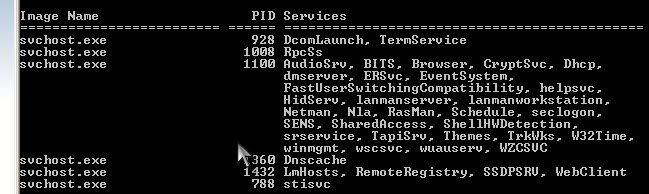
I'm always getting 100% cpu use from an svchost.exe process at bootup and sometimes randomly after a while. It's PID 1100 in the screenshot, if anyone has any suggestions what's causing it and if it's legitimate.
thanks,
ss
thanks,
ss
"She is quite the oddball. Did you notice how she didn't even get excited when she saw this original ZX-81?"
Moss
Moss
0
Comments
-
svchost.exe is a legitimate windows service - if you find an entry for scvhost.exe though you have a virus (notice the spelling).
Hogs the CPU on my PC occasionly but only normally for a short period of time. Dont try killing the process as your system will become very unstable without it.
You could try disabling some of those services it is using if not needed to free up some CPU cycles0 -
killing off the many useless services will resolve this problem, there are loads of guides out thrre including
http://www.tech-recipes.com/windows_tips1036.html0 -
I know it's a legitimate process, I just wondered what the best way was of determining what was using it and linked with it and doing something about it. I don't think it's really malware as I've had the same thing before a complete reinstall. I just wanted to find which app/driver was the culprit."She is quite the oddball. Did you notice how she didn't even get excited when she saw this original ZX-81?"
Moss0 -
My guess is wuauserv - Automatic Updates. You can identify the culprit using Process Explorer. Double-click the relevant svchost.exe process and use the Services tab to identify which DLL each service uses (Automatic Updates is wuauserv.dll) and the Threads tab to see which DLL is using the most CPU.0
-
superscaper wrote: »I'm always getting 100% cpu use from an svchost.exe process at bootup and sometimes randomly after a while. It's PID 1100 in the screenshot, if anyone has any suggestions what's causing it and if it's legitimate.
It's almost certainly the problem discussed here, related to automatic updates:
http://episteme.arstechnica.com/eve/forums/a/tpc/f/12009443/m/786004271831
The short answer is to install
http://support.microsoft.com/kb/927891
and http://support.microsoft.com/kb/932494
after which the svchost will still sometimes spike to 100%, but shouldn't slow the system up as much as it does now.
Processexplorer is a good tool for diagnosing this kind of thing BTW.0 -
i had this problem, involved stopping auto updates within services, rebooting to safe mode & deleting a folder the name of which escapes me, but I'll root around.
Right click on my computer- expand Services and applications – click on services – Right click on automatic updates – Properties – select disabled as the startup type. Reboot to safe mode, navigate to C:\windows\ rename the folder SoftwareDistribution to SoftwareDistribution.old - (I just deleted it)
Go back to services and set the startup type to automatic.
Reboot – failed updates should now install and CPU usage drop to normal level.0
This discussion has been closed.
Confirm your email address to Create Threads and Reply

Categories
- All Categories
- 355.9K Banking & Borrowing
- 255K Reduce Debt & Boost Income
- 456.2K Spending & Discounts
- 248.4K Work, Benefits & Business
- 606.1K Mortgages, Homes & Bills
- 179K Life & Family
- 263.9K Travel & Transport
- 1.5M Hobbies & Leisure
- 16.2K Discuss & Feedback
- 37.7K Read-Only Boards