We’d like to remind Forumites to please avoid political debate on the Forum.
This is to keep it a safe and useful space for MoneySaving discussions. Threads that are – or become – political in nature may be removed in line with the Forum’s rules. Thank you for your understanding.
📨 Have you signed up to the Forum's new Email Digest yet? Get a selection of trending threads sent straight to your inbox daily, weekly or monthly!
The Forum now has a brand new text editor, adding a bunch of handy features to use when creating posts. Read more in our how-to guide
Laptop Memory Crashing

PJB
Posts: 1,364 Forumite




in Techie Stuff
Hi All
My laptop keeps crashing, or at least programs on it do!
On the Task Manager there are 89 processes running, I will post them if someone would be so kind as tell me how!
Chrome seems to be the main hog! For example I have 10 tabs open and it is using 392,000k.
Details:
MSi CR630
4gb RAM
Windows 7 Home Premium
64-bit OS
200GB HDD. Partitioned C: 132 with 57 free & 88 with 38 free.
Any help or advice would be gratefully received!
Thanks in advance for reading and for any help you can give.
PJB
My laptop keeps crashing, or at least programs on it do!
On the Task Manager there are 89 processes running, I will post them if someone would be so kind as tell me how!
Chrome seems to be the main hog! For example I have 10 tabs open and it is using 392,000k.
Details:
MSi CR630
4gb RAM
Windows 7 Home Premium
64-bit OS
200GB HDD. Partitioned C: 132 with 57 free &
88 with 38 free.Any help or advice would be gratefully received!
Thanks in advance for reading and for any help you can give.
PJB
0
Comments
-
Not sure if this will help but thought I would post it just in case!
Component Details Subscore Base score
Processor AMD Athlon(tm) II P340 Dual-Core Processor 5.3 3.9
Determined by lowest subscore
Memory (RAM) 4.00 GB 5.9
Graphics ATI Mobility Radeon HD 4270 3.9
Gaming graphics 1919 MB Total available graphics memory 5.2
Primary hard disk 58GB Free (132GB Total) 5.9
Windows 7 Home Premium
System
Manufacturer Micro-Star International
Model MS-168B
Total amount of system memory 4.00 GB RAM
System type 64-bit operating system
Number of processor cores 2
Storage
Total size of hard disk(s) 221 GB
Disk partition (C:) 58 GB Free (132 GB Total)
Disk partition (D:) 38 GB Free (88 GB Total)
Media drive (E:) CD/DVD
Graphics
Display adapter type ATI Mobility Radeon HD 4270
Total available graphics memory 1919 MB
Dedicated graphics memory 256 MB
Dedicated system memory 0 MB
Shared system memory 1663 MB
Display adapter driver version 8.720.0.0
Primary monitor resolution 1366x768
DirectX version DirectX 10
Network
Network Adapter Realtek PCIe GBE Family Controller
Network Adapter 802.11bgn 1T1R Mini Card Wireless Adapter
Network Adapter Microsoft Virtual WiFi Miniport Adapter
Notes
The gaming graphics score is based on the primary graphics adapter. If this system has linked or multiple graphics adapters, some software applications may see additional performance benefits.0 -
How does it crash? Does the whole operating system crash, or just individual programs? How does it recover from the crash? What error messages, if any, are displayed?
There doesn't seem anything wrong with your basic spec, I fun a laptop with similar specification and it runs absolutely fine.
It's very hard to identify if it's a hardware or software fault from your limited description (not a dig at you, just saying).
A browser taking up 300Mb is nothing unusual, Firefox does the same, and it's under 10% of your available RAM.
Start with basics, uninstall unused programs and bloatware, get rid of Macafee or other paid Antivirus and install AVG or Avast! and then run through malware cleaners etc.
You have limited HDD space so it's worth backing up important stuff to HDD and getting rid of non essentials on the laptop.
FWIW, I thought my laptop had a memory fault a year or so ago, and pulled out one stick of memory, which after an OS reinstall seemed to cure it (HDD had become corrupt, laptop was freezing and dropping to ble Screen of Death). I've only just got back round to going back up to 8gb RAM after deciding to see if it really was that RAM stick at fault. It tested flawlessly, and the laptop has been stable for a few weeks now. go figure.0 -
Thanks Nev
It will close programms, normally firefox or chrome and sometimes word.
I used to get the 'Your computer memory is low' which from Google I understand is becasue over 75% of my virtual memory was being used so I did this:
http://www.kylirhorton.com/2009/disabling-low-memory-messages/
Which has removed the annoying warning messages but not solved the problem!
I use Eset Smart Security and have done for years, find it very good and doesn't hog resources.
Will look at uninstalling programs but I'm always a bit worried about uninstalling something I need that has some random name!
Bought an external to back up and it blocked so I need to buy another one to repair to and so I have dual back up!0 -
don't open so many tabs, and/or change browser
4GB + pagefile, you should have plenty of ram.
blocked?!!
> . !!!! ----> .0 -
don't open so many tabs, and/or change browser
4GB + pagefile, you should have plenty of ram.
blocked?
I've always had and have loads of tabs open and never been an issue before, strange!
Not sure what you mean by the 4GB pagefile bit.
I transferred loads of pictures to it and then it won't read it, gives an error about the formatting of it. Googled it a while ago and I need to recover it, tried a number of things but need a second HDD so going to buy one soon(ish!). I posted on here and you kindly posted:
https://forums.moneysavingexpert.com/discussion/46720310 -
That's odd.
Your HDD partitions (C: 132Gb, 88Gb)are "a bit weird" (not sure why they've been split that way that's all) and it could be that your page file settings are confused, making the computer think it is running out of virtual memory when it could be using more of the HDD.
I've done a screen grab of how to reveal your page file settings. Go to:
Control Panel>System and Security>System and then click on advanced settings on the left panel. This will bring up the system properties box you can see on the left. Click on each of the red boxes in turn to bring up your page file settings.
{Techy bit: Your computer has physical RAM - 4Gb. Programs, or running lots of programs at the same time, can sometimes need more than 4Gb total memory. If the computer could ONLY use physical RAM, it would simply crash. Instead, what happens is a portion of your Hard Drive is then used like incredibly slow RAM, to expand the memory available at the expense of performance. This is sometimes also called a swap file or Virtual memory. In your case, the computer is not only using all it's physical RAM, but it's exceeding it's allowable virtual memory space too, causing error messages and programs to be shut to free up memory.}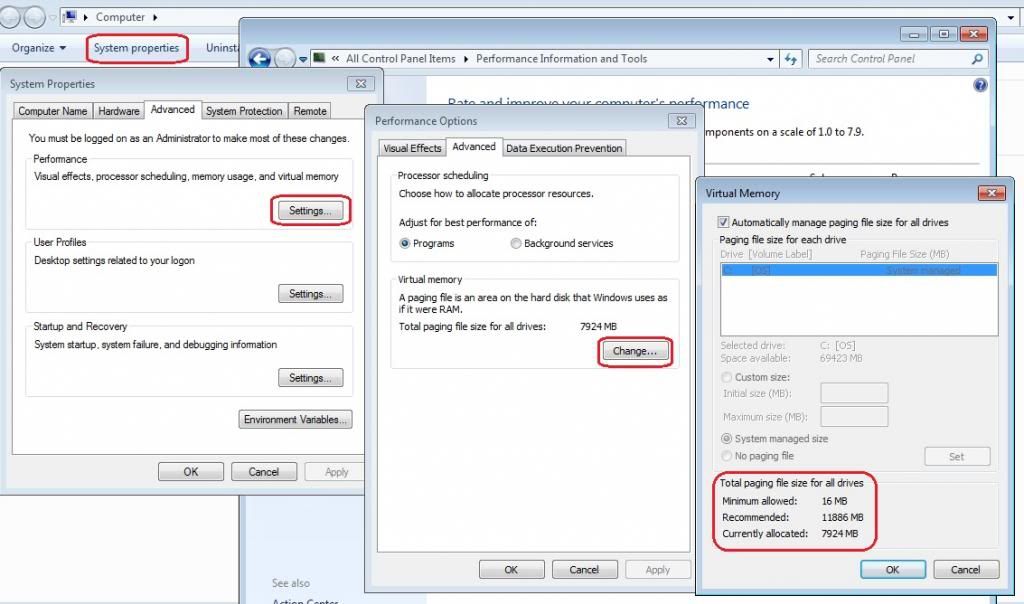
(click for a bigger image)
Really, you should let windows manage it since it does a good job 99% of the time. See the right hand box - mine is automatically set so that windows handles all the settings and the variable are greyed out. Normally this works. You can just about see that Windows can allocate a minimum of 12Mb Page file, a Maximum of 12Gb, and Currently has 8Gb (roughly) allocated. All this means is that Windows holds 8gb of memory in reserve to use as page file (virtual ram) and stops other programs filling that space.
Normally, if it started to get up to the end of that, it would simply allocate more memory up to 12Gb. If you've got programs that need more than 4Gb Ram + 12Gb Virtual Memory, that's a resource hog and do you do computational fluid dynamics at home?!
Anyway - solutions:
Check that windows manages it's memory and the settings look broadly similar to mine. They should work.
If they don't, don't be scared to uncheck the automatic box, select the drive you want to use (Probably C:) and set minimum to 4Gb, and maximum to 8-12Gb. that really should work.
The root cause of the problem though, is a program that it stealing all that memory. Go through them methodically and work out which it is. Crap antivirus are reknowned for this, Chrome is supposed to be ok.
In the long term, to keep the laptop viable I'd consider getting a 750Gb 2.52 SATA HDD, and another 4Gb Ram. that should buy you another couple of years of normal use. You're running out of HDD space and unless you do a major cleanup and don't need to install any more big programmes/music/photos/videos, that will be what cripples laptop performance.0 -
Thank you for your detailed reply.
My Virtual Memory has:
Minimum Allowed: 16mb
Recommended: 5758mb
Currently allocated: 1000mb
Do you know how do I change these please?0 -
Uncheck "Automatically manage my paging file size for all drives"
Put the page file on the drive with most space: C: in your case
Click "custom size"
Set minimum to 1024Mb
Set maximum to 11886Mb
Reset to apply changes.
Be aware this is a sticking plaster and is not solving the problem of WHAT is using that memory, only giving it more to use!0 -
Uncheck "Automatically manage my paging file size for all drives"
Put the page file on the drive with most space: C: in your case
Click "custom size"
Set minimum to 1024Mb
Set maximum to 11886Mb
Reset to apply changes.
Be aware this is a sticking plaster and is not solving the problem of WHAT is using that memory, only giving it more to use!
Thanks, all done.
Will be ordering another hard drive. Now I need to decide whether to order a bigger one for the laptop and put this one in a caddy for back ups or just keep this and get decent back up as this will then have alot less carp on it so should be ok. Decisions decisions!0 -
backup and factory restore cures most things, other than a browser bug.
it's highly unlikely you'd ever need a 12GB page file unless you have an application leaking memory.
What I meant about 4GB was, it's plenty of ram for most uses, so the pagefile never or rarely gets touched on moderm machines doing common tasks. ie set a min of 16, and a max of a few GB, and most of the time it will probably stay at 16MB.
To identify what's going on with ram, you need to look in task manager at the point of a crash or error message, memory error messages are often spurious.!!
> . !!!! ----> .0
This discussion has been closed.
Confirm your email address to Create Threads and Reply

Categories
- All Categories
- 353.5K Banking & Borrowing
- 254.1K Reduce Debt & Boost Income
- 455K Spending & Discounts
- 246.6K Work, Benefits & Business
- 602.9K Mortgages, Homes & Bills
- 178K Life & Family
- 260.5K Travel & Transport
- 1.5M Hobbies & Leisure
- 16K Discuss & Feedback
- 37.7K Read-Only Boards