We’d like to remind Forumites to please avoid political debate on the Forum.
This is to keep it a safe and useful space for MoneySaving discussions. Threads that are – or become – political in nature may be removed in line with the Forum’s rules. Thank you for your understanding.
📨 Have you signed up to the Forum's new Email Digest yet? Get a selection of trending threads sent straight to your inbox daily, weekly or monthly!
The Forum now has a brand new text editor, adding a bunch of handy features to use when creating posts. Read more in our how-to guide
Bt master socket wiring

aetbaar
Posts: 134 Forumite
I accidentally dislodged my by master socket and wanted to know how to wire it back
There are 6 wires in the bt master cable - orange, black, green, and three white and the socket has the 6 slots numbered 1-6 which ones goes where?
Also if connecting an extension to this which cables go to which in the master socket
There are 6 wires in the bt master cable - orange, black, green, and three white and the socket has the 6 slots numbered 1-6 which ones goes where?
Also if connecting an extension to this which cables go to which in the master socket
0
Comments
-
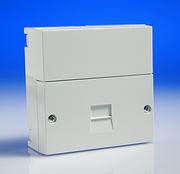
Assuming you have an NTE5 (main socket) - see below. Do you also have ADSL (Broadband) on that telephone line?
 If my post hasn't helped you, then don't click the 'Thanks' button!
 0
0 -
No it does not have Adsl it is really old and just is a plain box with six slots for the wires to go in numbered 1 to 60
-
Really, you shouldn't be tampering with the main socket as it is BT Openreach property!
Are you trying to reconnect internal extensions or the main incoming wires?
This should help you:
http://www.rob-r.co.uk/other/UKphonecatwiring.htmIf my post hasn't helped you, then don't click the 'Thanks' button!0 -
It looks asif you have an old line jack, not the modern NTE, and the cable you are referring to is the main incoming cable from the pole or underground.
Only 2 of the wires will need to be connected and they will go on to terminals 2 and 5.
Now which 2 to use you will have to do some testing as the engineer could have used any of them. They will be the 2 with 50 volts across them, so if you have or can borrow a multimeter you can test them until you see 50 volts.
Or you could touch the wires together and the ones you see a spark will have 50 volts on them, don't worry 50volts will not harm you!
Or you could connect 2 of them at a time to the socket to see which ones give you dial tone. I recommend you try this one first.
Once you have found the correct ones you ask about connecting an extension. You will need telephone cable which is different colours to the one you describe. You should connect the blue with white band wire to terminal 2 and the white with blue band to terminal 5, those 2 are a twisted pair.
You need connect no other wires unless you have a very old telephone (mostly with a bell) when that would need terminal 3 connected with the orange with white band wire.0 -
Ok thanks panic over I rechecked and that was just an extension socket I think I have found the master one as it says open reach on it I connected the phone to it and it works I would still like to know how to connect those extensions back up though as there are so many wires and hard to know which goes where0
-
Does the main Openreach socket look like the NTE5 one I posted a picture of above?notbritishgas wrote: »Or you could touch the wires together and the ones you see a spark will have 50 volts on them, don't worry 50volts will not harm you!
I wouldn't advise doing this! You could damage line equipment back at the exchange.If my post hasn't helped you, then don't click the 'Thanks' button!0 -
Thanks notbritishgas I will try your advice to reconnect the extensions0
-
Yes and it has open reach written on it0
-
Unscrew the lower half of the socket and wire the extension(s) to the IDC terminals on the back of the removable plate - as per the link I posted above.
You are allowed to connect an extension to that part without breaching any terms and conditions.
Note what I mentioned about the phone line having ADSL above and omit the bell wire to all extensions if it does.If my post hasn't helped you, then don't click the 'Thanks' button!0 -
This is probably a better guide if you are not using Ethernet cable:
http://www.kitz.co.uk/adsl/socket.htmIf my post hasn't helped you, then don't click the 'Thanks' button!0




This discussion has been closed.
Confirm your email address to Create Threads and Reply

Categories
- All Categories
- 354.4K Banking & Borrowing
- 254.4K Reduce Debt & Boost Income
- 455.4K Spending & Discounts
- 247.3K Work, Benefits & Business
- 604K Mortgages, Homes & Bills
- 178.4K Life & Family
- 261.5K Travel & Transport
- 1.5M Hobbies & Leisure
- 16K Discuss & Feedback
- 37.7K Read-Only Boards