We’d like to remind Forumites to please avoid political debate on the Forum.
This is to keep it a safe and useful space for MoneySaving discussions. Threads that are – or become – political in nature may be removed in line with the Forum’s rules. Thank you for your understanding.
📨 Have you signed up to the Forum's new Email Digest yet? Get a selection of trending threads sent straight to your inbox daily, weekly or monthly!
PC Not starting up
Comments
-
Thanks a lot for that reply.
The machine is :
Machine type :8422
Model no : KGM
S/N :LMBG6TK
Have the back off my computer and daughter's right now looking about. Not sure what the hard drive looks like but we are trying.0 -
Hi Lo.J
Firstly please please don't send your computer off before first getting the photos off. The muppets will almost certainly wipe your machine.
This is where a friendly friend who knows a lot about PC's is invaluable! If you don't have one, you can do the following:
1) Remove your existing hard disk. Open up your daughter's PC and unplug the wires which connect to her CD/DVD drive. Use those to connect to your hard disk and try it.
2) This is probably the safer way, buy a USB caddy as albertross suggests and put your disk in that. You can get them pretty cheaply nowadays. I'd recommend this one: http://www.maplin.co.uk/Module.aspx?ModuleNo=35057&criteria=IDE&doy=26m5
Its a lot more expensive but if you change your mind etc. you can return it afterwards to the shop for a refund.
If its an IBM, post the model number of the computer. It is usually something like XXXX-YYY and is stuck to the PC on the front (sometimes the back). We can better tell you whats inside the case then and even where the disk will be.
Me again :rolleyes:
Sorry, when you say that the USB caddy is the safer way, do you mean that muppetry on my part putting the hard drive into my daughter's might do more damage ?0 -
you need to change the setting on the hard disk to slave, there is normally a sticker on it to show you the settings, something like this
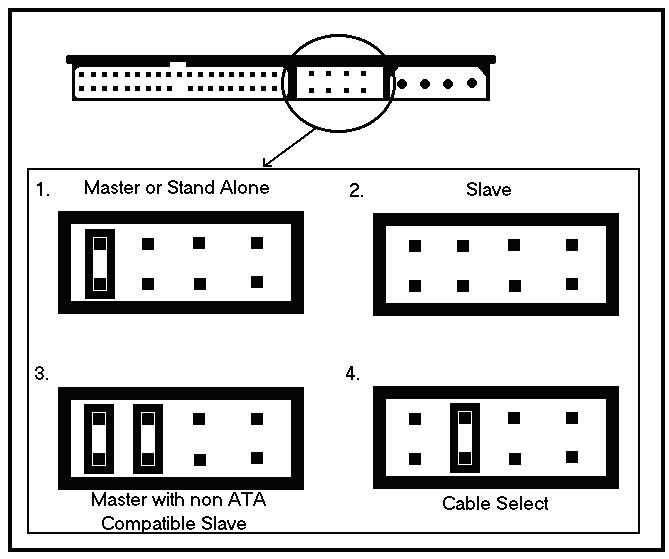 Ex forum ambassador
Long term forum member0 -
got the feeling your hard disk is a
Seagate® ST340014AS , Serial ATA (SATA)
according to this
http://developer.novell.com/yes/80855.htm
in which case I'm not sure it will fit in your daughters, if its an old machine it will only have IDE hard disk connectoreEx forum ambassador
Long term forum member0 -
Daughter's machine was given to her by a relative, might be about 4-5 years old, guess that's old by comp standards.
what about putting it in the cd disk drive as hobo28 suggested ?0 -
it's the wrong type of IDE connector i'm afraid, they are leads you can get that plug into a USB port
this sort of thing
http://cgi.ebay.co.uk/USB-2-0-SATA-IDE-ADAPTER-FOR-ALL-3-5-2-5-DRIVE-S_W0QQitemZ130118215628QQihZ003QQcategoryZ41994QQrdZ1QQcmdZViewItemEx forum ambassador
Long term forum member0 -
wrong type of connector for daughter's hard disk and her cd drive too?0
-
there are spare connectors in her puter that look as though they would fit and are currently not plugged into anything. should have said that sooner, sorry.0
-
If you have the tenacity -- use knoppix: http://www.knoppix.org/
Download, burn CD, change Bios setting to load of CD, from there you can see all that is there in your hard drive, save photos to a pendrive /USB drive and the send it back fro repairs.
if you need more info and are willing --post back.
Knoppix -- has saved my bacon on a few occasions.0 -
there are spare connectors in her puter that look as though they would fit and are currently not plugged into anything. should have said that sooner, sorry.
in which case it should just detect...plug it in using the lead, you will also need a power connector
this is the sata cable
this is a sata power cable
The connector circled in blue is the power receptacle for the power connector.
The connector circled in red is where the SATA cable connects Ex forum ambassador
Long term forum member0






This discussion has been closed.
Confirm your email address to Create Threads and Reply

Categories
- All Categories
- 355.6K Banking & Borrowing
- 254.8K Reduce Debt & Boost Income
- 456.1K Spending & Discounts
- 248.2K Work, Benefits & Business
- 605.8K Mortgages, Homes & Bills
- 179K Life & Family
- 263.5K Travel & Transport
- 1.5M Hobbies & Leisure
- 16.1K Discuss & Feedback
- 37.7K Read-Only Boards