We’d like to remind Forumites to please avoid political debate on the Forum.
This is to keep it a safe and useful space for MoneySaving discussions. Threads that are – or become – political in nature may be removed in line with the Forum’s rules. Thank you for your understanding.
📨 Have you signed up to the Forum's new Email Digest yet? Get a selection of trending threads sent straight to your inbox daily, weekly or monthly!
The Forum now has a brand new text editor, adding a bunch of handy features to use when creating posts. Read more in our how-to guide
Battery for Acer Aspire One 722

littleredhen
Posts: 3,357 Forumite




in Techie Stuff
I want to buy a replacement battery but there are loads of websites and different battery numbers etc - how do I find the right battery!!
The mind is like a parachute. It doesn’t work unless it’s open.:o
A winner listens, a loser just waits until it is their turn to talk:)
A winner listens, a loser just waits until it is their turn to talk:)
0
Comments
-
If you remove your battery you should find the information you need on the battery itself
 0
0 -
Turn the laptop over, it will tell you.
should have some numbers like this AL10A31, AL10B31, AL10BW, AL10G31, BT.00603.121, LC.BTP00.128, LC.BTP00.129
These are the battery codes. all compatible.
now look at the mAh number and 11.10V and 4200mAh to 7000mah
these are important
11.10V = Voltage, so your replacement should have this number on it.
4200mAh - 7000mAh Capacity <this is the power of battery. bigger the number longer it should last, but it will also be slightly bigger, wider.
0 -
thanks will have another look but have had battery out and can't see any numbers on it at all but will try againThe mind is like a parachute. It doesn’t work unless it’s open.:o
A winner listens, a loser just waits until it is their turn to talk:)0 -
Just checking, is the current one apparently completely dead? Aspire ones, early versions I expect, had a habit of failing to charge a battery at all once it had gone totally flat, quick bios flash and it was all solved. If the current battery doors still charge, just poorly, ignore this answer
 0
0 -
no the current battery isn't dead but doesn't have much charge left in itThe mind is like a parachute. It doesn’t work unless it’s open.:o
A winner listens, a loser just waits until it is their turn to talk:)0 -
On the underside of the laptop, should be indented onto the actual plastic.
example see the number AS10D81 that is the battery replacement code. You should have a number like that on your battery, then google that number and it should also bring up compatible batteries code aswell.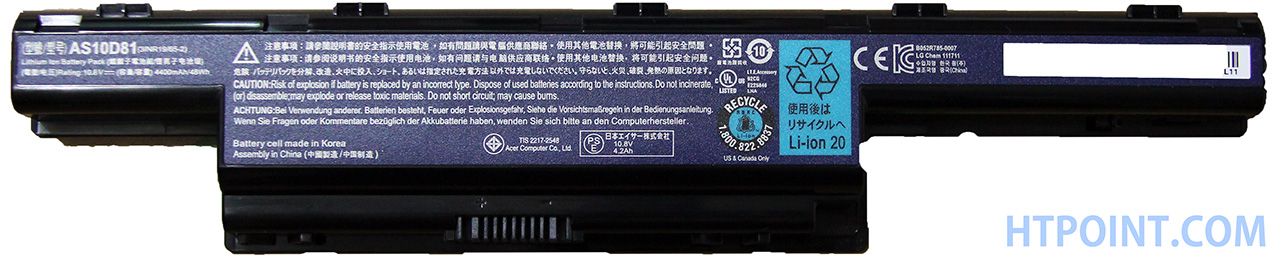 0
0
This discussion has been closed.
Confirm your email address to Create Threads and Reply

Categories
- All Categories
- 353.9K Banking & Borrowing
- 254.3K Reduce Debt & Boost Income
- 455.2K Spending & Discounts
- 246.9K Work, Benefits & Business
- 603.5K Mortgages, Homes & Bills
- 178.3K Life & Family
- 261.1K Travel & Transport
- 1.5M Hobbies & Leisure
- 16.1K Discuss & Feedback
- 37.7K Read-Only Boards