We’d like to remind Forumites to please avoid political debate on the Forum.
This is to keep it a safe and useful space for MoneySaving discussions. Threads that are – or become – political in nature may be removed in line with the Forum’s rules. Thank you for your understanding.
📨 Have you signed up to the Forum's new Email Digest yet? Get a selection of trending threads sent straight to your inbox daily, weekly or monthly!
Windows 8 Boot Manager

LucianH
Posts: 445



 Forumite
in Techie Stuff
I've just installed Windows 8 which I've dual booted on top of Vista on my laptop. I have one drive which had two partitions (Vista on C: and Data on  ). I shrunk the partition and created a third (which I re-lettered as X: to get it out of the way when I was using vista).
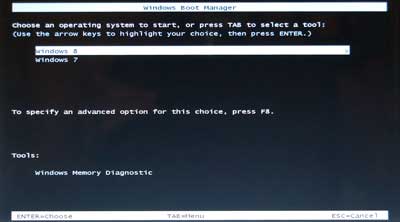
I then installed Windows 8 pro on the new partition. However, when I boot up I get a "dos" based screen (like this one):
and not the GUI screen (like this one):

(Although, I have been running this config over the last week and it did boot up with the GUI once - and I don't think I did anything different).
Does anybody know how I can force it to use the GUI screen consistently?
). I shrunk the partition and created a third (which I re-lettered as X: to get it out of the way when I was using vista).I then installed Windows 8 pro on the new partition. However, when I boot up I get a "dos" based screen (like this one):
and not the GUI screen (like this one):
(Although, I have been running this config over the last week and it did boot up with the GUI once - and I don't think I did anything different).
Does anybody know how I can force it to use the GUI screen consistently?
Never let it get you down... unless it really is as bad as it seems.
0
Comments
-
Not sure if it will help (I stick to grub) but try easybcd perhaps http://neosmart.net
But I think using a 1 second default will help with either solutions4.8kWp 12x400W Longhi 9.6 kWh battery Giv-hy 5.0 Inverter, WSW facing Essex . Aint no sunshine ☀️ Octopus gas fixed 5.07 + Octopus Intelligent Flux leccy
CEC Email energyclub@moneysavingexpert.com0 -
Or perhaps look here http://www.7tutorials.com/how-dual-boot-windows-8-windows-7-windows-vista-or-windows-xp4.8kWp 12x400W Longhi 9.6 kWh battery Giv-hy 5.0 Inverter, WSW facing Essex . Aint no sunshine ☀️ Octopus gas fixed 5.07 + Octopus Intelligent Flux leccy
CEC Email energyclub@moneysavingexpert.com0 -
I think I've found the answer for anybody else who's interested:
http://blog.blong.com/2012/09/windows-8-boot-manager-goodbye.html
And it looks like I don't want to change away from the old dos based boot menu. It looks like I'm getting this since my default OS is Vista. According to the article you get the nice GUI when Windows 8 is set to default but it takes time to load since it effectively starts Windows 8 (and it has to reboot when you select the other OS).Never let it get you down... unless it really is as bad as it seems.0


This discussion has been closed.
Confirm your email address to Create Threads and Reply

Categories
- All Categories
- 355.7K Banking & Borrowing
- 254.9K Reduce Debt & Boost Income
- 456.1K Spending & Discounts
- 248.3K Work, Benefits & Business
- 605.8K Mortgages, Homes & Bills
- 179K Life & Family
- 263.6K Travel & Transport
- 1.5M Hobbies & Leisure
- 16.2K Discuss & Feedback
- 37.7K Read-Only Boards