We’d like to remind Forumites to please avoid political debate on the Forum.
This is to keep it a safe and useful space for MoneySaving discussions. Threads that are – or become – political in nature may be removed in line with the Forum’s rules. Thank you for your understanding.
📨 Have you signed up to the Forum's new Email Digest yet? Get a selection of trending threads sent straight to your inbox daily, weekly or monthly!
The Forum now has a brand new text editor, adding a bunch of handy features to use when creating posts. Read more in our how-to guide
E: 31/01 Win £500 to enjoy at the Twinings Tea Shop

*KatieL*
Posts: 61,494 Forumite



Comments
-
The website had a few technical difficulties so they have extended the end date to 31st Jan. The site appears to be working fine now.0
-
This is my first message so it won't allow me to leave a link and I apologise if this has already been posted!
Twinning have extended this until the 31st Jan due to a technical problem they had during the competition.
twinings.co.uk/about-twinings/twinings-competitions/win-a-shopping-spree-on-the-twinings-tea-shop
Good luck!0 -
:TA big thanks to all who post and sprinkling lucky dust to all who enter :smileyhea0
-
StripeySock wrote: »This is my first message so it won't allow me to leave a link and I apologise if this has already been posted!
Twinning have extended this until the 31st Jan due to a technical problem they had during the competition.
twinings.co.uk/about-twinings/twinings-competitions/win-a-shopping-spree-on-the-twinings-tea-shop
Good luck!
Sorry but its here: https://forums.moneysavingexpert.com/discussion/4346977
I'll pm a BG.
sent to dalkirst
Ideally you need to search before posting please.
Comping Guide:
2 How do I search to see if a comp has been posted?
The Forum Search is not foolproof although if you take a couple of easy steps then it can help you not to post duplicate comps.
On any Forum page, just above where the threads are listed you will see the option to ‘Search this Forum’, click this & then select ‘Advanced Search’.A new screen will open, which is the Advanced Search screen & seems to be more responsive to searches.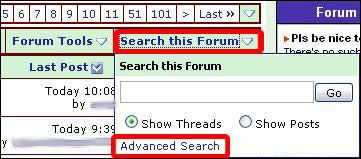
Please refer to the image below for numbered steps.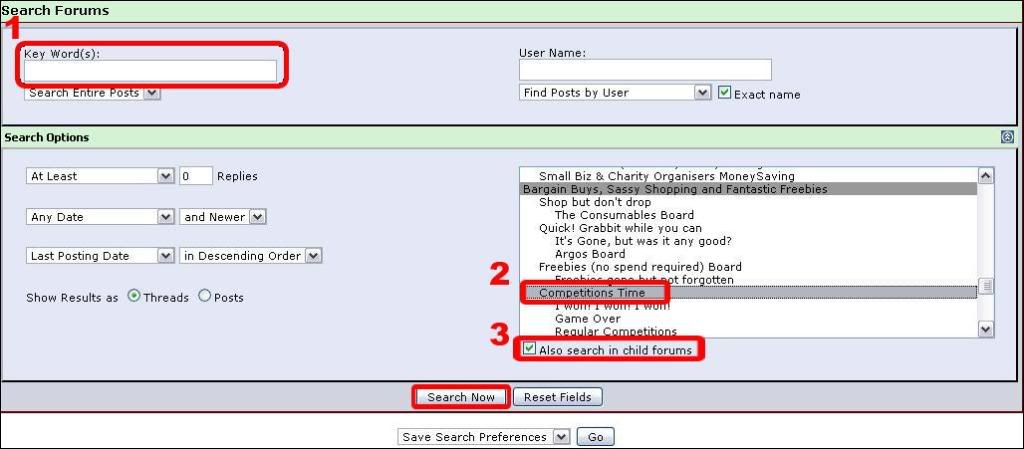
- Key Words.
Take the main part of a comp page address (URL) & type / paste it here.
For Example, if http://www.goodtoknow.co.uk/competitions/show/id/2704 is the comp page, use keyword: goodtoknow.co.uk
Also, for the radio comps, try searching for the part of the url that starts '/Article...' it should bring up the other stations if they have been posted.
I recommend you only use the main part of the comp URL as sometimes comps change location on a site.
If that search brings back too many results, then try using a word from the comp which will have been used if it was posted on MSE to narrow it down slightly.
For Example, goodtoknow.co.uk watch
You could also use the answer to search again, just to ensure you aren’t about to post a comp that is already on here. - Search Forums.
If Competitions Time is not already highlighted in the list, simply scroll down the list & click on it to highlight. - Also search in child forums.
Ensure this box is ticked, it means the search will also check in Competitions Time sub forums (the I won! Forum, the Game Over Forum & the Regular Competitions Forum).
Something else to be aware of is that it can take a couple of hours for the forum software to include new threads into the search function. If you take a quick glance down the last couple of pages of threads to check for comps that sound similar to the one you are about to post & don’t see anything then you are about ready to post a new comp!
Another way some MSE Compers use to search for specific comps is to use the Google Search Engine. If you wanted to search for, say, Kung Fu Panda comps in the forum then you would type:
"Kung Fu Panda" "competition" site:forums.moneysavingexpert.com
(Please note the placement of the speech marks as that is very important!)
This would then return results relating to your search request.0 - Key Words.






This discussion has been closed.
Confirm your email address to Create Threads and Reply

Categories
- All Categories
- 354.6K Banking & Borrowing
- 254.4K Reduce Debt & Boost Income
- 455.5K Spending & Discounts
- 247.4K Work, Benefits & Business
- 604.3K Mortgages, Homes & Bills
- 178.5K Life & Family
- 261.8K Travel & Transport
- 1.5M Hobbies & Leisure
- 16.1K Discuss & Feedback
- 37.7K Read-Only Boards