We’d like to remind Forumites to please avoid political debate on the Forum.
This is to keep it a safe and useful space for MoneySaving discussions. Threads that are – or become – political in nature may be removed in line with the Forum’s rules. Thank you for your understanding.
📨 Have you signed up to the Forum's new Email Digest yet? Get a selection of trending threads sent straight to your inbox daily, weekly or monthly!
What laptop cooler to buy

lonestarfan
Posts: 1,232 Forumite



in Techie Stuff
I've decided to buy a laptop cooler. I know that reviews are mixed about whether they work or not but I'm going to try it to see if it helps my laptop keep cool. (i've cleaned the fan out).
I'm not sure if I can buy a notebook cooler or a laptop cooler - they might be the same thing.
I've got a laptop - its a Toshiba A210 model PSAFHE-00800PEN.
TIA.
I'm not sure if I can buy a notebook cooler or a laptop cooler - they might be the same thing.
I've got a laptop - its a Toshiba A210 model PSAFHE-00800PEN.
TIA.
0
Comments
-
Here You have a passive alternative cooler (no noise) .amazon.com/ThermaPAK-HS15A-HeatShift-Laptop-Laptops/dp/B001CBFTFM/ref=pd_sim_e_1
And here You have a fan alternative .amazon.com/Cooler-Master-NotePal-Cooling-R9-NBC-4WAK-GP/dp/B002MU1ZRS/ref=sr_1_1?s=electronics&ie=UTF8&qid=1349266564&sr=1-1&keywords=cooling+pad
Sorry for cut up url's, i'm new and i can't post full links 0 -
I have no idea which is best, but do you want cooling pad or those with fans?0
-
Get Zalman's cooler pad.
I strongly recommend them. You have 15.4' laptop so it will cost around £40..it is a lot as for cooler pad but this is worth indeed.0 -
Unless you are playing 3D games continually or blocking up vents/resticting airflow, laptops shouldn't get hot and shouldn't need coolers.
Assuming the fan is coming on, try it without the battery in, if it's still got the original in, lift it away from the desk if it has vents underneath, and if the cpu is getting hammered, look what is running in task manager.
Which cpu and graphics card has it got, what are you doing when it gets hot, how hot is hot.!!
> . !!!! ----> .0 -
Thnx everyone. I didn't realise there was a difference between a laptop cooler and a fan thing. It cuts out when it gets too hot. I've put a new battery in it, I've cleaned all the fans. We leave it hanging over the edge of the table as the vent is on a corner. That's not safe so we need something to lift it off the table and cool it so I'm going to try a laptop fan thing.0
-
Get one with two fans rather than one central one. Much better cooling ability. I'll have a look...0
-
lonestarfan wrote: »I've decided to buy a laptop cooler. I know that reviews are mixed about whether they work or not but I'm going to try it to see if it helps my laptop keep cool. (i've cleaned the fan out).
I'm not sure if I can buy a notebook cooler or a laptop cooler - they might be the same thing.
I've got a laptop - its a Toshiba A210 model PSAFHE-00800PEN.
TIA.
Completely pointless and a waste of money. As long as the heatsink is cleared out and the fan is working then all is OK.
Remember, silicon components don't experience damage until they go above 70 degrees and even though your laptop base may feel hot to touch, it is nowhere near 70 degrees in there.
So you haven't cleaned it out properly. To test whether you have do the following:It cuts out when it gets too hot. I've put a new battery in it, I've cleaned all the fans
1) Get a torch and shine it through the fan intake on the base of the laptop.
2) Whilst doing that, look through the vent on the side of the laptop. If you cannot see light through the whole of the vent from top to bottom and left to right or can only see through it partially, then it is blocked.
When we say the fan is blocked, we don't mean the fan itself rather the gap between it and the heatsink radiator.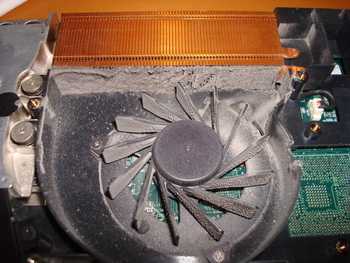
As you can see in the above picture, the fan is clear but the heatsink is blocked up so no air the fan is moving can go over the heatsink and therefore no cooling occurs.
On most laptops, you need to take the bottom off and the fan out to clean it properly.0 -
The above, while generally true, isn't exclusively so. My Z61m Thinkpad has had overheating 'issues' from new (and yes it has been back to IBM/Lenovo).
Some laptops are poorly designed (the Z61 is an example, IMNSHO) and a laptop cooler can be of use if you've sunk a pile of money into a machine that overheats and don't feel like replacing it.
It's a minority case, I admit, but there are always exceptions.0 -
If you are using your laptop on a 5hour or so basis (daily), I suggest that you remove your battery (this kind of practice can practically save your laptop battery and the battery will or can even last longer than expected) laptop batteries should not be charged too often. As for the fan, I suggest that you get 1 with 2 or 3 fans in it like this one:
http://www.amazon.co.uk/CRYSTAL-Fans-Cooler-Laptop-Notebook/dp/B003LLADCA/ref=tag_stp_s2_edpp_url
It's always good to keep you laptop well ventilated on the inside to prevent over heating.0 -
i brought one from poundland is really goodReplies to posts are always welcome, If I have made a mistake in the post, I am human, tell me nicely and it will be corrected. If your reply cannot be nice, has an underlying issue, or you believe that you are God, please post in another forum. Thank you0



This discussion has been closed.
Confirm your email address to Create Threads and Reply

Categories
- All Categories
- 355.6K Banking & Borrowing
- 254.8K Reduce Debt & Boost Income
- 456.1K Spending & Discounts
- 248.2K Work, Benefits & Business
- 605.8K Mortgages, Homes & Bills
- 179K Life & Family
- 263.6K Travel & Transport
- 1.5M Hobbies & Leisure
- 16.1K Discuss & Feedback
- 37.7K Read-Only Boards