We’d like to remind Forumites to please avoid political debate on the Forum.
This is to keep it a safe and useful space for MoneySaving discussions. Threads that are – or become – political in nature may be removed in line with the Forum’s rules. Thank you for your understanding.
📨 Have you signed up to the Forum's new Email Digest yet? Get a selection of trending threads sent straight to your inbox daily, weekly or monthly!
The Forum now has a brand new text editor, adding a bunch of handy features to use when creating posts. Read more in our how-to guide
E: 26/10 Win Family tickets to see Scrooge The Musical

Rebbie
Posts: 536 Forumite




http://www.goodtoknow.co.uk/money/competitions/60756/win-family-tickets-to-see-scrooge-the-musical
Answer: 5
Sorry, I don't know how to put in the shorter links.
Answer: 5
Sorry, I don't know how to put in the shorter links.
“Be who you are and say what you feel, because those who mind don't matter and those who matter don't mind.” - Dr Seuss
0
Comments
-
Sorry, I don't know how to put in the shorter links.
Here you go.
Just my view of course but I prefer that the "clicky" shows the site name & not such as "enter here" ,"clicky","link" etc
On this it could be:
www.goodtoknow.co.uk
You can always increase the font size as well.Just a habit with me :-)
By doing it that way we are all aware of the site that we are clicking through to plus if it is posted as the first line on the thread it can be seen in page view so if it's a site that holds no interest we can skip it without opening the thread.
This is just my view & not meant as a dig at any poster on here as all efforts are very welcome :-)
9 How do I do a 'clicky' instead of putting the full URL?
On the image below, follow the numbered steps.Right click & copy the URL of the comp you want to post.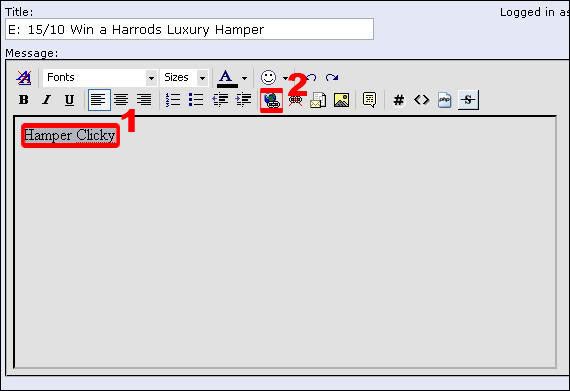
- Type the text that you want to be your neat link / clicky, For Example, ‘Hamper Clicky’ on the post & then highlight it. (I also make the word/s bold too at this point so they show up better in the post as a link).
- Click the icon of a world with a paper clip under it & a box will appear.
Remove 'http://' that is already in the box & then paste the comp URL in. Then click 'OK'. Your neat link / clicky is now done.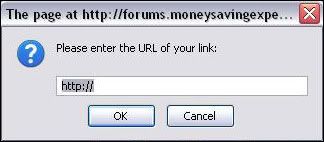 0
0




This discussion has been closed.
Confirm your email address to Create Threads and Reply

Categories
- All Categories
- 354.6K Banking & Borrowing
- 254.5K Reduce Debt & Boost Income
- 455.5K Spending & Discounts
- 247.5K Work, Benefits & Business
- 604.4K Mortgages, Homes & Bills
- 178.6K Life & Family
- 261.9K Travel & Transport
- 1.5M Hobbies & Leisure
- 16.1K Discuss & Feedback
- 37.7K Read-Only Boards