We’d like to remind Forumites to please avoid political debate on the Forum.
This is to keep it a safe and useful space for MoneySaving discussions. Threads that are – or become – political in nature may be removed in line with the Forum’s rules. Thank you for your understanding.
📨 Have you signed up to the Forum's new Email Digest yet? Get a selection of trending threads sent straight to your inbox daily, weekly or monthly!
The Forum now has a brand new text editor, adding a bunch of handy features to use when creating posts. Read more in our how-to guide
Ok HERE WE GO !!

walks
Posts: 411 Forumite
in Techie Stuff
We are two oldies that really don't have a clue what we are doing with our pcs I have had my laptop since last yr but my partner brought a new 1 yesterday and as gave it to me, As it is a much faster and more up to date 1,(Very lucky arnt i),The problem i have is how do i get my favorites of this one and put on to new also got pics and msn and addresses to move do i have to do it manually or can i do it some other way, I bet you are all laughing out there thinking how stupid are they well yes we are LOL Any help would be great but it as to be easy for us to understand too.
Many thanks
Pip
x
Many thanks
Pip
x
Every cloud has a silver lining:j
0
Comments
-
If using Internet Explorer, try File, Import and Export.:doh: Blue text on this forum usually signifies hyperlinks, so click on them!..:wall:0
-
Hi there and welcome. If you think you are alone, then forget it!. I've had several people on this site trying to help me reinstall sound. We went round in circles untill I discovered the on/off button.
Regarding transferring your favourites. I would suggest. On your old machine, compose an email to send to yourself on the new machine and retain it in DRAFTS whilst it is being prepared.
On the old machine, go to each favourite in turn, right clic on it and at the bottom of a box you will see PROPERTIES, clic on that and the url will be presented highlited. Rt clic on the url, so that it is copied, then go back to your DRAFT email and paste it. Keep repeating this untill all your favourites are in the email then send it to your new machine.
Once you have them, open each in turn and clic on FAVOURITES then ADD.
That's my way, no doubt someone will come along and provide a quicker route, but I suppose you've got all day with nothing to do!!!!This is a system account and does not represent a real person. To contact the Forum Team email forumteam@moneysavingexpert.com0 -
Hi Pip.
Not laughing here - everybody has to start somewhere.
If you have Windows XP on the old computer then you can use the inbuilt Transfer Wizard to copy over files and settings to the new one, described here:
http://www.microsoft.com/windowsxp/using/setup/expert/crawford_november12.mspx
There are several ways to copy files etc. You can either copy to movable media (floppy disk, USB flash drive, CD, DVD etc.) and then load the data and files into the new computer, or set up a direct copying method using cables or a wireless network (if you have one set up).
So in order to be a little more specific, it would help if we knew:
a) Which version of Windows is running on both computers, and
b) Do you have a wireless network set up?0 -
Having re-read the opening line of the original post:-
We are two oldies that really don't have a clue what we are doing with our pcs
it would not come as a surprise to me if this section :-
There are several ways to copy files etc. You can either copy to movable media (floppy disk, USB flash drive, CD, DVD etc.) and then load the data and files into the new computer, or set up a direct copying method using cables or a wireless network (if you have one set up).
was out of their depth. I may be wrong, lets wait and see.This is a system account and does not represent a real person. To contact the Forum Team email forumteam@moneysavingexpert.com0 -
islandman wrote:Having re-read the opening line of the original post:-
We are two oldies that really don't have a clue what we are doing with our pcs
it would not come as a surprise to me if this section :-
There are several ways to copy files etc. You can either copy to movable media (floppy disk, USB flash drive, CD, DVD etc.) and then load the data and files into the new computer, or set up a direct copying method using cables or a wireless network (if you have one set up).
was out of their depth. I may be wrong, lets wait and see.
Which is why I'm asking them for further information:So in order to be a little more specific, it would help if we knew:
a) Which version of Windows is running on both computers, and
b) Do you have a wireless network set up?Today 12:15 PM
So they can be taken through the procedure in simple steps. 0
0 -
You are all very good thanks, i have bt wireless voyger2091 on both comps , Windows xp on the old one and vista on this new one if this is any help to you,We cant belive how good you have all been with trying to help.
Pip
xEvery cloud has a silver lining:j0 -
Email all your pics to yourself and simply download them onto the new machine when you logon.
a gmail account gives you nearly 3gb of space to do this0 -
OK, because you have wireless capability, you can just copy over the necessary files from one laptop to the other.
Method 1.
For this you would need:
A network between the 2 laptops
http://www.pcworld.com/article/id,102461-page,1/article.html
http://compnetworking.about.com/od/homenetworking/Home_Networking_Setting_Up_a_Home_Network.htmhttp://compnetworking.about.com/od/homenetworking/Home_Networking_Setting_Up_a_Home_Network.htm
You then set up a shared folder:
http://www.wellesley.edu/Computing/FileSharing/Windows/facstaffxp.html
Put the files you want to copy in the shared folder, turn on the second laptop, open the shared folder (Click START....My Network Places and double click the shared folder), right click and click Copy on each file, then right click where you want to put each file on the second computer and click Paste.
Do this for each file you want to copy and the first laptop will send each file to the place you Pasted on the second laptop.
If that all seems a bit daunting, there is always......
Method 2.
Right click each item you want to transfer and click Copy.
Open an item of movable media (Click START....My Computer and then double click the drive you want to copy to).....
This can be a blank CD in your CD-rewriter drive, a blank DVD in your DVD-rewriter drive, a blank floppy disk in your floppy drive or a USB pen drive/flash drive like this one:
http://www.amazon.co.uk/Bytestor-USB-2-0-Drive-256MB/dp/B0000ZGVEO
Right click in the blank disk and click Paste.
Do this for each item you want to transfer. Then put the disk/flash drive into your second laptop. Open it (Click START...My Computer then double left click the drive where your disk is). Right click each item and click Copy. Right click somewhere on your second laptop where you want to put the file and click Paste. The file will be copied from the movable media to the place you right click and Paste on your second laptop.
Now where are your files?
Your pictures will be wherever you saved them. Could be in My Documents (Click START...My Documents) or My Pictures (Click START....My Documents and then double click My Pictures).
Your Favourites:
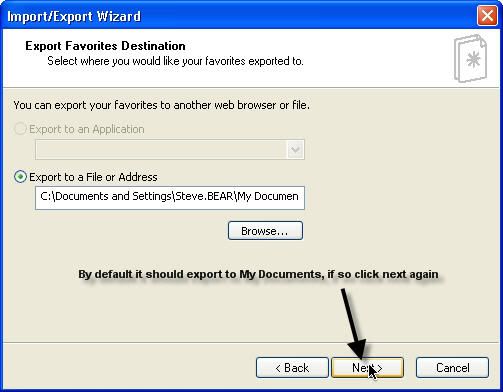
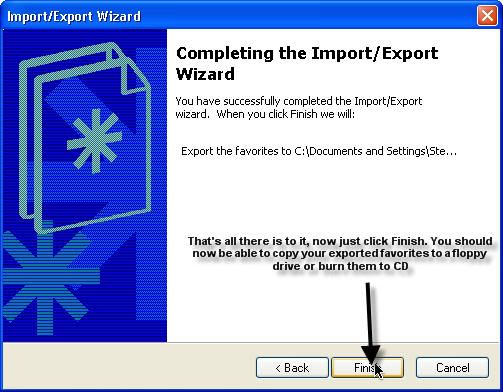
Open Internet Explorer, click File and then follow the instructions below. Once you have them saved to My Documents simply copy to a floppy disk, CD, DVD or flash drive as described above.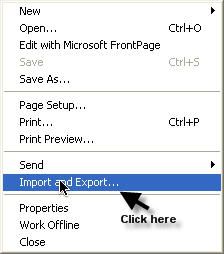
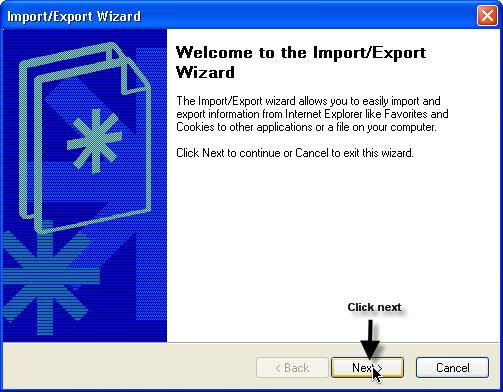
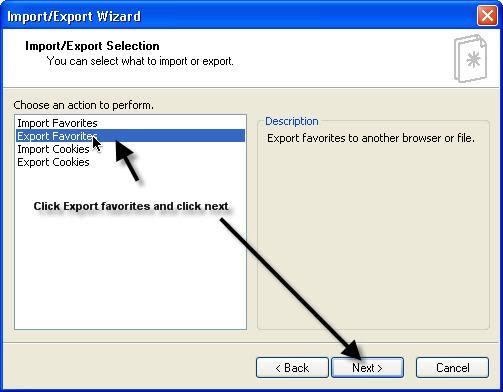
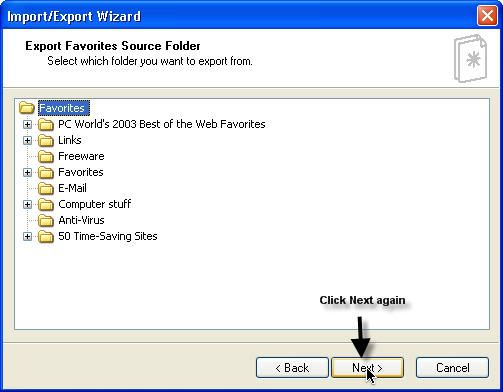
Your email addresses:
Take a look here:
http://support.microsoft.com/kb/308665
If that seems daunting, because you have Windows XP on your first laptop, you can get Windows to do it all using the Files and Settings Transfer Wizard as:
Method 3:
http://www.helpwithwindows.com/WindowsXP/howto-01.html
Come back if you require any more information or clarification.0 -
Bless you all, and wombat i might just be able to do this i will have to wait now till 2morrow don't want to be tired well i have got to do something like this i am slightly wishing i had not got another 1 less hassle.
thank you all so much you are brill
Pip
xEvery cloud has a silver lining:j0 -
Good luck, Pip.
Just one more note: You can't copy PROGRAMS (usually files ending with .exe). These will need installing on your new laptop using the supplied disk or downloaded installer.
So if you want your favourite photo editor on your new laptop, you can't just copy it from your old one. You have to set it up from new. 0






This discussion has been closed.
Confirm your email address to Create Threads and Reply

Categories
- All Categories
- 353.5K Banking & Borrowing
- 254.1K Reduce Debt & Boost Income
- 455K Spending & Discounts
- 246.6K Work, Benefits & Business
- 602.9K Mortgages, Homes & Bills
- 178.1K Life & Family
- 260.6K Travel & Transport
- 1.5M Hobbies & Leisure
- 16K Discuss & Feedback
- 37.7K Read-Only Boards