Ready, steady… save!
You don’t need a chart to join in. Here are 2 ways to record your savings:
1. Cross it off
Pop a chart into your first post. Saved an amount? Cross it out! Read more »
£0.01 £0.02 £0.03
2. Write it down
Skip the chart and add updates to your first post. Read more »
“Another +£3 saved today. Go me!”
Use +£ before each new saving so it counts towards your total.
📨 Have you signed up to the Forum's new Email Digest yet? Get a selection of trending threads sent straight to your inbox daily, weekly or monthly!
Networking lap top to desk top?

hethmar
Posts: 10,678



 Forumite
in Techie Stuff
I have my desk top containing all my work files in my bedroom office but am using a new laptop downstairs a lot now.
The desktop OS is Vista and my new laptop is Windows 7. Is it going to be possible to network both of these computers please. Fact is Ive had a recent accident which means getting up to the office is pretty well impossible for a couple of months and it would be useful to be able to access my files from my laptop and to print wirelessly.
The desktop OS is Vista and my new laptop is Windows 7. Is it going to be possible to network both of these computers please. Fact is Ive had a recent accident which means getting up to the office is pretty well impossible for a couple of months and it would be useful to be able to access my files from my laptop and to print wirelessly.
0
Comments
-
Hi there as you mentioned about getting to the office after your accident (hope you are ok) do you have a network in place ? if not do you have a wireless router? and is the desktop connected via lan? and i assume the printer is connected to the desktop0
-
I have a slightly different setup which works and I suspect that yours would too. I have a Windows XP desktop downstairs with a printer attached locally. Upstairs I have a Windows 7 Desktop attached to the wireless router. it was some months ago, but I believe that I made them both members of the same workgroup - they both connect to each other and after setting permissions how I wanted can read files on one computer from the other when they're both switched on. The PC with the printer has to be switched on if you want to print from the second desktop, as it is acting as the print server.
Hopefully this is a little clearer than mud !0 -
Hi, thanks for the replies. I am a complete numpty and I didnt know if two different OS would work as a network? I have netgear wireless router upstairs in the office and its working fine for this laptop downstairs. I was thinking of changing the printer/scanner/copier upstairs (which is old anyway) for a wireless job so, in theory, I could type out OHs surveys/quotes whilst sitting on ten cushions on the sofa in my dressing gown
 and send it to the printer so that he could get it printed and sent off.
This laptop is a samsung RV511 on Windows 7 - the desktop is a Dell on Vista.0 -
Yes you can file share on a network between your laptop and desktop via the Netgear router. I'm guessing the old printer is usb connected to the desktop. If the desktop is left on you could set up the printer to be shared on the network as well so that you can print from the laptop. In other words it will do what you and let you print from the laptop wirelessly but only if the Dell is on. A new wireless printer will connect directly to the network via the router so it would allow you to print wirelessly from the laptop even if the desktop is off.
TOG604!0 -
ok well if your going to get a wireless printer you can place that anywhere, all you need to do is connect the Dell desktop to the wireless router with a network cable and on the location of the folder you want to access on the desktop right click and select share, now from the laptop go to my documents and on the left scroll down to network fingers crossed you should then be able to see the dell computer click on it and you should be able to see the folder you shared to access it you will need to enter the username and password you have set up on the dell. hope this works ok0
-
Many thanks. Having problems following it all. Ive fiddled with this laptop and found a networking step by step, gone through it only to read that "you can share docs and photos with any other computer in the house using Windows 7". Hmm, I dont want to spend money on making updating the Dell from Vista.
Ill copy out what you kind people have said and have a go tomorrow again to see if I can get the two puters to share info.0 -
Vista will network perfectly with Win7604!0
-
I did it today on a customers machine. Laptop on Win7, desktop on XP. Works best if you put a password on the user account and set up the same user accounts/passwords on both machines. In File Explorer, on the folders you want to share right click on them and select "Sharing" and go from there.
On Vista: Go to Network and Sharing Centre and tick the appropriate boxes.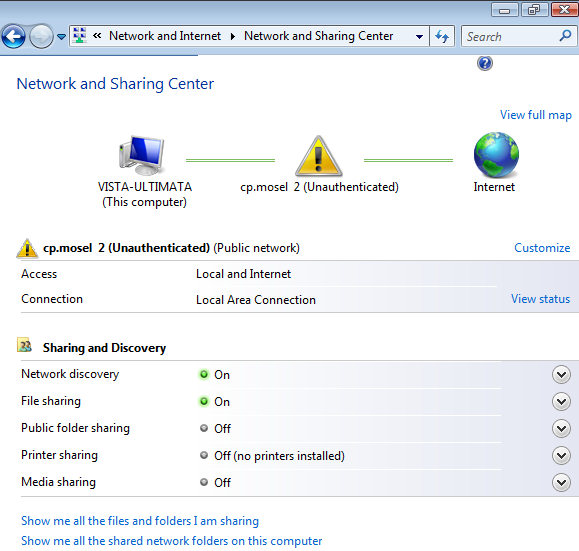
Same place on Windows 7. Click on Choose Homegroup and Sharing options. 0
-
Sounds easy when you say it Many thanks. I will give it a go later today when Im up to getting upstairs to the Dell desktop - fingers crossed I dont bu**er it all up x 0
-
The fact the Operating Systems are different versions should not make a difference. I have XP, Vista and Windows 7 at home and can share files between them.
To start with, make sure that the Workgroup name is the same on all machines. Set up a shared directory on each machine, to put the files in that you want to access, rather than sharing the whole of a drive. A bit more secure that way.0




This discussion has been closed.
Confirm your email address to Create Threads and Reply

Categories
- All Categories
- 356K Banking & Borrowing
- 255K Reduce Debt & Boost Income
- 456.3K Spending & Discounts
- 248.5K Work, Benefits & Business
- 606.2K Mortgages, Homes & Bills
- 179.1K Life & Family
- 264K Travel & Transport
- 1.5M Hobbies & Leisure
- 16.2K Discuss & Feedback
- 37.7K Read-Only Boards