We’d like to remind Forumites to please avoid political debate on the Forum.
This is to keep it a safe and useful space for MoneySaving discussions. Threads that are – or become – political in nature may be removed in line with the Forum’s rules. Thank you for your understanding.
📨 Have you signed up to the Forum's new Email Digest yet? Get a selection of trending threads sent straight to your inbox daily, weekly or monthly!
Zen MP3 player - how do label albums/songs on it?

londonman81
Posts: 1,130 Forumite




in Techie Stuff
I've got a Zen mp3 player and I'm ripping music from CD's to load onto the player.
However, after doing the drag/drop routine onto the mp3 player, when I label the albums and songs through the PC it doesn't show the labels on the MP3 player itself. Instead it just shows 'Track 1' etc
Where do I label the album/songs in order for it to show up on the mp3 player?
Thanks
However, after doing the drag/drop routine onto the mp3 player, when I label the albums and songs through the PC it doesn't show the labels on the MP3 player itself. Instead it just shows 'Track 1' etc
Where do I label the album/songs in order for it to show up on the mp3 player?
Thanks
"To be ignorant of one's ignorance is the malady of the ignorant." Amos Bronson Alcott
0
Comments
-
What method have you used to label them at the moment?0
-
What method have you used to label them at the moment?
I've just done right click > rename and then typed in the name manually.
I can see the names when I open the music folder in the mp3 through my PC, but I can't see those names when I look at the same folders through the mp3 player itself.
??"To be ignorant of one's ignorance is the malady of the ignorant." Amos Bronson Alcott0 -
Hi, if you have one of these
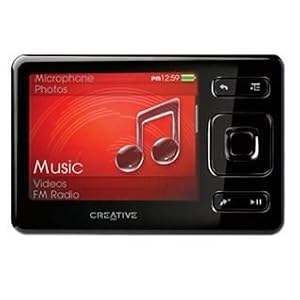
then this player and the Zen MX uses the MTP file system which means that the ID3 tags on the MP3 files have to be correct.
I have one and I use Windows Media Player to fill in the tags for me:
Add the ripped CD to WMP library right click and choose "get album info"
Or just use WMP to rip the CD in the first place - it fills in the tags automagically.
More info on the Zen here
How to use wmp11 to find album info here
I mostly use WMP to sync to the zen, but drag and drop works fine once the tags are sorted. You can also use Winamp or Media monkey to do the same job.
Dave0 -
Hi, if you have one of these
then this player and the Zen MX uses the MTP file system which means that the ID3 tags on the MP3 files have to be correct.
I have one and I use Windows Media Player to fill in the tags for me:
Add the ripped CD to WMP library right click and choose "get album info"
Or just use WMP to rip the CD in the first place - it fills in the tags automagically.
More info on the Zen here
I mostly use WMP to sync to the zen, but drag and drop works fine once the tags are sorted. You can also use Winamp or Media monkey to do the same job.
Dave
Thanks for that - the thing is that when I rip the CD, it doesn't fill in any name for each track i.e just shows Track 1, Track 2 etc. Should it still be possible to fill in the names manually somewhere and have it show up on the mp3 player?
BTW - i have the Zen Style 100
Thanks"To be ignorant of one's ignorance is the malady of the ignorant." Amos Bronson Alcott0 -
londonman81 wrote: »Should it still be possible to fill in the names manually somewhere and have it show up on the mp3 player?
Yes - in the ID3 tags the previous poster referred to.
Select an mp3 file on your PC and right-click on it. Select Properties.
This may vary for you, but I then select Summary Tab, Advanced button, and that shows me the tags. (Windoze XP). I'll bet you don't have the tracks named here.
It varies in later versions of Windoze0 -
Yes - in the ID3 tags the previous poster referred to.
Select an mp3 file on your PC and right-click on it. Select Properties.
This may vary for you, but I then select Summary Tab, Advanced button, and that shows me the tags. (Windoze XP). I'll bet you don't have the tracks named here.
It varies in later versions of Windoze
I get Advanced Button and it shows no track name, so where do I enter it?"To be ignorant of one's ignorance is the malady of the ignorant." Amos Bronson Alcott0 -
What is shown under Advanced on your system?0
-
Sorry I haven't got any experience of the Zen style, but the trick with WMP should still work.
Be warned that under MP3 file properties in Windows there are two Advanced buttons. You want the one in the summary tab - it toggles between Advanced and Simple.
I still claim that it's easier editing the tags in WMP:)
Please let us know how you get on.
Dave0 -
you can use something like mp3tag to batch tag all the mp3s from the file name.
ie if you have named the file name *artist* - *Title* then using mp3tag it can auto insert the artist and title into the mp3s metadata
ps WMP is awful for meta tagging (literally everything else is better) and doing it manually would take ages,0 -
you can use something like mp3tag to batch tag all the mp3s from the file name.
ie if you have named the file name *artist* - *Title* then using mp3tag it can auto insert the artist and title into the mp3s metadata
ps WMP is awful for meta tagging (literally everything else is better) and doing it manually would take ages,
You are quite right, MP3tag is very good. But I am trying to keep things simple at this stage. MP3tag is a bit techy for a newbie.
I quote WMP because it is installed on all modern Windows machines by default and there is no extra program to download and install. As you say it is a bit naff, but labelling one CD at a time is no big deal. I have used it for years - it works for me and my Zen.
WMP will find album info from the internet so manually editing is a rarity although you sometimes have to manually add the album art.
MP3tag does a similar job - and gets the album art!
Dave0

This discussion has been closed.
Confirm your email address to Create Threads and Reply

Categories
- All Categories
- 355.4K Banking & Borrowing
- 254.7K Reduce Debt & Boost Income
- 456K Spending & Discounts
- 248K Work, Benefits & Business
- 605.3K Mortgages, Homes & Bills
- 178.9K Life & Family
- 263.1K Travel & Transport
- 1.5M Hobbies & Leisure
- 16.1K Discuss & Feedback
- 37.7K Read-Only Boards