We’d like to remind Forumites to please avoid political debate on the Forum.
This is to keep it a safe and useful space for MoneySaving discussions. Threads that are – or become – political in nature may be removed in line with the Forum’s rules. Thank you for your understanding.
📨 Have you signed up to the Forum's new Email Digest yet? Get a selection of trending threads sent straight to your inbox daily, weekly or monthly!
Networking...

LocalLad
Posts: 62 Forumite
in Techie Stuff
Hi, I've recently signed up for WiMAX with this company and am very happy with the speeds I receive. The setup means a box placed outside and an ethernet cable running from box into house which then can plug into laptop directly for internet access. I want to make this a wireless setup, so purchased this as the walls in the house are ridiculously thick. I have setup the Devolo according to instructions and plugged Ethernet cable from outside to the homeplug. My laptop can pick up the Devolo network, but it seems the Devolo network can't connect to the internet even though the ethernet is connected.
This is the instructions of setting up the broadband on windows, and this is the instructions of setting up a router to it.
Does anyone know how to get the broadband and the Devolo router homeplug to connect to eachother? The lights on the Homeplug indicate that they are connected. I don't know if I have to change IP adresses or which ones to use and where!! Any help would be much appreciated. Thanks.
This is the instructions of setting up the broadband on windows, and this is the instructions of setting up a router to it.
Does anyone know how to get the broadband and the Devolo router homeplug to connect to eachother? The lights on the Homeplug indicate that they are connected. I don't know if I have to change IP adresses or which ones to use and where!! Any help would be much appreciated. Thanks.
0
Comments
-
The Develo product is a switch so it doesn't know where to route your internet traffic as there's no gateway.LocalLad wrote:plugged Ethernet cable from outside to the homeplug.
You'll need to include a router between your WiMAX connection and the input of your Develo device, follow the instructions as per the router connection in your post. make sure your laptop and any other clients are using DHCP to obtain IP's and you'll be good to go.
Switches route traffic within a network
Routers Join networks (in your case WAN to LAN)P.I.C.N.I.C problem: Problem In Chair, Not In Computer0 -
The Develo product is a switch so it doesn't know where to route your internet traffic as there's no gateway.
You'll need to include a router between your WiMAX connection and the input of your Develo device, follow the instructions as per the router connection in your post. make sure your laptop and any other clients are using DHCP to obtain IP's and you'll be good to go.
Switches route traffic within a network
Routers Join networks (in your case WAN to LAN)
Thanks for your reply. I didn't realise the Devolo was only a switch. I assumed because I could receive internet connection direct from Box outside, it was only a matter of the Devolo extending that wirelessly, this mustn't be the case then!
This then makes it quite an expensive setup. Anyother recommendations? Bearing in mind the house has very thick brick walls throughout!0 -
If it's only your laptop and you don't need to share the internet connection with anything else, try plugging your laptop into the ethernet port of the 3 port homeplug and follow the directly connected instructions.
Also, considering that your Homeplugs will be handling your wireless, you don't need an all-singing-all-dancing router, you can pick up a cheapy one for under a tenner (like this one)P.I.C.N.I.C problem: Problem In Chair, Not In Computer0 -
If it's only your laptop and you don't need to share the internet connection with anything else, try plugging your laptop into the ethernet port of the 3 port homeplug and follow the directly connected instructions.
Also, considering that your Homeplugs will be handling your wireless, you don't need an all-singing-all-dancing router, you can pick up a cheapy one for under a tenner (like this one)
I already have direct access when I plug the Ethernet coming from box outside directly to my laptop, I don't need the Homeplug for that. Put basically, I thought that the box outside acts like the modem; albeit it is just a receiver, and then extend using N wireless homeplug. I thought that because this Devolo was a starter kit with N Wireless would pick the internet up from the modem (box outside) and transmit wirelessly. Does this make any sense?0 -
Yes it does, and if you're just using your laptop and don't need any internet connection sharing then that's possible as it will be a direct connection between your laptop and the ISP.
The settings they give you for connecting gives you an IP address and subnet mask that is Class C which allows lots of separate networks, with only 2 IP's per network (your ISP as the host and your PC as the client) - If you want to share that connection what you then need to to is create another network for your house and route the traffic from there to your ISP. Like the diagram below: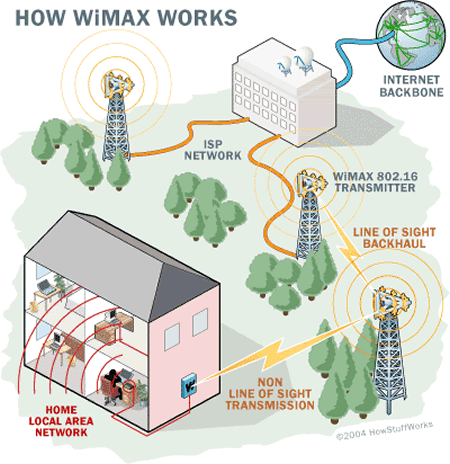
You could use a directly connected PC to do this but that's less cost effective and more hassle than a cheap router.P.I.C.N.I.C problem: Problem In Chair, Not In Computer0 -
Yes it does, and if you're just using your laptop and don't need any internet connection sharing then that's possible as it will be a direct connection between your laptop and the ISP.
The settings they give you for connecting gives you an IP address and subnet mask that is Class C which allows lots of separate networks, with only 2 IP's per network (your ISP as the host and your PC as the client) - If you want to share that connection what you then need to to is create another network for your house and route the traffic from there to your ISP. Like the diagram below:
You could use a directly connected PC to do this but that's less cost effective and more hassle than a cheap router.
Thanks for your help. I'll get a cheap router and enjoy my new fast(ish) broadband.0




This discussion has been closed.
Confirm your email address to Create Threads and Reply

Categories
- All Categories
- 355.8K Banking & Borrowing
- 254.9K Reduce Debt & Boost Income
- 456.2K Spending & Discounts
- 248.4K Work, Benefits & Business
- 606K Mortgages, Homes & Bills
- 179K Life & Family
- 263.8K Travel & Transport
- 1.5M Hobbies & Leisure
- 16.2K Discuss & Feedback
- 37.7K Read-Only Boards