We’d like to remind Forumites to please avoid political debate on the Forum.
This is to keep it a safe and useful space for MoneySaving discussions. Threads that are – or become – political in nature may be removed in line with the Forum’s rules. Thank you for your understanding.
📨 Have you signed up to the Forum's new Email Digest yet? Get a selection of trending threads sent straight to your inbox daily, weekly or monthly!
The Forum now has a brand new text editor, adding a bunch of handy features to use when creating posts. Read more in our how-to guide
Quick question (I hope)

Maximillion
Posts: 662 Forumite
in Techie Stuff
morning tech gods,
My missus has a sumsung phone and I have a sony erricson - we've got the software for both installed for uploading pics etc. however...
Really annoyingly; when I startup the pc both software suites open up explorer at the "file manager" type directories and I have to close them both down each time. :mad:
I can't find options to stop this anywhere. normally I'd uninstall the ruddy stuff on principle but unfortunately we do use it.
any ideas?
My missus has a sumsung phone and I have a sony erricson - we've got the software for both installed for uploading pics etc. however...
Really annoyingly; when I startup the pc both software suites open up explorer at the "file manager" type directories and I have to close them both down each time. :mad:
I can't find options to stop this anywhere. normally I'd uninstall the ruddy stuff on principle but unfortunately we do use it.
any ideas?
0
Comments
-
"Really annoyingly; when I startup the pc both software suites open up explorer at the "file manager" type directories "
Can you just explain that bit a little better please mate.
If ya can't then try going to Start/Run type msconfig and press enter.
then goto the start up tab. Then look along the list of programs listed there. Look for the 2 that resemble your phone programs and untick the boxes.
Press apply and OK
then restart the computer when prompted.
Hopefully that'll do the trick
If that isn't what you were looking for then it is because I have misinterpreted what you were trying to say
HTH0 -
Control panel, Performance and maintenance, Admin tools,component services,services local.You can the set the program to ask to come on .0
-
Thanks for the help guys, neither program appears on those lists (amazingly despite countless mining attempts AOL is still there, will I ever be rid!!?) - sorry jamangie will try and explain better; after start up windows explorer automatically opens twice. each window opens at the directories for the phone software (where it deposits the uploaded files etc.) Samsung PC studio and sony erricson file manager. Can't think how to explain differently. hang on will attach pic in a tic.
 this is what I get : :mad:
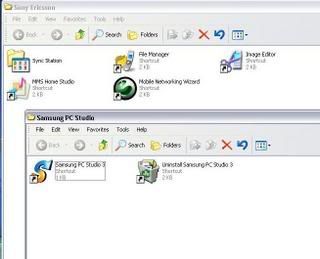 0
0 -
They don't appear in Start/All Programs/Start Up do they? If they are then delete them. Then perhaps you could try looking in Tools(In any Explorer File Menu)/Folder Options/View Tab. Scroll down to the bottom of the list and I think 4th from the bottom is a tick box saying "Restore Previous Folder Windows at Logon" Make sure thats UnTicked. Click Apply/OK Then Restart. Next for me would be to Uninstall them and re install both of those programs and see if that does it. If not, sell your computer to me for a fiver and upon reciept I will sledge it for you:D:D:D 0
-
firstcrowcounter wrote:Thanks for the help guys, neither program appears on those lists (amazingly despite countless mining attempts AOL is still there, will I ever be rid!!?).........
This program should get rid of AOHell for you!
:cool::doh: Blue text on this forum usually signifies hyperlinks, so click on them!..:wall:0 -
I have unistalled Aol and now get on line through my modem.I am still with aol,but all those flipping pop up of theirs was driving me crazy.I have nothing of Aol on my computer now,and it flys along0
-
imho wrote:I have unistalled Aol and now get on line through my modem.I am still with aol,but all those flipping pop up of theirs was driving me crazy.I have nothing of Aol on my computer now,and it flys along
Glad to hear it. AOL is all right as an ISP, it's all the AOHell bloatware that causes the problems!
:cool::doh: Blue text on this forum usually signifies hyperlinks, so click on them!..:wall:0 -
-
Jamangie wrote:Click Apply/OK Then Restart. Next for me would be to Uninstall them and re install both of those programs and see if that does it. If not, sell your computer to me for a fiver and upon reciept I will sledge it for you:D:D:D
cheers J but I don't think it's worth that much! :rotfl:
tried - failed - got bored and just uninstalled them. thanks for you help :T0





This discussion has been closed.
Confirm your email address to Create Threads and Reply

Categories
- All Categories
- 353.5K Banking & Borrowing
- 254.1K Reduce Debt & Boost Income
- 455K Spending & Discounts
- 246.6K Work, Benefits & Business
- 602.9K Mortgages, Homes & Bills
- 178.1K Life & Family
- 260.6K Travel & Transport
- 1.5M Hobbies & Leisure
- 16K Discuss & Feedback
- 37.7K Read-Only Boards